
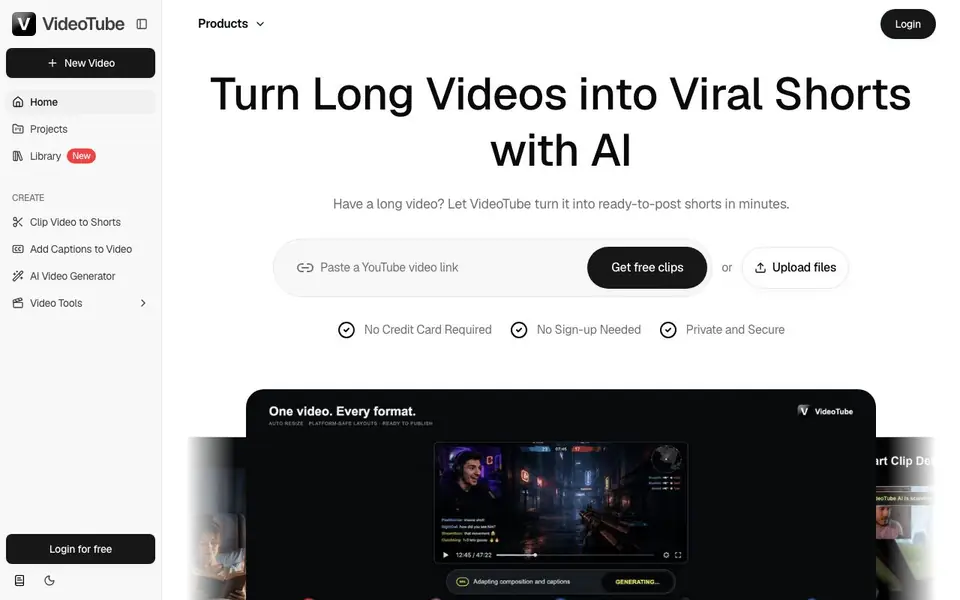
What is VideoTube?
VideoTube is an AI-powered video repurposing tool that automatically turns long videos into short clips. It analyzes your content to find the most engaging moments, then adds captions, removes filler words, and reframes the video for vertical formats. You can paste a YouTube link or upload files directly, with no credit card or sign-up required.
Once you upload a podcast, webinar, interview, or YouTube video, VideoTube's AI detects hooks, highlights, emotions, and valuable moments. It then generates clips with animated subtitles, adjusts layouts and framing, and adds B-roll to boost retention. The result is multiple ready-to-post shorts you can share on TikTok, YouTube Shorts, and Instagram Reels.
VideoTube suits podcasters, YouTubers, educators, coaches, marketers, and streamers who want more social content without manual editing. The website highlights features like viral score, smart captions, auto reframe, silence removal, and AI B-roll. It emphasizes privacy and security, and offers a free start with no credit card needed.
VideoTube features
- AI Highlight Detection: Finds moments in your video that keep viewers watching and engaged.
- Viral Score: Identifies clips with the highest potential for engagement on social platforms.
- Smart Captions: Creates animated subtitles automatically for your short clips.
- Auto Reframe: Converts landscape videos into vertical format for TikTok, Shorts, and Reels.
- Silence & Filler Removal: Removes pauses and unnecessary words to tighten your clips.
What you can do with VideoTube
- Turn a podcast episode into dozens of short clips for social media.
- Repurpose a YouTube video into multiple Shorts without manual editing.
- Convert a webinar into promotional clips to boost course enrollment.
- Transform a live stream VOD into finished clips automatically.
How to get started with VideoTube
- Paste a YouTube video link or upload your video file.
- Let the AI analyze your video and generate clips with captions and framing.
- Review and publish your shorts to TikTok, YouTube Shorts, or Instagram Reels.
Tips for better results with VideoTube
- Paste a YouTube link directly into VideoTube to test its highlight detection on a short video before committing to a full upload.
- Upload your highest-quality source file to VideoTube, since cleaner audio and visuals improve caption accuracy and clip selection.
- Review VideoTube's viral score for each generated clip and prioritize the top-scoring ones for your main social channels.
- Use VideoTube's auto reframe and silence removal together to quickly produce vertical shorts that feel polished without manual editing.
- checks
VideoTube pricing
VideoTube has a free way to start, with paid plans for heavier use. Check videotube.ai for current limits and prices.
What to check before you rely on VideoTube
- Check whether VideoTube's free tier limits the number of clips you can generate per video or per month, since the site only says no credit card is required.
- Verify if VideoTube exports clips in formats compatible with your editing software or social platforms, as the website does not list export options.
- Confirm VideoTube's privacy policy for uploaded files, especially if you handle sensitive content, because the site only states it is private and secure.
Who VideoTube is for
VideoTube suits podcasters, YouTubers, marketers and educators. If that is not you, the AI video editors below may fit better.
Similar tools compared with VideoTube
| Tool | What it is | Pricing |
|---|---|---|
| VideoTube | AI long-video to shorts repurposer | Freemium |
| SiVideoGen | AI video generator with multiple models | Freemium |
| Descript | AI video and audio text-based editor | Freemium |
| InVideo | Agentic AI video editor and maker | Freemium |
| VEED | AI video creation and editing platform | See website |
VideoTube FAQ
What is VideoTube AI?
VideoTube is an AI-powered tool that turns long videos into short clips. It detects highlights, adds captions, removes filler words, and reframes videos for social platforms like TikTok, YouTube Shorts, and Instagram Reels.
What types of videos can I turn into Shorts?
You can upload podcasts, webinars, interviews, YouTube videos, or any long-form content. The AI analyzes the video to find engaging moments and creates multiple shorts from it.
How does VideoTube find the best moments in my videos?
VideoTube uses AI to detect hooks, highlights, emotions, and valuable moments. It assigns a viral score to clips based on their engagement potential, so you get the most shareable parts.
Can I use VideoTube for free?
Yes, you can start for free with no credit card required and no sign-up needed. The website mentions free clips, but details on paid plans are not stated on the site.
What file formats can I upload to VideoTube, and can I export the clips in different resolutions?
VideoTube lets you upload files directly or paste a YouTube link. The website does not list specific file formats or export resolutions. For details on supported formats and export options, check the upload page or contact support.
Does VideoTube have a mobile app or work on tablets?
VideoTube is a web-based tool, so you can use it on any device with a browser, including phones and tablets. The website does not mention a dedicated mobile app. For the best experience, use a modern browser on your device.
What does the free plan of VideoTube include, and are there any limits on the number of videos I can process?
VideoTube offers a free start with no credit card or sign-up needed. The website does not specify the exact limits of the free plan, such as how many videos or clips you can generate. Check the pricing page or sign up to see your usage limits.


