

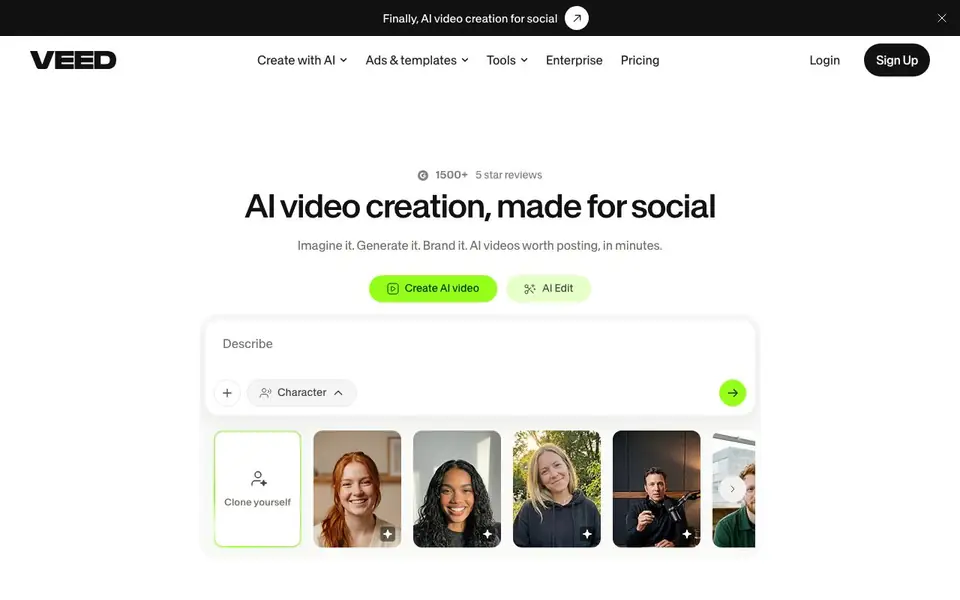
What is VEED?
VEED is an all-in-one AI video platform that lets you generate and edit videos in one workflow. You can turn an idea into a polished video without a camera, using AI to create talking heads, explainers, product demos, ads, and more. It's built for marketers and solopreneurs who want fast, brand-consistent content for social media.
You start by picking a template or using the AI generator to create a video from your idea. Then you can edit with AI tools like subtitle generation, eye contact correction, and noise reduction. The brand kit applies your colors, fonts, logos, and voice to every video instantly, so everything looks like your brand, not generic AI output.
VEED suits anyone who needs to publish videos regularly, from marketing teams to individual creators. The site highlights features like subtitles that keep viewers watching and AI dubbing for multilingual reach. It doesn't specify pricing details on the homepage, so you'll need to check their pricing page for plan options.
VEED features
- AI Video Generator: Turn any idea into a video in minutes without needing a camera.
- Auto Subtitles: Generate designed subtitles that keep viewers engaged and watching longer.
- Brand Kit: Apply your colors, fonts, logos, and voice to every video automatically.
- AI Dubbing: Dub your videos into other languages to reach a wider audience.
- Eye Contact Correction: Fix eye contact in UGC-style ads to improve engagement and ROI.
What you can do with VEED
- Create talking-head videos for social media without filming yourself.
- Generate product demos and explainer videos from a simple idea.
- Add professional subtitles to existing footage to boost watch time.
- Produce branded ads and testimonials that match your visual identity.
How to get started with VEED
- Sign up or log in to VEED's platform from their website.
- Choose a template or use the AI generator to start your video from an idea.
- Edit with AI tools like subtitles, dubbing, and brand kit, then export.
Tips for better results with VEED
- Start with a template in VEED to see the workflow before using the AI generator, so you learn the editing tools and brand kit faster.
- Apply your brand kit in VEED before generating any video, so colors, fonts, logos, and voice are consistent from the first draft.
- Use VEED's eye contact correction and noise reduction on UGC-style ads, as these features directly improve engagement and ROI.
- Generate subtitles with VEED on every video, since designed subtitles keep viewers watching longer and boost social performance.
- Test VEED's AI dubbing on a short clip first to confirm the voice quality and language accuracy before committing to a full project.
VEED pricing
VEED’s homepage does not list prices. Check veed.io for current plans.
What to check before you rely on VEED
- Check VEED's pricing page for plan limits, since the homepage does not list any costs or feature tiers.
- Verify which export formats and resolutions VEED supports for your final videos, as the site does not state these details.
- Confirm how VEED handles your data and privacy, especially for uploaded footage, because the homepage gives no specifics.
- Review VEED's platform compatibility for your operating system and browser, as the site does not list system requirements.
Who VEED is for
VEED suits marketers, solopreneurs, content creators and videographers. If that is not you, the AI video editors below may fit better.
Similar tools compared with VEED
| Tool | What it is | Pricing |
|---|---|---|
| VEED | AI video creation and editing platform | See website |
| SiVideoGen | AI video generator with multiple models | Freemium |
| Descript | AI video and audio text-based editor | Freemium |
| InVideo | Agentic AI video editor and maker | Freemium |
| CapCut | AI-powered photo and video editor | Freemium |
VEED FAQ
What can I create with VEED?
You can generate AI videos like talking heads, explainers, product demos, ads, and testimonials. You can also edit existing footage with subtitles, dubbing, and other AI tools.
Is VEED free to use?
The homepage doesn't state pricing details. You'll need to visit VEED's pricing page to see if there's a free plan or trial.
Who is VEED for?
It's built for marketers and solopreneurs who need to create social-ready videos quickly. It also suits videographers and content teams looking to speed up production.
Can I make videos look like my brand?
Yes, VEED has a brand kit feature that applies your colors, fonts, logos, and voice to every video automatically, so your output looks consistent and professional.
What file formats can VEED export videos in?
VEED lets you export your finished videos in common formats like MP4, which works for most social platforms. The website does not list every export option, so check the export settings inside the editor or the VEED help center for the full list of formats and resolutions available.
Does VEED work on mobile devices or only on desktop?
VEED is a browser-based tool, so you can use it on any device with a modern web browser, including laptops, tablets, and smartphones. The website does not mention dedicated mobile apps, so for the best experience, use a desktop browser. Check VEED's help pages for any device-specific guidance.
What does the free plan of VEED include?
VEED offers a free plan, but the website does not detail what it includes. Typically, free plans have limits on video length, exports, and access to premium AI features. To see the exact free plan features, visit VEED's pricing page and look for the free tier details.


