

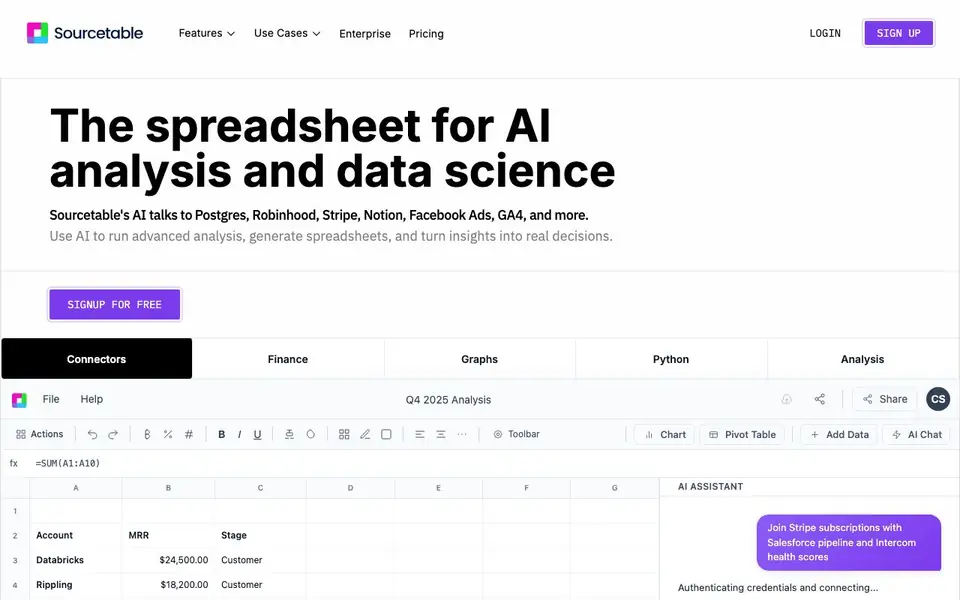
What is Sourcetable?
Sourcetable is an AI spreadsheet that combines the familiarity of Excel with the power of AI and Python. You can connect it to databases and apps like Postgres, Stripe, Notion, and Google Analytics, then ask questions in plain English. It generates charts, writes formulas, and even builds dashboards automatically.
To get started, you sign up with your email and connect your data sources. Then you can use the AI assistant to query your data, create visualizations, or run Python code for custom analysis. The tool also offers templates for finance, marketing, operations, and more, so you can apply it to your specific work.
Sourcetable suits analysts, finance teams, marketers, and researchers who want to work with data without switching tools. It supports large files and multiple tabs, and it promises enterprise-grade security with SOC 2, HIPAA, and PCI compliance. The website notes that your data is not used to train LLMs.
Sourcetable features
- AI assistant: Ask questions in plain English and get answers, charts, or formulas.
- Data connectors: Connect to Postgres, Stripe, Notion, Facebook Ads, GA4, and more.
- Python integration: Run Python code for cleaning, modeling, and visualization without leaving the sheet.
- Instant visualizations: Turn data into charts and graphs automatically or on your terms.
- Template library: Generate Excel templates for finance, operations, marketing, and research.
What you can do with Sourcetable
- Analyze campaign performance and customer behavior for marketing.
- Build financial models and analyze market data for investment decisions.
- Process experimental data and generate visualizations for research.
- Track SLA, capacity planning, and weekly business reviews from live data.
How to get started with Sourcetable
- Sign up with your work email on the Sourcetable website.
- Connect your data sources, such as databases or apps like Stripe.
- Ask questions in the AI chat or use templates to start analyzing.
Tips for better results with Sourcetable
- Connect your live data sources like Postgres or Stripe first, then ask Sourcetable questions in plain English to get accurate answers based on real-time information.
- Use Sourcetable's Python integration for complex cleaning or modeling tasks, but start with simple queries to learn how it handles your data before scaling up.
- Try the template library for your specific role, such as finance or marketing, to see how Sourcetable structures common analyses, then customize the templates to your own data.
- When you ask Sourcetable for a chart or formula, be specific about the columns and time period you want, so the AI generates output that matches your intent without extra back-and-forth.
Sourcetable pricing
Sourcetable has a free way to start, with paid plans for heavier use. Check sourcetable.com for current limits and prices.
What to check before you rely on Sourcetable
- Check whether the free plan includes the data connectors you need, since the website lists many integrations but does not state which ones are available on free tier.
- Verify the export options for your work, as the site does not specify which file formats you can download, such as Excel or CSV, beyond using the tool itself.
- Confirm the data privacy terms for your specific use, because while the site says LLMs are not trained on your data, it does not detail how your connected data is stored or processed.
Who Sourcetable is for
Sourcetable suits analysts, finance teams, marketers and researchers. If that is not you, the AI data analysis tools below may fit better.
Similar tools compared with Sourcetable
| Tool | What it is | Pricing |
|---|---|---|
| Sourcetable | AI spreadsheet and data analyst | Freemium |
| Julius AI | AI workspace for data and content | See website |
| Rows | AI-powered spreadsheet and data analyst | See website |
| Clay | AI platform for go-to-market workflows | Freemium |
| Semrush Copilot | SEO and AI search visibility platform | Freemium |
Sourcetable FAQ
How do I analyze data with Sourcetable?
You can ask questions in plain English in the AI chat, and Sourcetable will generate answers, charts, or formulas. You can also use Python for custom logic or start from a template.
What data sources are supported?
Sourcetable connects to Postgres, BigQuery, GA4, MySQL, DuckDB, Google Ads, and more. It also integrates with apps like Stripe, Notion, and Facebook Ads.
Is Sourcetable free?
The website offers a free signup, but it also has paid plans. Pricing details are on the Pricing page, and there is a discount for students, professors, and teachers.
Can I analyze spreadsheets with multiple tabs?
Yes, Sourcetable supports spreadsheets with multiple tabs. You can analyze data across tabs and generate visualizations from them.
Does Sourcetable offer a free plan, and what does it include?
Sourcetable has a freemium pricing model, meaning you can start using it for free. The website highlights a 'SIGNUP FOR FREE' option, but it does not list the specific limits of the free plan. To see what the free plan includes, check the pricing page or sign up to explore the available features.
Can Sourcetable export data or connect to tools like Google Sheets or Excel?
Sourcetable connects to many data sources like Postgres, Stripe, Notion, and GA4, and it supports file uploads. However, the website does not mention exporting data to other formats or connecting directly to Google Sheets or Excel. For details on export options, review the help documentation or contact support.
Does Sourcetable run on mobile devices or only on desktop?
Sourcetable is a web-based spreadsheet, so you can access it through a browser on any device. The website does not specify dedicated mobile apps or offline support. For the best experience, use a desktop browser, and check the help center for any platform-specific guidance.


