

What is Rosebud?
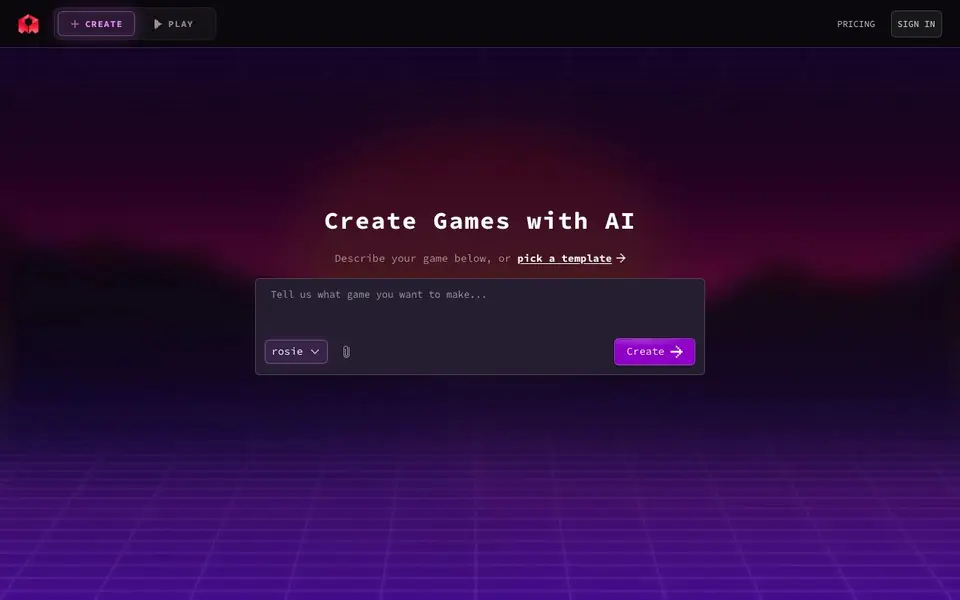
Rosebud is an AI game maker that turns your text descriptions into playable games. You start by typing what you want or choosing from templates like Interactive Story, Voxel World, City Builder, RPG, or Vampire Survivors. The tool then generates the game for you, and you can deploy it right away.
To get started, you describe your game idea in plain language or select a template. Rosebud uses AI models like Rosie, GPT-Sol, and Claude Opus to build the game. You can also use its web dev features, such as an AI code generator and website builder, to expand your project.
Rosebud suits beginners who want to make games without programming, as well as educators and creators exploring game design. The site mentions features like AI NPCs, skybox generation, and sprite sheets, but it does not list specific pricing or limits on the homepage.
Rosebud features
- Prompt-based creation: Type a game idea and Rosebud turns it into a playable game.
- Template library: Pick from ready-made types like RPG, City Builder, or Interactive Story.
- AI model options: Choose between Rosie, GPT-Sol, or Claude Opus for generation.
- Web dev tools: Use AI code generation and website building to extend your game.
- Asset generators: Create skyboxes, sprite sheets, and AI NPCs for your game.
What you can do with Rosebud
- Create an interactive story game by describing your plot and characters.
- Build a voxel world or city builder from a template in minutes.
- Generate AI NPCs to populate your game world with unique characters.
- Use the AI website builder to make a landing page for your game.
How to get started with Rosebud
- Go to Rosebud's site and click Create.
- Describe your game idea or choose a template from the list.
- Pick an AI model and hit Create to generate and deploy your game.
Tips for better results with Rosebud
- Start with a specific template like RPG or City Builder, then describe your game in plain language to give Rosebud a clear foundation to build from.
- Experiment with the AI model options Rosie, GPT-Sol, or Claude Opus in Rosebud to see which one produces the game style you prefer for your project.
- Use Rosebud's asset generators for skyboxes and sprite sheets to add visual depth, then test your game early to catch issues before expanding further.
- Combine Rosebud's game creator with its AI website builder to make a landing page for your game, but keep your initial scope small to avoid overcomplicating the build.
Rosebud pricing
Rosebud’s homepage does not list prices. Check rosebud.ai for current plans.
What to check before you rely on Rosebud
- Check whether Rosebud's homepage lists any pricing or plan limits; it does not, so you may need to sign in or contact support to find out.
- Verify what export formats Rosebud supports for your game files, since the site does not state this clearly on the main page.
- Review Rosebud's privacy policy and terms of service before uploading your game ideas, as the homepage does not detail data handling or ownership rights.
Who Rosebud is for
Rosebud suits game hobbyists, educators, no-code creators and indie developers. If that is not you, the AI 3D and game tools below may fit better.
Similar tools compared with Rosebud
| Tool | What it is | Pricing |
|---|---|---|
| Rosebud | AI game maker with prompts | See website |
| SiGameGen | AI game builder from one sentence | Freemium |
| Scenario | AI platform for creative asset generation | See website |
| Spline | Browser-based 3D design with AI | Freemium |
| Civitai | AI art community and model library | Freemium |
Rosebud FAQ
What can I make with Rosebud?
You can make playable games like interactive stories, voxel worlds, city builders, RPGs, and multiplayer obbies. You can also generate game assets like skyboxes, sprite sheets, and AI NPCs.
Do I need coding skills?
No. Rosebud is designed for prompt-based creation. You describe your game or pick a template, and the AI builds it for you. The site also offers web dev tools if you want to go further.
Is Rosebud free?
The homepage does not state pricing details. It has a Pricing page, so you should check there for current plans and whether a free tier exists.
Who is Rosebud for?
It's for anyone who wants to create games without coding, including educators, hobbyists, and indie developers. There's also a dedicated section for educators on the site.
Can Rosebud export my game to platforms like Steam or mobile app stores?
The Rosebud website does not mention exporting games to external platforms like Steam or mobile stores. It focuses on creating and deploying games directly through its platform. For details on export options, check the Rosebud documentation or contact their support team.
Does Rosebud run on Mac, Windows, or mobile devices?
The Rosebud website does not specify which operating systems or devices are supported. Since it is a web-based tool, it likely works in a browser on most devices, but for confirmation, visit the Rosebud site or their help resources for platform requirements.
What does the free plan of Rosebud include, and are there any limits?
The Rosebud website does not list specific pricing or limits for its free plan. It mentions you can start creating games without coding, but details on usage limits or paid tiers are not provided on the homepage. Check the pricing page or contact Rosebud for accurate plan information.


