
What is indra?
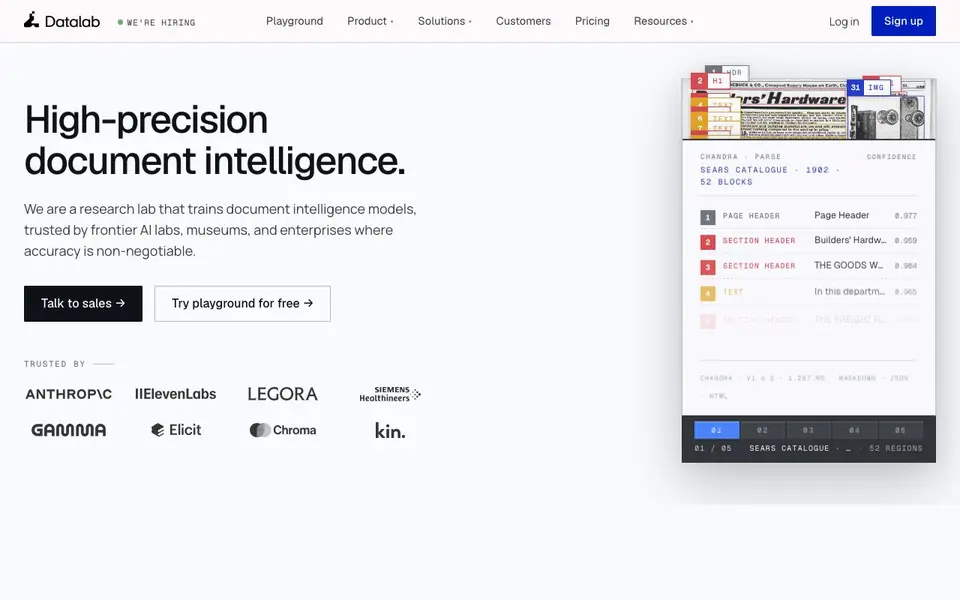
Datalab is a research lab that trains document intelligence models. It provides high-precision parsing and extraction for PDFs, spreadsheets, slides, and more. The platform is trusted by frontier AI labs, museums, and enterprises where accuracy is critical.
You can use the playground to test processors like Convert, Extract, Segment, and Eval. Convert turns documents into markdown, HTML, and JSON with word-level bounding boxes. Extract finds key information using pre-defined schemas. Segment identifies natural document boundaries, and Eval assesses output quality. You can compose these processors into pipelines and deploy them in the managed cloud, your VPC, or air-gapped on-premises.
Datalab suits AI research labs, financial services, healthcare, insurance, and science teams. It handles training corpora, scientific papers, long books, and multilingual sources. The platform supports batch processing at scale, with continuous monitoring and regression flagging. Pricing is not stated on the website, but you can try the playground for free.
indra features
- Convert: Transforms PDFs, spreadsheets, and slides into structured markdown, HTML, and JSON.
- Extract: Pulls key information using pre-defined extraction schemas for your documents.
- Segment: Identifies natural boundaries between documents combined into one file.
- Eval: Measures output quality using your own rubrics or Datalab's criteria.
- Deploy anywhere: Runs in managed cloud, your VPC, or fully air-gapped on-premises.
What you can do with indra
- Parse scientific papers and books into clean training data for AI models.
- Extract structured data from clinical trial documents for healthcare workflows.
- Convert insurance claims forms into JSON for automated processing.
- Segment mixed document batches to separate distinct files accurately.
How to get started with indra
- Sign up on Datalab's website to access the playground.
- Choose processors like Convert or Extract and test them on your documents.
- Compose a pipeline, deploy it to your preferred environment, and monitor quality.
Tips for better results with indra
- Start with the playground to test Convert, Extract, Segment, and Eval on your own documents before building a pipeline. This lets you see output quality firsthand.
- Use indra's Convert processor to get word-level bounding boxes in markdown, HTML, or JSON, which helps when you need precise layout for downstream tasks.
- Compose multiple processors into a pipeline in indra, like Convert followed by Extract, to streamline complex document workflows and reduce manual steps.
- Leverage indra's Segment processor when you have combined files, as it identifies natural boundaries so you can split documents accurately before further processing.
indra pricing
indra’s homepage does not list prices. Check datalab.to for current plans.
What to check before you rely on indra
- Verify that the free playground access covers the processors and document types you need, since the website does not state any usage limits or feature restrictions.
- Check whether indra's deployment options—managed cloud, VPC, or air-gapped—align with your data privacy requirements, as the site does not list specific security certifications.
- Confirm the output formats you require are supported, such as markdown, HTML, and JSON, and test with your own files to ensure they meet your accuracy standards.
Who indra is for
indra suits AI research labs, financial services, healthcare teams and insurance companies. If that is not you, the AI data analysis tools below may fit better.
Similar tools compared with indra
| Tool | What it is | Pricing |
|---|---|---|
| indra | High-precision document intelligence platform | See website |
| Julius AI | AI workspace for data and content | See website |
| Rows | AI-powered spreadsheet and data analyst | See website |
| Clay | AI platform for go-to-market workflows | Freemium |
| Semrush Copilot | SEO and AI search visibility platform | Freemium |
indra FAQ
What can I do with Datalab?
You can convert PDFs, spreadsheets, and slides into structured formats like markdown, HTML, and JSON. You can also extract specific information, segment combined documents, and evaluate output quality.
Is Datalab free to use?
The website says you can try the playground for free, but it does not state whether there is a free plan or paid pricing details. You should check the pricing page or contact sales for specifics.
Who is Datalab for?
It is for organizations that need high-accuracy document processing, including AI research labs, financial services, healthcare, insurance, and science teams. It is also used by museums and enterprises.
Can I run Datalab on my own infrastructure?
Yes. Datalab offers deployment in the managed cloud, in your VPC, or fully air-gapped on-premises. You choose the network because Datalab owns the models.
What document formats can Datalab's Convert processor handle?
Datalab's Convert processor transforms PDFs, spreadsheets, and slides into structured markdown, HTML, and JSON. It includes word-level bounding boxes and redlines. The website does not list every possible file type, so check the playground or documentation for the full list of supported formats.
Can I use Datalab without creating an account?
The website shows a Sign up button and a playground you can try for free, but it does not state whether an account is required to use the playground. To find out, visit the Datalab website and attempt to access the playground directly or contact their sales team.
Does Datalab offer a free plan or trial?
Datalab's website says you can try the playground for free, but it does not specify what the free access includes or whether it is a time-limited trial. Pricing is not stated on the site. For details on free usage limits, check the playground sign-up flow or contact Datalab sales.


