

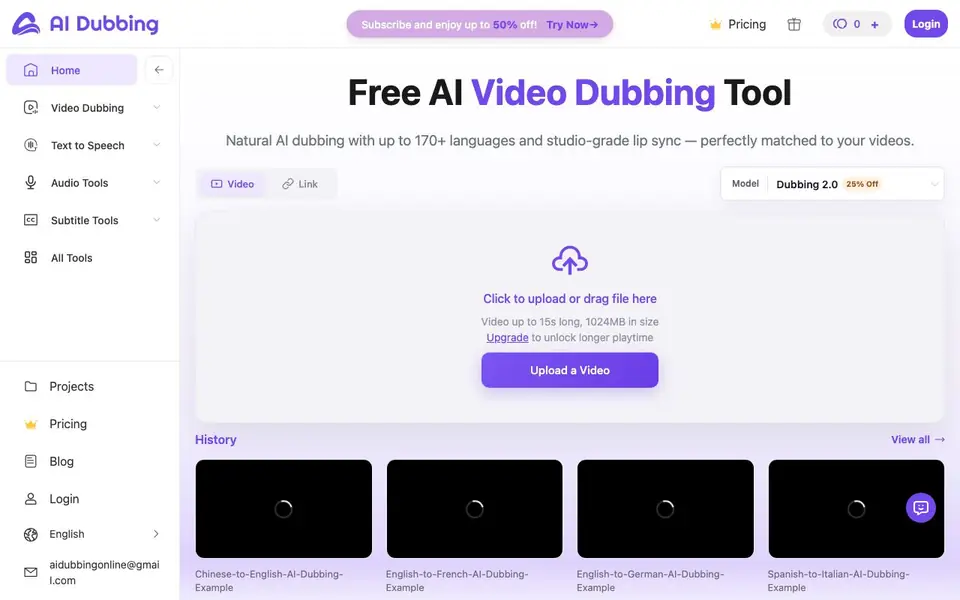
What is AI Dubbing?
AI Dubbing is a free online tool that translates your videos into over 170 languages. It adds natural-sounding AI voices and matches them to the speaker's lip movements. You can also clone the original voice to keep the video's personality consistent across languages.
To use it, you upload a video file. The AI automatically detects the spoken language. Then you choose the target language, pick a voice or clone the original, and decide whether to add subtitles. After processing, you preview and download the dubbed video.
It suits creators, e-commerce sellers, educators, and corporate trainers who want to reach international viewers. The free version supports videos up to 15 seconds long and 1024MB in size. Longer videos require an upgrade. The website mentions multiple dubbing engines, from editable subtitles to studio-grade lip sync.
AI Dubbing features
- Multilingual dubbing: Translates videos into 170+ languages with natural, human-like voices.
- Lip-sync accuracy: Matches new audio to the speaker's mouth movements for realistic results.
- Voice cloning: Recreates the original speaker's voice in any target language.
- Voice library: Offers a diverse range of professional AI voices across accents, ages, and styles.
- Auto subtitles: Generates accurate transcripts and lets you add subtitles to your dubbed videos.
What you can do with AI Dubbing
- Localize product videos for different regions to boost global ad performance.
- Convert online courses into multiple languages without hiring voice actors.
- Dub corporate training videos for employees across several countries.
- Translate destination videos to attract international travelers in their native language.
How to get started with AI Dubbing
- Upload your video file; the AI automatically recognizes the spoken language.
- Set the target language, choose a voice or clone the original, and decide on subtitles.
- Preview the dubbed video and download it once processing is complete.
Tips for better results with AI Dubbing
- Upload a clean video with one clear speaker and minimal background noise to help AI Dubbing detect the language and match lip movements accurately.
- Test AI Dubbing with a short 15-second clip first to review voice quality and lip-sync before committing to longer projects that require an upgrade.
- Use the voice cloning option in AI Dubbing to keep your original speaker's tone across languages, which preserves brand personality for consistent global content.
- Preview the dubbed video carefully and check subtitle timing, as AI Dubbing lets you adjust these details before downloading the final file.
AI Dubbing pricing
AI Dubbing has a free way to start, with paid plans for heavier use. Check aidubbing.io for current limits and prices.
What to check before you rely on AI Dubbing
- Confirm your video is under 15 seconds and 1024MB, as the free version of AI Dubbing does not support longer files without an upgrade.
- Check whether the website lists pricing for longer videos or premium features, as it only shows a freemium label and a subscription discount.
- Review AI Dubbing's data and privacy policy, since the site does not state how uploaded videos are stored or whether they are used for training.
Who AI Dubbing is for
AI Dubbing suits content creators, e-commerce sellers, online course instructors and corporate trainers. If that is not you, the AI video editors below may fit better.
Similar tools compared with AI Dubbing
| Tool | What it is | Pricing |
|---|---|---|
| AI Dubbing | AI video dubbing and translation tool | Freemium |
| SiVideoGen | AI video generator with multiple models | Freemium |
| Descript | AI video and audio text-based editor | Freemium |
| InVideo | Agentic AI video editor and maker | Freemium |
| VEED | AI video creation and editing platform | See website |
AI Dubbing FAQ
What does AI Dubbing do?
It translates your videos into over 170 languages with natural AI voices and lip sync. You can also clone the original speaker's voice and add subtitles. It's designed for creators, educators, and businesses reaching global audiences.
Is AI Dubbing free to use?
Yes, there is a free version. It supports videos up to 15 seconds long and 1024MB in size. For longer videos, you need to upgrade. The website mentions a subscription with up to 50% off, but doesn't list specific prices.
Who is AI Dubbing for?
It's for content creators, e-commerce sellers, online course instructors, corporate trainers, and marketers who want to localize videos for international audiences. The testimonials highlight use cases like YouTube, product ads, and training materials.
Can I keep the original speaker's voice?
Yes, you can clone the original voice. This recreates it in any target language, keeping the video's personality and brand consistent. The website says this ensures consistent branding while expanding to global audiences.
Can AI Dubbing export the dubbed video in different formats or resolutions?
The AI Dubbing website does not mention specific export formats or resolutions. You can preview and download the processed video after dubbing, but details on file types or quality settings are not listed. Check the tool's interface or contact support for this information.
Does AI Dubbing work on mobile devices or only on desktop?
The AI Dubbing website does not specify whether it works on mobile devices or only on desktop. Since it is an online tool, you can likely access it through a web browser on any device, but the site does not confirm this. Try it on your device to see if it works.
What does the free plan of AI Dubbing include besides the 15-second video limit?
The free plan of AI Dubbing allows you to upload videos up to 15 seconds long and 1024MB in size. It includes access to all core features like dubbing, lip-sync, voice cloning, and subtitles, but longer videos require an upgrade. The website does not list any other free limitations.


