
What is VoiSpark?
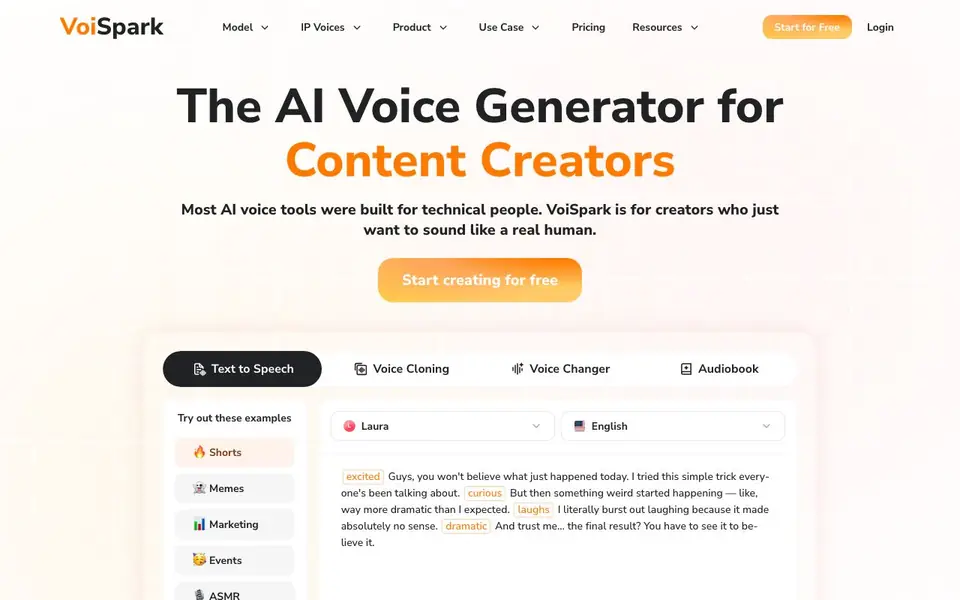
VoiSpark is an AI voice generation platform built for content creators, not technical users. It offers text-to-speech, voice cloning, and voice changing in one studio. You can pick from a large library of voices, including celebrity-style options, and add emotion tags to make lines sound excited, curious, or dramatic.
To get started, you paste your script, choose a voice, and adjust emotion tags per sentence. For cloning, you upload just 15 seconds of audio, and VoiSpark captures your tone and speech patterns. The platform supports long-form content: upload entire chapters, edit lines without redoing everything, and assign different speakers to keep narration fresh.
VoiSpark suits YouTubers, TikTok creators, podcasters, educators, marketers, and event hosts. It handles voiceovers, parodies, ASMR, e-learning narration, and ad testing. The website mentions a 100% free trial and credits for using voices, with positive user reviews praising ease of use and cloning quality.
VoiSpark features
- Massive voice library: Choose from 700+ voice options, including celebrity-style voices, for varied projects.
- Emotion tags: Add tags to each sentence to shape tone, rhythm, and intent for human-like delivery.
- Realistic voice cloning: Clone your voice from just 15 seconds of uploaded audio material.
- Long-form narration: Upload entire chapters at once and keep voice quality consistent throughout.
- Voice changer: Transform your voice for different roles, characters, or creative performances.
What you can do with VoiSpark
- Create voiceovers for YouTube videos and TikTok shorts with expressive AI voices.
- Clone a guest's voice for podcast episodes or re-record fixes with consistency.
- Generate narration for e-learning courses and tutorial voiceovers.
- Produce promotional voiceovers for product explainer videos and ad campaigns.
How to get started with VoiSpark
- Visit VoiSpark's website and click 'Start for Free' to create an account.
- Paste your script, pick a voice from the library, and add emotion tags to lines.
- Generate your audio, then edit lines or clone your voice using a 15-second sample.
Tips for better results with VoiSpark
- Paste your script into VoiSpark and add emotion tags sentence by sentence to shape tone, rhythm, and intent for a more human delivery.
- Upload a clean 15-second audio sample for cloning, then test VoiSpark's clone on short lines before committing to long-form narration.
- Use VoiSpark's long-form feature to upload entire chapters at once, and assign different speakers to keep narration fresh across sections.
- For voiceovers, start with VoiSpark's 700+ voice library to find a match, then tweak emotion tags per line to avoid flat, robotic output.
VoiSpark pricing
VoiSpark has a free way to start, with paid plans for heavier use. Check voispark.com for current limits and prices.
What to check before you rely on VoiSpark
- Check VoiSpark's free trial credits and what they cover, since the website mentions credits but does not list exact amounts or limits.
- Verify the pricing page for paid plans and credit costs, as the site labels VoiSpark freemium but does not state specific prices.
- Review VoiSpark's data and privacy policy for uploaded audio, especially for cloning, since the website does not detail how your samples are stored or used.
Who VoiSpark is for
VoiSpark suits content creators, podcasters, educators and marketers. If that is not you, the AI voice generators below may fit better.
Similar tools compared with VoiSpark
| Tool | What it is | Pricing |
|---|---|---|
| VoiSpark | AI voice generator for creators | Freemium |
| ElevenLabs | AI voice generator and voice agents platform | Freemium |
| Murf | AI voice and conversational agent platform | See website |
| Resemble AI | AI deepfake detection and watermarking platform | See website |
| Speechify | AI text-to-speech and voice assistant | Freemium |
VoiSpark FAQ
What can I create with VoiSpark?
You can create text-to-speech voiceovers, clone voices, change voices, and produce long-form narration. It's for videos, podcasts, e-learning, ads, events, and creative projects like ASMR or character roles.
How does voice cloning work?
You upload about 15 seconds of audio, and VoiSpark captures your natural speech patterns and tone. The clone is then available for generating new audio, and user reviews say the quality is excellent.
Is VoiSpark free to use?
The website offers a 100% free trial to start creating. After that, you use credits for voice generation, and some users mention wanting to buy extra credits, so there are paid plans available.
Who is VoiSpark for?
It's designed for content creators, not technical users. YouTubers, TikTokers, podcasters, educators, marketers, and event hosts can all use it for voiceovers, parodies, narration, and promotional audio.
What file formats can VoiSpark export audio in?
The VoiSpark website does not specify the exact audio file formats it supports for export. To find out which formats are available, check the platform's documentation or contact their support team directly.
Does VoiSpark have a mobile app or does it only work in a web browser?
The VoiSpark website does not mention a dedicated mobile app. It appears to be a web-based platform, so you can likely access it through a browser on your computer or mobile device. For confirmation, check the site's system requirements or help section.
What does the free plan on VoiSpark include?
VoiSpark offers a 100% free trial that gives you credits to use voices. The website does not list the exact number of credits or which features are included in the free plan. For details, visit the pricing page or sign up to see what you get.


