
What is Voice Changer?
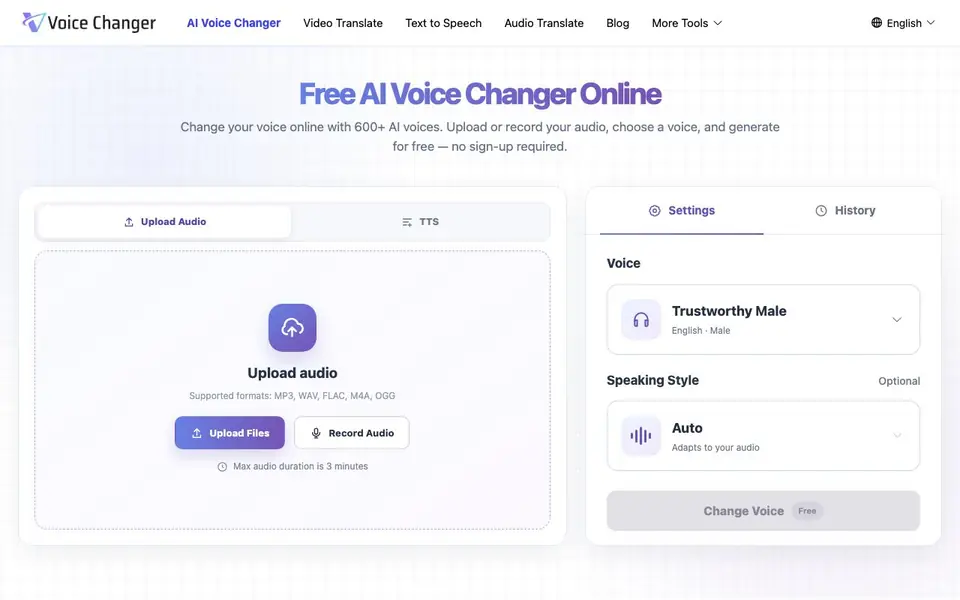
Voice Changer is a free online tool that changes the voice in your audio files. You upload or record a clip, choose from over 600 AI voices across 40 languages, and generate a new version with a different voice. It works entirely in your browser, so there is no software to install and no account to create.
To use it, you start by uploading an audio file in MP3, WAV, FLAC, M4A, or OGG format, or you can record your voice directly. Then you pick a voice from the library, which includes options like natural female, child, anime, and robot styles. After you click generate, you can preview the result and download the finished audio.
The tool is designed for content creators, gamers, podcasters, and social media users who want to experiment with different voices for videos, skits, or narration. It preserves the pacing and emotion of your original recording. The free version supports audio clips up to 3 minutes long, and you can adjust the speaking speed to match your needs.
Voice Changer features
- 600+ AI voices: Choose from a large library spanning 40 languages with various ages, genders, and accents.
- No sign-up required: Use the tool immediately without creating an account or providing a credit card.
- Browser-based recording: Record your voice directly in the browser instead of uploading a file.
- Multiple audio formats: Upload MP3, WAV, FLAC, M4A, or OGG files for conversion.
- Speed control: Adjust the speaking speed of the transformed voice to get the pacing right.
What you can do with Voice Changer
- Create character voices for gaming videos and animations.
- Give social media clips a distinctive voice for skits or memes.
- Transform narration for podcast segments without re-recording.
- Experiment with different voice styles for voiceover projects.
How to get started with Voice Changer
- Upload an audio file or record your voice directly in the browser.
- Browse the voice library and pick a voice that fits your project.
- Click generate, preview the new voice, and download the finished audio.
Tips for better results with Voice Changer
- Upload the cleanest audio you have, with minimal background noise, so Voice Changer can preserve the pacing and emotion of your original recording without distortion.
- Test a few different voices from the 600+ library on the same short clip before generating your final version, since some styles suit certain content better than others.
- Use the speed control in Voice Changer to adjust the transformed voice's pacing, especially for narration or skits where timing matters for comedic or dramatic effect.
- Keep your clips under the 3-minute limit and preview the result before downloading, so you can regenerate with a different voice or style if the first attempt isn't right.
Voice Changer pricing
Voice Changer is free to use according to its website.
What to check before you rely on Voice Changer
- Confirm the free version's 3-minute maximum audio duration fits your project, since longer recordings cannot be processed without splitting them into separate clips.
- Check whether the website states any limits on the number of generations you can run, as it does not list a cap or mention paid tiers for extended use.
- Verify that your audio file is in one of the supported formats (MP3, WAV, FLAC, M4A, OGG), since other formats may not upload successfully.
Who Voice Changer is for
Voice Changer suits content creators, gamers, podcasters and social media users. If that is not you, the AI voice generators below may fit better.
Similar tools compared with Voice Changer
| Tool | What it is | Pricing |
|---|---|---|
| Voice Changer | Free online AI voice changer | Free |
| ElevenLabs | AI voice generator and voice agents platform | Freemium |
| Murf | AI voice and conversational agent platform | See website |
| Resemble AI | AI deepfake detection and watermarking platform | See website |
| Speechify | AI text-to-speech and voice assistant | Freemium |
Voice Changer FAQ
Is Voice Changer really free?
Yes, the tool is completely free to use. You can upload or record audio, choose a voice, and generate the transformed audio without paying anything or signing up.
Do I need to create an account to use it?
No, you do not need to sign up or log in. The tool works directly in your browser, and you can start changing voices right away.
What audio formats are supported?
You can upload MP3, WAV, FLAC, M4A, and OGG files. There is also an option to record your voice directly in the browser if you prefer not to upload a file.
How long can my audio be?
The maximum audio duration is 3 minutes per clip. If you need longer recordings, you may need to split them into smaller parts, though the website does not state a workaround.
Can I use Voice Changer on my phone or tablet?
Voice Changer works entirely in your browser, so you can use it on any device with a modern web browser, including phones and tablets. The website does not mention dedicated mobile apps, but you can access the tool directly from your device's browser.
Does Voice Changer let me download the changed audio in the same format I uploaded?
Voice Changer lets you download the finished audio after you generate it, but the website does not specify which output formats are available. You can check the download options after generating your clip to see what formats are offered.
What can I do with the free plan on Voice Changer besides changing my voice?
The free plan on Voice Changer includes all core features: uploading or recording audio, choosing from 600+ AI voices, adjusting speaking speed, and downloading the result. The website does not mention any additional paid features, so you can use these tools without paying.


