
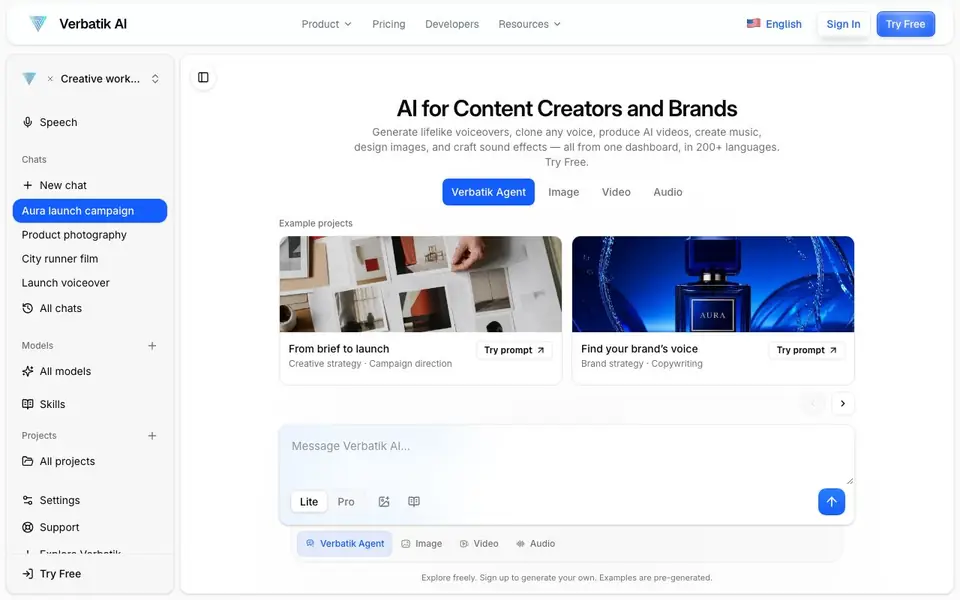
What is Verbatik?
Verbatik is an all-in-one AI creative platform for content creators and brands. It combines text-to-speech, voice cloning, AI video generation, music creation, image design, and sound effects into one dashboard. You can produce voiceovers, ads, podcasts, audiobooks, and more without switching between tools.
To get started, you sign up and explore the creative workspace. You can generate speech in over 161 languages with thousands of voices, clone your own voice, or design a voice from a prompt. The platform also lets you create videos with AI avatars, generate music in any genre, and add animated subtitles in 100+ languages.
Verbatik suits marketers, content creators, and developers. It offers a Verbatik Agent for creative strategy and campaign ideas, plus an API for building custom applications. The website mentions a free trial, but specific pricing details are not stated there.
Verbatik features
- Text to Speech: Convert text into ultra-realistic speech with neural voices in 150+ languages.
- Voice Cloning: Clone your own voice or design a new one from a prompt.
- AI Video Generation: Turn ideas into videos with AI avatars and cinematic visuals.
- Music Generation: Create studio-quality tracks in any genre, with vocals or instrumental.
- Auto Captions: Generate animated subtitles in 100+ languages to boost engagement.
What you can do with Verbatik
- Create voiceovers for ads, podcasts, and audiobooks.
- Produce UGC-style ads with AI avatars without hiring creators.
- Localize content by generating speech in multiple languages.
- Add animated captions to social videos for muted viewing.
How to get started with Verbatik
- Sign up for a free account on the Verbatik website.
- Explore the creative workspace and choose a model or project type.
- Generate your first voiceover, video, or music track from the dashboard.
Tips for better results with Verbatik
- Start with the free trial to test Verbatik's voice cloning and text-to-speech quality before committing to a paid plan, since pricing details are not listed on the website.
- Use Verbatik's all-in-one editor to combine voiceovers, music, and captions in one project, which saves time compared to exporting and re-importing files between separate tools.
- When cloning your voice with Verbatik, record a clean, noise-free sample in a quiet room, and speak in a consistent tone to get the most accurate replica for your projects.
- Leverage Verbatik's 150+ languages and 10,000+ voices to localize your content, but always listen to a sample voice in your target language to ensure it matches your brand's tone.
- checks
Verbatik pricing
Verbatik has a free way to start, with paid plans for heavier use. Check verbatik.com for current limits and prices.
What to check before you rely on Verbatik
- Check Verbatik's website for specific pricing and plan limits, as it only mentions a free trial and does not state costs or usage caps, so you may need to contact sales.
- Review Verbatik's data and privacy policy to understand how your voice clone and uploaded content are stored and used, since the website does not detail these practices.
- Verify that Verbatik supports the platforms you need, such as macOS or Windows, and check if your desired export formats are available, as the site does not list them explicitly.
Who Verbatik is for
Verbatik suits content creators, marketers, brands and developers. If that is not you, the AI voice generators below may fit better.
Similar tools compared with Verbatik
| Tool | What it is | Pricing |
|---|---|---|
| Verbatik | All-in-one AI creative platform | Freemium |
| ElevenLabs | AI voice generator and voice agents platform | Freemium |
| Murf | AI voice and conversational agent platform | See website |
| Resemble AI | AI deepfake detection and watermarking platform | See website |
| Speechify | AI text-to-speech and voice assistant | Freemium |
Verbatik FAQ
What can I create with Verbatik?
You can create lifelike voiceovers, AI videos, music, sound effects, images, and auto-captions. It's designed for podcasts, ads, audiobooks, and social content, all from one dashboard.
Does Verbatik have a free plan?
The website says 'Try Free' and mentions signing up to generate your own content, but it does not specify the exact free plan limits or whether a paid plan is required after trial.
Who is Verbatik for?
It's for content creators, brands, and developers. You can use it for marketing campaigns, social media content, and building custom apps with the Verbatik API.
How many languages and voices does Verbatik support?
Verbatik offers over 161 languages and thousands of AI voices. The homepage mentions 200+ languages in the meta description and 150+ in some sections, so the exact count may vary by feature.
What can Verbatik export or integrate with?
Verbatik's website does not list specific export formats or third-party integrations. It mentions an API for developers to build custom applications, but details on what you can export or connect to are not provided. Check the Developers section on verbatik.com for the latest integration and export options.
Does Verbatik work on mobile devices?
Verbatik's website mentions macOS and Windows as supported platforms, but it does not mention mobile apps or mobile browser compatibility. You can likely access it through a mobile browser, but for a definitive answer, check the website's support or FAQ pages for device requirements.
What does Verbatik's free plan include?
Verbatik offers a free trial, but the website does not specify what features or usage limits it includes. To find out what you can do without paying, sign up and explore the free trial, or check the pricing page for details on plan tiers and what each includes.


