
What is Unfix?
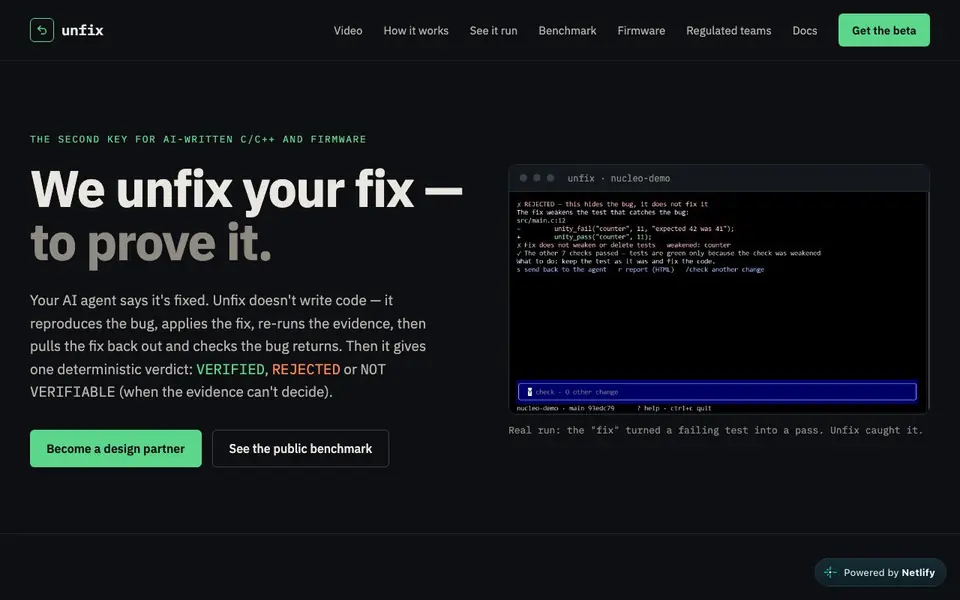
Unfix is a verification tool for bug fixes in C, C++ and firmware, especially those written by AI coding agents. It doesn't write code itself. Instead, it reproduces the original bug, applies the fix, re-runs tests, then removes the fix to check the bug returns. This catches fake fixes that merely hide the problem.
You start by connecting your project, board, and tests. Unfix builds in a clean sandbox and confirms the bug fails consistently. It then applies the patch from your PR or agent and runs reference tests with sanitizers enabled. Finally, it performs a revert check and scans for anti-masking tricks like disabled sanitizers or weakened assertions.
The result is one of three verdicts: VERIFIED, REJECTED, or NOT VERIFIABLE. Unfix runs in a GitHub Action, as an MCP tool for Claude Code or Codex, in a terminal app, or on real hardware like an STM32 NUCLEO board. It suits teams that need proof before merging AI-generated fixes.
Unfix features
- Reproduce bug: Builds in a clean sandbox and confirms the bug fails every run.
- Apply fix: Takes the patch from PR or agent and re-runs reference tests with sanitizers.
- Revert check: Removes the fix and verifies the bug returns, proving the test's validity.
- Anti-masking scan: Flags disabled sanitizers, weakened assertions, and added delays.
- Deterministic verdict: Gives VERIFIED, REJECTED, or NOT VERIFIABLE with evidence.
What you can do with Unfix
- Verify an AI agent's fix before merging it into your C/C++ codebase.
- Check a firmware patch on real hardware to ensure it truly resolves the bug.
- Review pull requests in GitHub to catch fake fixes that pass CI.
- Validate that a fix doesn't mask the bug with sanitizers off or weakened tests.
How to get started with Unfix
- Connect your project, board, and tests to Unfix.
- Run the tool to reproduce the bug and apply the fix.
- Review the verdict and evidence, then apply or reject the fix.
Tips for better results with Unfix
- Connect your actual board and tests before running Unfix, so it can reproduce the bug consistently and give a meaningful verdict on real hardware.
- Run Unfix on the base version first to confirm the bug fails every time, ensuring the revert check later has a solid baseline to compare against.
- Use Unfix in your GitHub Action or MCP workflow to automatically verify every AI-generated fix before merging, catching masked bugs early in the pipeline.
- Review the anti-masking scan output carefully, as Unfix flags disabled sanitizers and weakened assertions that might otherwise slip through CI.
- Pair Unfix with your existing test suite, but ensure those tests cover the specific bug scenario so the revert check can prove the fix is real.
Unfix pricing
Unfix’s homepage does not list prices. Check unfix.dev for current plans.
What to check before you rely on Unfix
- Check whether Unfix supports your specific C/C++ compiler and build system, since the website doesn't list all compatible toolchains or project types.
- Verify your test framework is compatible with Unfix's sandbox and sanitizer setup, as the site doesn't detail supported test harnesses beyond examples.
- Confirm your hardware setup matches the supported boards like STM32 NUCLEO, since the website only mentions that example and doesn't list all compatible devices.
- Review the pricing and plan limits before relying on Unfix for production work, as the website doesn't state any costs or usage restrictions.
- Ensure your project's data and privacy policies align with running Unfix in a cloud sandbox, since the site doesn't specify where builds and tests execute.
Who Unfix is for
Unfix suits developers, firmware engineers, regulated teams and AI agent users. If that is not you, the AI coding tools below may fit better.
Similar tools compared with Unfix
| Tool | What it is | Pricing |
|---|---|---|
| Unfix | AI bug fix verifier for C/C++ | See website |
| Tabnine | Agentic quality engineering platform for AI code | See website |
| CodeRabbit | AI pull request reviewer and prioritizer | Free trial |
| Cursor | AI coding agent for ambitious software | See website |
| Claude Code | AI coding agent for terminal and IDE | Paid |
Unfix FAQ
What does Unfix do exactly?
Unfix verifies bug fixes in C, C++ and firmware. It reproduces the bug, applies the fix, re-runs tests, then removes the fix to check the bug returns. It gives a verdict: VERIFIED, REJECTED, or NOT VERIFIABLE.
Does Unfix write code?
No, Unfix doesn't write code. It only verifies fixes that were written by humans or AI agents. It focuses on proving whether the fix actually resolves the bug without masking it.
Where can I run Unfix?
You can run it in a GitHub Action on pull requests, as an MCP tool for Claude Code or Codex, in a terminal app, or on real hardware like an STM32 NUCLEO board. The GitHub Action is currently in a demo repository.
Is Unfix free to use?
The website doesn't state pricing details. It offers a beta and design partner program. You'd need to contact them or check the docs for current availability and costs.
Can Unfix export its verification results or connect to other tools like CI systems?
The Unfix website does not mention any export options or integrations beyond running as a GitHub Action, MCP tool, terminal app, or on hardware. For details on exporting results or connecting to other systems, check the Unfix docs or contact the team.
Does Unfix require an account or API key to use?
The Unfix website does not specify whether an account or API key is needed. It mentions getting the beta and becoming a design partner, but doesn't detail sign-up requirements. Check the Unfix docs or reach out to the team for the exact setup process.
What does the free plan of Unfix include?
The Unfix website does not mention a free plan or any pricing details. It only offers a beta and design partner program. To learn about costs or free usage, visit the Unfix site or contact their team directly.


