

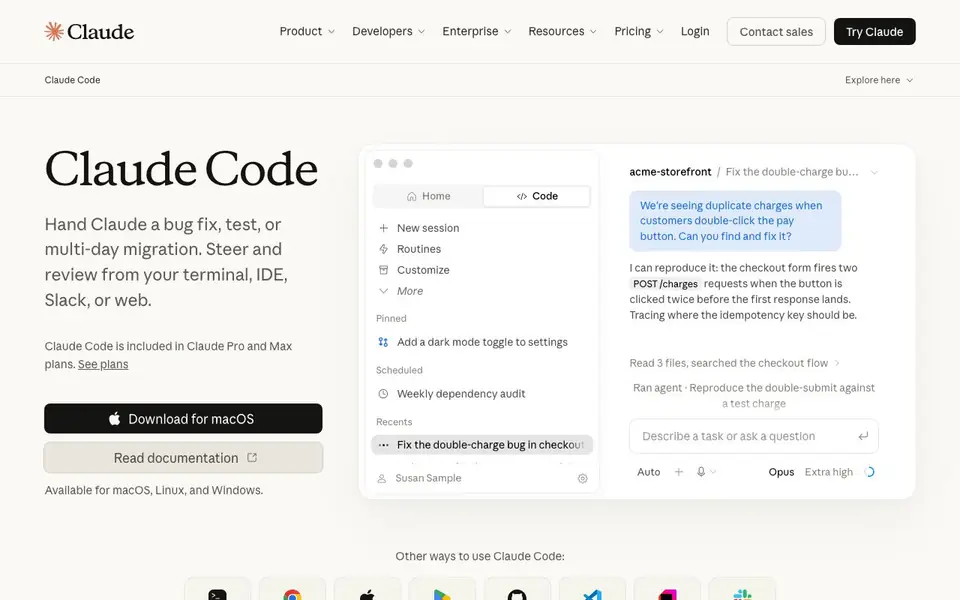
What is Claude Code?
Claude Code is Anthropic's agentic coding tool designed for developers. It works directly in your terminal, IDE, Slack, or web, and can handle tasks like bug fixes, writing tests, and multi-day migrations. You steer and review its work while it builds plans and asks clarifying questions.
To get started, you download it for macOS, Linux, or Windows. You can also use it through other interfaces like VS Code, JetBrains, GitHub, and Slack. Once installed, you give it a task in plain language, such as "fix the double-charge bug in checkout." It reads relevant files, searches your codebase, and runs commands to reproduce issues and implement fixes.
Claude Code is included in Claude Pro and Max plans, which are paid subscriptions. It suits individual developers, teams, and enterprises. the website says features like Projects for grouping sessions, auto mode for longer autonomous work, and self-hosted environments for running sessions on your own infrastructure.
Claude Code features
- Codebase understanding: Reads and analyzes your project structure to explain what it does and how it's organized.
- Bug fixing: Reproduces issues, traces root causes, and edits files to resolve them.
- Test writing: Generates tests for modules and features you specify.
- Multi-day migrations: Handles long-running tasks that span hours or days with planning.
- Multi-interface access: Works from terminal, web, iOS, Android, GitHub, VS Code, JetBrains, and Slack.
What you can do with Claude Code
- Fix a duplicate charge bug in a checkout flow.
- Write tests for a payments module.
- Explain what an unfamiliar repository does.
- Migrate code from one framework or structure to another.
How to get started with Claude Code
- Download Claude Code for macOS, Linux, or Windows from the website.
- Install it using the provided curl command or read the documentation.
- Start a session and give it a task in plain language, like fixing a bug or explaining a codebase.
Tips for better results with Claude Code
- Start with a specific task like "fix the double-charge bug in checkout" so Claude Code can reproduce the issue and trace the root cause efficiently.
- Review each file Claude Code edits and run its suggested tests yourself, since you steer and approve the work it proposes.
- Use Claude Code's Projects feature to group related sessions, making it easier to supervise multiple agents working on the same codebase.
- Break multi-day migrations into smaller, clearly defined steps and check in regularly, as Claude Code plans long tasks but needs your guidance.
- checks
Claude Code pricing
Claude Code is a paid product. Check claude.com for current plans and whether a demo or trial is offered.
What to check before you rely on Claude Code
- Check your Claude Pro or Max plan's usage limits before starting large tasks, as the website says limits apply but does not specify them.
- Verify that your operating system is supported, since Claude Code works on macOS, Linux, and Windows, but the website does not list other platforms.
- Confirm that your codebase size fits your plan, as the website suggests Pro suits small codebases and Max suits larger ones, but gives no exact thresholds.
Who Claude Code is for
Claude Code suits developers, software engineers and tech teams. If that is not you, the AI coding tools below may fit better.
Similar tools compared with Claude Code
| Tool | What it is | Pricing |
|---|---|---|
| Claude Code | AI coding agent for terminal and IDE | Paid |
| Tabnine | Agentic quality engineering platform for AI code | See website |
| CodeRabbit | AI pull request reviewer and prioritizer | Free trial |
| Cursor | AI coding agent for ambitious software | See website |
| Devin | Autonomous AI software engineer | See website |
Claude Code FAQ
What is Claude Code?
Claude Code is an AI coding agent by Anthropic. It understands your codebase, edits files, and runs commands to help with tasks like bug fixes, tests, and migrations. You can use it from your terminal, IDE, Slack, or web.
How much does Claude Code cost?
Claude Code is included in Claude Pro and Max plans, which are paid subscriptions. Pro costs $18 per month with annual billing or $22 monthly. Max plans start at $110 per month. There is no free plan mentioned.
Who is Claude Code for?
Claude Code is for developers and software engineers. It suits individuals doing short coding sprints, teams working on larger codebases, and power users who need extensive access to Claude models. Team and Enterprise options are also available.
What can I build or connect with Claude Code?
You can use Claude Code in your terminal, web browser, iOS, Android, GitHub, VS Code, JetBrains, and Slack. It works on macOS, Linux, and Windows. The website does not list specific integrations beyond these interfaces.
Does Claude Code work on Windows or only on Mac and Linux?
Claude Code is available for macOS, Linux, and Windows. You can download it from the official site and run it directly on any of these operating systems. The website does not mention any limitations for Windows, so you can expect it to work there as well.
Can I use Claude Code on my phone or tablet?
Yes, Claude Code can be used on iOS and Android devices. The website lists iOS and Android as other ways to use Claude Code, so you can access it from your mobile device. This is useful if you need to check on tasks or make quick edits while away from your computer.
What does the free plan include for Claude Code?
Claude Code is not free; it is included in paid Claude Pro and Max plans. The website does not mention a free plan for Claude Code. To use it, you need to subscribe to one of the paid plans, which start at $18 per month with an annual commitment.


