

What is Windsurf?
Devin Desktop is a desktop application that brings together coding agents and a full IDE in one place. You can manage fleets of local and cloud agents from a single surface, so you don't have to switch between different tools. It lets you plan, delegate, review, and ship work without leaving your editor.
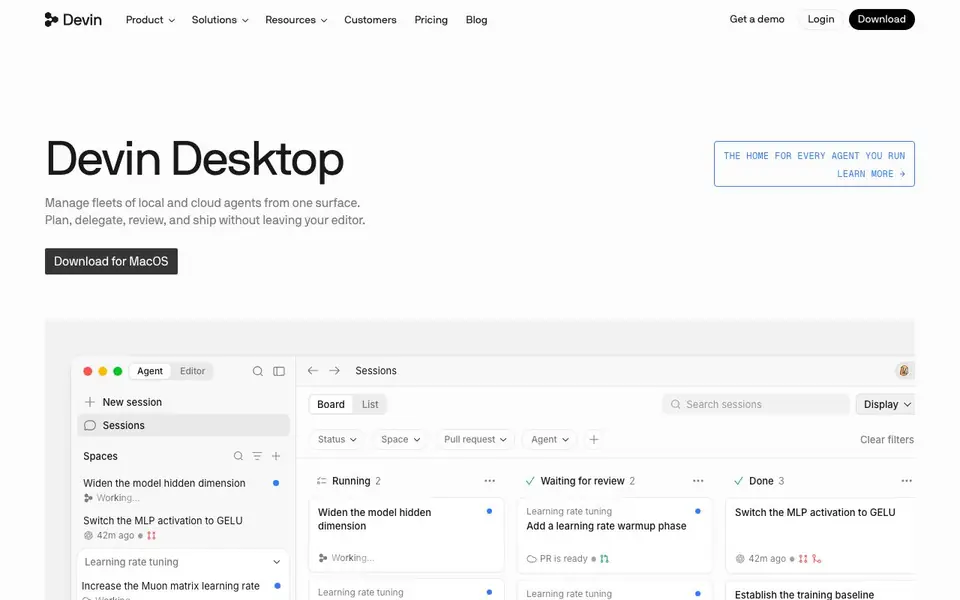
You start by deciding what to build. Your agents then write the code, chase edge cases, and test details. The built-in IDE includes syntax highlighting, autocomplete, and debugging tools, so you can read, trace, and debug every change your agents ship. A session board shows running tasks, pull requests, and completed work.
The app supports multiple agents and models through the Agent Client Protocol (ACP). You can work with agents like Devin Cloud, Devin Local, Codex, Claude Agent, OpenCode, and Cascade. It is designed for engineers who want a team of agents working alongside them. The website mentions a Cognition Platform for enterprise, but does not state pricing details.
Windsurf features
- Agent fleet management: Oversee local and cloud agents from one unified desktop surface.
- Full IDE included: Read, trace, and debug code with syntax highlighting and autocomplete.
- Session board: Track running tasks, pull requests, and completed work in a visual list.
- Multi-agent support: Work with Devin, Codex, Claude Agent, OpenCode, and Cascade via ACP.
- Task delegation: Assign coding tasks and let agents write code, test, and handle edge cases.
What you can do with Windsurf
- Plan a coding task and delegate it to an agent for implementation.
- Review pull requests and agent changes directly in the built-in IDE.
- Debug code by tracing agent-shipped changes with IDE tools.
- Manage multiple coding agents and their sessions from one board.
How to get started with Windsurf
- Download Devin Desktop for macOS from the website.
- Connect your preferred coding agents and models via the Agent Client Protocol.
- Start a new session, plan a task, and delegate it to an agent.
Tips for better results with Windsurf
- Start each session by writing a clear task description in the session board, then delegate it to an agent so the work is tracked and reviewable from one place.
- Use the built-in IDE to trace and debug every change Windsurf ships, rather than trusting agent output blindly, since you can read the exact code modifications.
- Review pull requests directly in Windsurf's session board before merging, so you catch edge cases the agent may have missed and keep the workflow in one surface.
- Run multiple agents in parallel for independent tasks, then use the session board to monitor their status and prioritize which pull requests to review first.
Windsurf pricing
Windsurf’s homepage does not list prices. Check devin.ai for current plans.
What to check before you rely on Windsurf
- Check whether the free plan or trial includes cloud agents, since the website lists features but does not state any pricing or plan limits.
- Verify which operating systems Windsurf supports beyond macOS, as the download button only mentions MacOS and the site does not list others.
- Confirm how your code and session data are handled, because the website does not state data privacy or security policies for local or cloud agents.
Who Windsurf is for
Windsurf suits software engineers, developer teams and coding agent users. If that is not you, the AI coding tools below may fit better.
Similar tools compared with Windsurf
| Tool | What it is | Pricing |
|---|---|---|
| Windsurf | Desktop hub for coding agents | See website |
| Tabnine | Agentic quality engineering platform for AI code | See website |
| CodeRabbit | AI pull request reviewer and prioritizer | Free trial |
| Cursor | AI coding agent for ambitious software | See website |
| Claude Code | AI coding agent for terminal and IDE | Paid |
Windsurf FAQ
What is Devin Desktop?
Devin Desktop is a desktop app that combines coding agents with a full IDE. You can manage local and cloud agents, plan tasks, review their work, and ship code without leaving the editor.
Which coding agents does it support?
The website lists support for Devin Cloud, Devin Local, Codex, Claude Agent, OpenCode, and Cascade. It works across models and agents using the Agent Client Protocol (ACP).
Is Devin Desktop free?
The website does not state pricing details. It mentions a Cognition Platform for enterprise and a pricing page, but specific costs are not listed.
Who is Devin Desktop for?
It is for engineers who want to work with coding agents. The site says it provides 'a team of agents for every engineer' and includes enterprise options for larger teams.
Does Windsurf require an account to use?
The Windsurf website does not state whether an account is required to use the app. To get accurate information, check the official Windsurf documentation or contact their support team directly.
What operating systems does Windsurf support?
The Windsurf website mentions a download for macOS, but it does not list other supported operating systems. For the full list of compatible platforms, check the official Windsurf download page or release notes.
Can Windsurf export or connect to external tools?
The Windsurf website does not mention specific export options or integrations with external tools. It focuses on managing coding agents and the built-in IDE. For details on integrations, check the official Windsurf documentation or contact support.


