

What is Cursor?
Cursor is an AI-powered coding agent designed to help you build ambitious software. It integrates into your development workflow, appearing in your IDE, terminal, Slack, and GitHub. You can hand off tasks like building features or fixing bugs, and Cursor works autonomously to complete them.
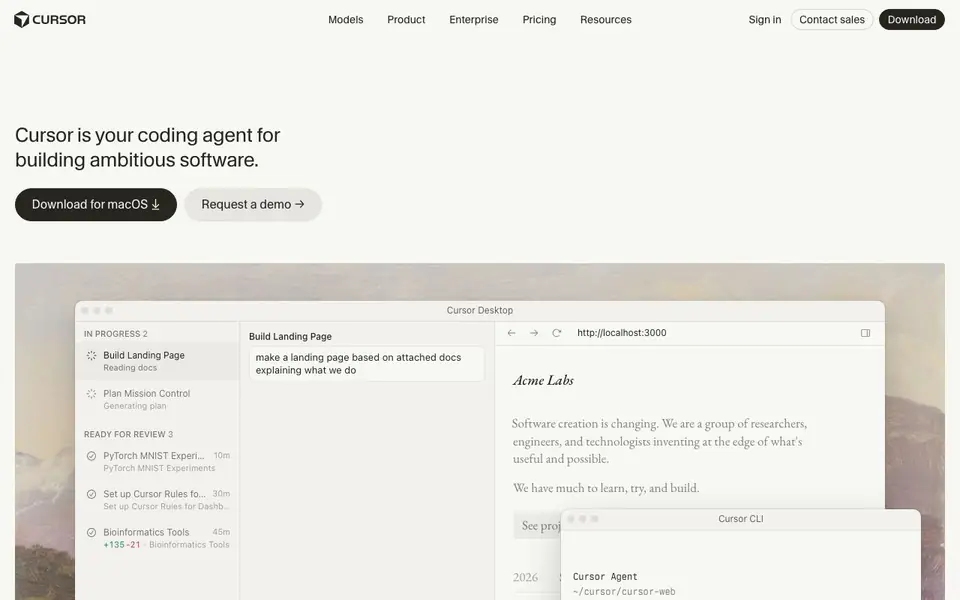
You start by describing a task in plain language, such as "build a landing page based on attached docs." Cursor plans the work, generates code, and can even run tests and demos for you to review. It uses its own cloud environment to build, test, and demo features end to end, so you can focus on higher-level decisions.
Cursor suits developers and teams who want to speed up coding. It offers features like context-aware completions, semantic search, and multi-agent collaboration. The website mentions secure codebase indexing and reinforcement learning as part of its research. Pricing details are not listed on the homepage, so you may need to check their pricing page or contact sales.
Cursor features
- Agentic coding: Hand off tasks to Cursor and it works autonomously to build, test, and demo features.
- IDE integration: Use Cursor directly in your code editor for AI-powered assistance.
- Terminal CLI: Run Cursor from your terminal to get command-line assistance.
- Slack collaboration: Interact with Cursor in Slack for team communication and task delegation.
- GitHub PR review: Cursor can review pull requests in GitHub to help maintain code quality.
What you can do with Cursor
- Build a landing page from attached documentation.
- Implement a new algorithm like Gotoh's for sequence alignment.
- Create an interactive dashboard with realtime charts.
- Add a multiplayer mode to an existing app.
How to get started with Cursor
- Download Cursor for macOS from the website.
- Install the CLI using the provided curl command.
- Start a task by describing what you want to build or fix.
Tips for better results with Cursor
- Start with a detailed, plain-language task description in Cursor, including any attached docs or files, so it can plan and generate code that matches your intent.
- Use Cursor's GitHub PR review feature to catch issues early, and review its generated demos and tests before merging changes into your main codebase.
- Break large features into smaller tasks when using Cursor, like adding a single algorithm or dashboard chart, to make its autonomous work easier to verify and adjust.
- Explore Cursor's Slack and terminal integrations to delegate quick fixes or questions without switching contexts, keeping your team's workflow in one place.
Cursor pricing
Cursor’s homepage does not list prices. Check cursor.com for current plans.
What to check before you rely on Cursor
- Check the pricing page or contact sales for plan costs, since the homepage does not list any pricing details for Cursor.
- Verify what data your code and prompts are used for, as the website mentions secure indexing but does not state specific data retention policies.
- Confirm which IDEs, operating systems, and cloud environments Cursor supports, since the homepage does not list system requirements or export formats.
Who Cursor is for
Cursor suits developers, software teams and engineering managers. If that is not you, the AI coding tools below may fit better.
Similar tools compared with Cursor
| Tool | What it is | Pricing |
|---|---|---|
| Cursor | AI coding agent for ambitious software | See website |
| Tabnine | Agentic quality engineering platform for AI code | See website |
| CodeRabbit | AI pull request reviewer and prioritizer | Free trial |
| Claude Code | AI coding agent for terminal and IDE | Paid |
| Devin | Autonomous AI software engineer | See website |
Cursor FAQ
What is Cursor?
Cursor is an AI coding agent that helps you build software. It can turn ideas into code, work autonomously on tasks, and integrate with your IDE, terminal, Slack, and GitHub.
How does Cursor work?
You describe a task in plain language, and Cursor plans, writes code, and can test and demo the result. It runs in parallel and uses its own cloud environment to complete tasks end to end.
Is Cursor free?
The homepage does not state pricing. You can check the pricing page on cursor.com or contact sales for details.
Who is Cursor for?
Cursor is for developers and teams building software. It helps accelerate development by handling coding tasks, so you can focus on decisions and review.
What platforms or devices does Cursor run on?
Cursor is available for macOS, and the website also mentions a CLI for terminal use. The homepage does not list other operating systems like Windows or Linux, so check the download section or contact support if you need those versions. Cursor Desktop and Cursor CLI are the two interfaces shown.
Can Cursor connect to my existing Slack or GitHub accounts?
Yes, Cursor integrates with Slack for team collaboration and with GitHub for pull request reviews. You can interact with Cursor in Slack to delegate tasks, and it can review PRs to help maintain code quality. The website does not specify setup steps, so check the docs or contact sales for details.
Does Cursor require an account or subscription to use?
The homepage does not mention account requirements or pricing details. It offers a download for macOS and a request demo option, but free or paid plans are not listed. To know if you need an account or what the free plan includes, visit the pricing page or contact sales directly.


