

What is CodeRabbit?
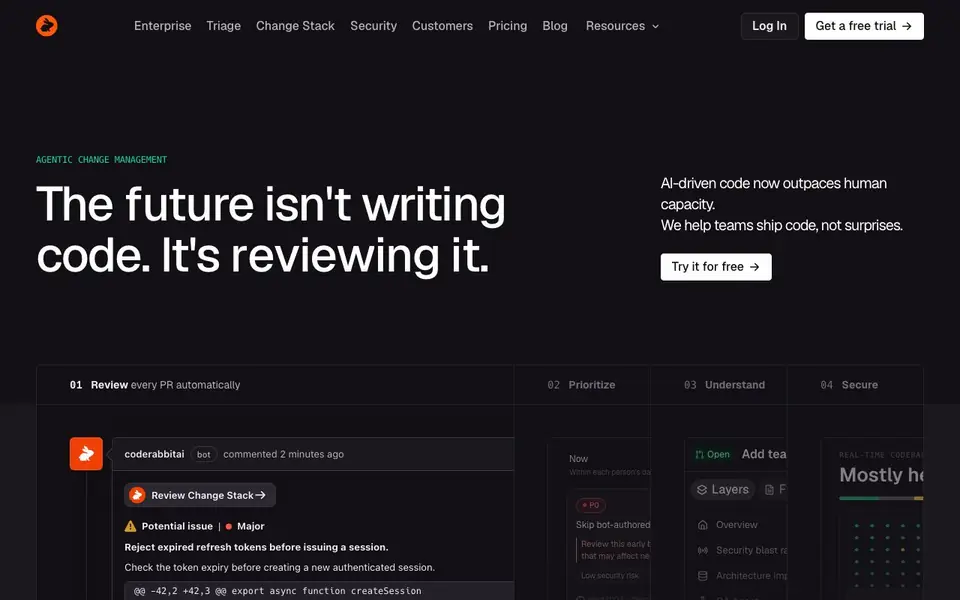
CodeRabbit is an AI-first pull request reviewer. It scans every PR automatically and gives context-aware feedback. You get line-by-line suggestions that you can commit directly. It also flags potential issues and security risks before you merge.
After a PR lands, CodeRabbit helps you triage. It ranks open reviews by priority within your daily capacity. You can see which PRs need attention first and why. It also shows the security blast radius and architecture impact of changes, so you understand the consequences of merging.
CodeRabbit also monitors real-time codebase health. It scans every PR for dependency vulnerabilities and shows fixes when ready. It is trusted by large teams like NVIDIA, Swiggy, Visma, Trivago, Clerk, and Task Rabbit. You can start with a free trial from the website.
CodeRabbit features
- Automated PR reviews: Every pull request gets a full AI review with comments and suggestions.
- Committable suggestions: Apply line-by-line code fixes directly from the review comments.
- Priority triage: Open reviews are ranked by importance within your daily review capacity.
- Security scanning: Dependency vulnerabilities are detected on every PR with ready fixes.
- Change stack support: Reviews and prioritizes stacked PRs to reduce rework and assumptions.
What you can do with CodeRabbit
- Review every pull request automatically before merging.
- Prioritize which PRs to review first based on impact and risk.
- Identify and fix dependency vulnerabilities in your codebase.
- Understand the security blast radius of a proposed change.
How to get started with CodeRabbit
- Sign up for a free trial on CodeRabbit's website.
- Install the CodeRabbit bot on your GitHub or GitLab repository.
- Open a pull request and let CodeRabbit review it automatically.
Tips for better results with CodeRabbit
- Enable CodeRabbit on your repository and let it review every pull request automatically, then read the line-by-line comments to catch issues before you merge.
- Use CodeRabbit's committable suggestions to apply fixes directly from review comments, saving time on routine changes like token expiry checks.
- Check the priority triage view in CodeRabbit daily to see which PRs need attention first, ranked by impact and risk within your capacity.
- Review the security blast radius and architecture impact sections in CodeRabbit to understand consequences of merging before you approve any change.
CodeRabbit pricing
CodeRabbit offers a free trial before you pay. Check coderabbit.ai for current plans.
What to check before you rely on CodeRabbit
- Verify what the free trial includes and whether it limits the number of PRs or users, since the website does not state these details.
- Confirm how CodeRabbit handles your code data and privacy, as the website does not mention data retention or security certifications.
- Check if CodeRabbit supports your version control platform and workflow, since the website only shows examples and does not list all integrations.
Who CodeRabbit is for
CodeRabbit suits software engineers, engineering managers, devops teams and security teams. If that is not you, the AI coding tools below may fit better.
Similar tools compared with CodeRabbit
| Tool | What it is | Pricing |
|---|---|---|
| CodeRabbit | AI pull request reviewer and prioritizer | Free trial |
| Tabnine | Agentic quality engineering platform for AI code | See website |
| Cursor | AI coding agent for ambitious software | See website |
| Claude Code | AI coding agent for terminal and IDE | Paid |
| Devin | Autonomous AI software engineer | See website |
CodeRabbit FAQ
What does CodeRabbit do?
CodeRabbit is an AI code review tool. It automatically reviews every pull request, gives line-by-line suggestions, flags potential issues, and helps you prioritize which PRs to review first.
Does CodeRabbit have a free plan?
The website offers a free trial. You can try it before committing to a paid plan. Pricing details are on the Pricing page.
Who is CodeRabbit for?
It is for development teams that want to validate AI-generated code and human code faster. Large companies like NVIDIA, Swiggy, Visma, and Trivago use it.
What can I connect CodeRabbit to?
It works with GitHub and GitLab. The website says it is the most installed AI app on both platforms. You can install it as a bot on your repositories.
What does CodeRabbit's free trial include?
CodeRabbit offers a free trial that you can start from the website. The trial lets you use CodeRabbit's core features, such as automated PR reviews and security scanning, without paying upfront. For specific limits or duration, check the pricing page or contact CodeRabbit directly.
Does CodeRabbit run on my local machine or in the cloud?
CodeRabbit is a cloud-based service that integrates with your code repositories. You don't install it locally; you connect it to your version control system, and it automatically reviews pull requests. For supported platforms and setup details, visit the CodeRabbit website.
Can CodeRabbit export review reports or integrate with other tools?
CodeRabbit's website mentions integrations for connecting to your code repositories and managing reviews. It does not specify export options for reports or additional integrations beyond what's listed. For detailed information, check the integrations or documentation sections on the CodeRabbit website.


