

What is Devin?
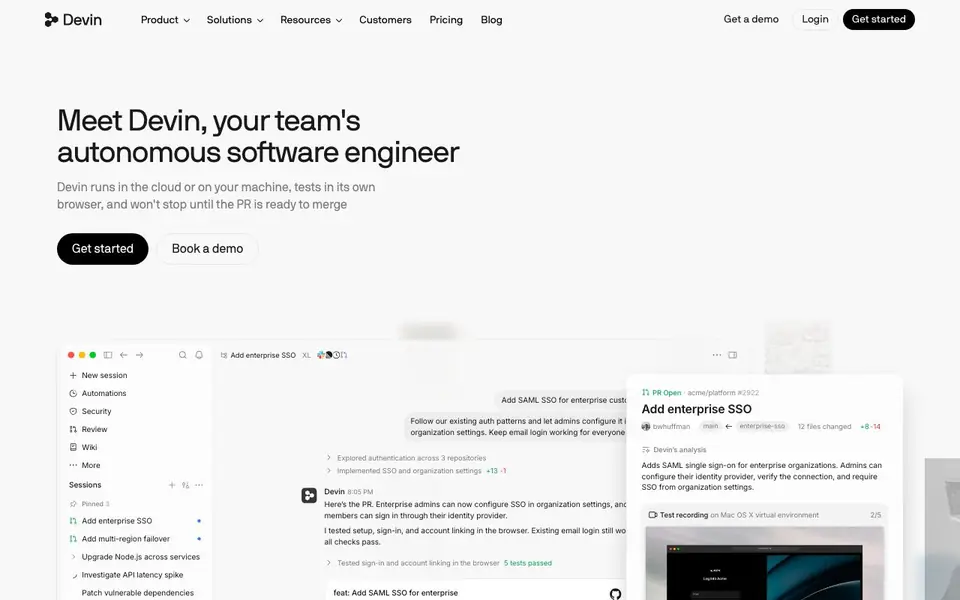
Devin is an AI coding agent that acts like an autonomous software engineer on your team. It runs in the cloud or on your machine, spins up its own virtual machines, and works until a pull request is ready to merge. You can delegate big tasks, and Devin splits them across parallel cloud agents, manages them, and reports back.
To get started, you create a session and describe what you want—like fixing a bug, adding a feature, or running a security scan. Devin explores your repositories, writes code, tests it in its own browser, and records itself clicking through what it built. It can also join threads when you tag @Devin in Slack or Teams, read follow-ups, and keep working even when your laptop is closed.
Devin suits engineering teams that want to offload routine coding work, from dependency upgrades to test coverage. It supports multiple models and a Fusion mode that mixes frontier models for cost efficiency. The site mentions features like Automations, Security, Review, and Wiki, but does not state specific pricing or free plan details—check the Pricing page for that.
Devin features
- Autonomous sessions: Describe a task and Devin plans, codes, tests, and opens a PR without stopping.
- Parallel cloud agents: Split large tasks across multiple agents that run in the cloud and report back.
- Own virtual machines: Spins up Windows, Mac, or Linux VMs to build and test in a real browser.
- Slack and Teams integration: Tag @Devin in a thread and it reads context, responds, and starts work.
- Model flexibility: Choose from models like Fusion, Ultra, Normal, or Lite to balance cost and performance.
What you can do with Devin
- Fix failing checkout tests and open a pull request with regression tests.
- Upgrade dependencies like React or Next.js across your services automatically.
- Investigate API latency spikes and patch vulnerable dependencies.
- Document service architecture or refactor code while preserving behavior.
How to get started with Devin
- Sign up or log in to Devin and create a new session.
- Describe your task, like fixing a bug or adding a feature, and let Devin explore your repos.
- Review the PR Devin opens, check the test recordings, and merge when ready.
Tips for better results with Devin
- Start with a clear, single task like fixing a bug or adding a feature, and describe the expected outcome in detail so Devin can plan and execute without ambiguity.
- Use Devin's model selection to match task complexity: pick Fusion for hard problems, Lite for routine work, and adjust effort levels to balance speed and cost.
- Tag @Devin in Slack or Teams threads to give follow-up context, and let it keep working while you close your laptop for long-running tasks like dependency upgrades.
- Review Devin's test recordings and PR summaries before merging, and iterate by asking it to address specific feedback or add more tests in the same session.
Devin pricing
Devin’s homepage does not list prices. Check devin.ai for current plans.
What to check before you rely on Devin
- Check the Pricing page for plan limits and costs, as the website does not state specific pricing or free plan details.
- Verify data and privacy policies for your code and repositories, since Devin runs in the cloud and spins up virtual machines.
- Confirm which platforms and integrations you need, like Slack or Teams, and whether export formats for results meet your workflow.
Who Devin is for
Devin suits software engineers, engineering teams and devops teams. If that is not you, the AI coding tools below may fit better.
Similar tools compared with Devin
| Tool | What it is | Pricing |
|---|---|---|
| Devin | Autonomous AI software engineer | See website |
| Tabnine | Agentic quality engineering platform for AI code | See website |
| CodeRabbit | AI pull request reviewer and prioritizer | Free trial |
| Cursor | AI coding agent for ambitious software | See website |
| Claude Code | AI coding agent for terminal and IDE | Paid |
Devin FAQ
What can Devin do for me?
Devin can plan and implement features, fix bugs, run security scans, upgrade dependencies, and write tests. It works autonomously until a pull request is ready, and it can manage parallel tasks across cloud agents.
Does Devin work with my existing tools like Slack or Teams?
Yes, you can tag @Devin in Slack or Teams threads. Devin reads the conversation, responds to follow-ups, and starts working on the task directly from the thread.
How does Devin test what it builds?
Devin spins up its own virtual machines—Windows, Mac, or Linux—and tests in a real browser. It records itself clicking through the app and runs tests to verify everything works before opening a PR.
Is there a free plan or trial?
The website does not state specific pricing or a free plan. It has a Pricing page and a 'Get a demo' option, so you should check there for current plans and any trial availability.
What can Devin export or connect to besides Slack and Teams?
Devin can open pull requests on your repositories and integrates with Slack and Teams for tagging. The website does not mention other export or connection options, such as Jira or GitHub Actions. For the latest integrations, check the Devin documentation or contact support.
Does Devin run on my local machine or only in the cloud?
Devin runs in the cloud or on your machine, as stated on the site. It can spin up virtual machines for testing, but you can also run it locally. The website does not specify system requirements, so check the setup guide for details.
What does the free plan for Devin include?
The website does not mention a free plan or trial. It only shows a 'Get started' button and a 'Pricing' page, but the pricing details are not listed. To know if a free tier exists, visit the Pricing page or contact the Devin team directly.


