

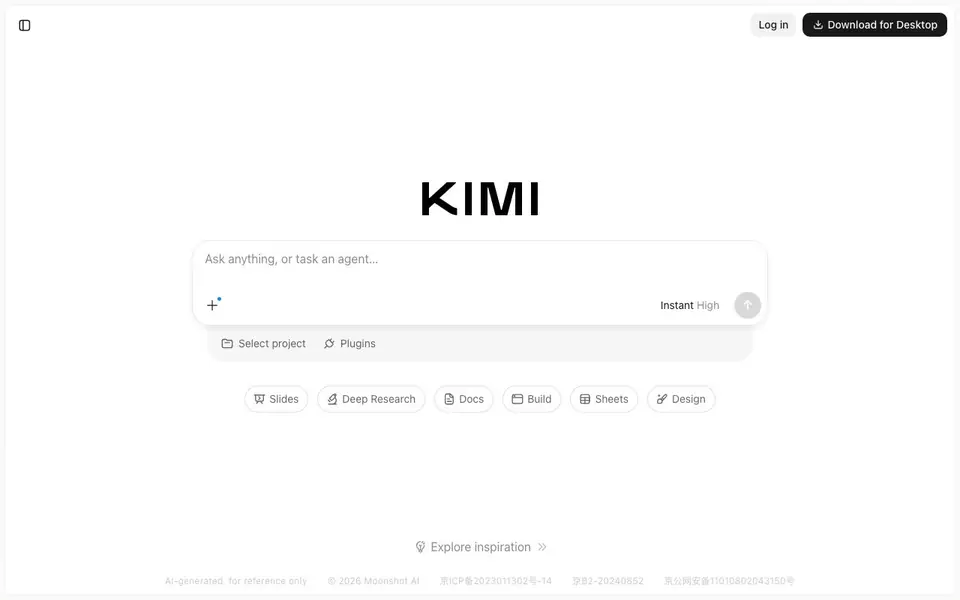
What is Kimi?
Kimi is an AI assistant built for agentic coding and knowledge work. It can help you build playable multiplayer and 3D games, create consulting-grade slides, and run parallel tasks using features like Swarm and Goal. You can start a new chat, use plugins, schedule tasks, and get inspiration for your projects.
To use Kimi, you start a new chat and ask anything or task an agent. You can choose between Instant and High modes, select a project, and use plugins for Slides, Deep Research, Docs, Build, Sheets, and Design. You can also explore inspiration to see what others have created.
Kimi suits developers, knowledge workers, and anyone who wants to get more done with AI. The website does not mention specific limits, but it offers a desktop app and requires login to sync chat history. It is created by Moonshot AI.
Kimi features
- Agentic coding: Build games and software with AI assistance.
- Slide creation: Make consulting-grade presentations quickly.
- Parallel tasks: Run multiple tasks at once with Swarm and Goal.
- Deep Research: Get in-depth answers and insights.
- Plugins: Use tools for Docs, Build, Sheets, and Design.
What you can do with Kimi
- Create a playable multiplayer game from a prompt.
- Generate a professional slide deck for a client meeting.
- Run several research tasks simultaneously to save time.
- Build a web app or design a sheet with AI help.
How to get started with Kimi
- Go to Kimi's website and start a new chat.
- Type your request or task an agent with a specific goal.
- Choose a mode like Instant or High, and use plugins as needed.
Tips for better results with Kimi
- Start with a specific prompt that names your goal, like a playable multiplayer game or a client-ready slide deck, so Kimi knows exactly what to build.
- Use Kimi's High mode for complex tasks like agentic coding or deep research, and reserve Instant mode for quick questions or simple drafts.
- Combine Kimi's plugins, such as Build and Slides, with parallel tasks via Swarm or Goal to tackle multiple project parts in one session.
- Explore Kimi's Inspiration section before starting to see proven prompts and workflows, then adapt them to your own project needs.
Kimi pricing
Kimi’s homepage does not list prices. Check kimi.com for current plans.
What to check before you rely on Kimi
- Check whether Kimi's free plan or paid tiers have task limits, since the website does not state any specific usage caps.
- Verify if your chat history syncs across devices without logging in, as the site requires login for sync and offers a desktop app.
- Confirm what export formats Kimi supports for slides, docs, or code, because the website does not list them explicitly.
Who Kimi is for
Kimi suits developers, knowledge workers, students and professionals. If that is not you, the AI chatbots below may fit better.
Similar tools compared with Kimi
| Tool | What it is | Pricing |
|---|---|---|
| Kimi | AI assistant for coding and knowledge work | See website |
| SiChatApp | Free browser chat with multiple AI models | Freemium |
| ChatGPT | AI chatbot for chat, work, and creation | Freemium |
| Gemini | AI assistant for chat and tasks | Freemium |
| Claude | AI assistant for writing, coding, and analysis | Freemium |
Kimi FAQ
What can Kimi do?
Kimi is an AI assistant for coding and knowledge work. You can build games, create slides, run deep research, and use plugins for docs, sheets, and design. It also supports running parallel tasks with agents.
Is Kimi free to use?
The website does not state pricing details. You can log in and download the desktop app, but it doesn't mention a free plan or paid tiers. Check the site's pricing or login page for more information.
Who is Kimi for?
Kimi is for developers, knowledge workers, and anyone who wants to get more done with AI. It's especially useful for building software, creating presentations, and handling research tasks.
What integrations or plugins does Kimi offer?
Kimi includes plugins for Slides, Deep Research, Docs, Build, Sheets, and Design. You can also use features like Swarm and Goal to run parallel tasks. The website doesn't list external integrations.
Does Kimi have a desktop app and which platforms does it support?
Yes, Kimi offers a desktop app, as indicated by the 'Download for Desktop' option in the interface. The website does not specify which operating systems are supported, so you should check the download page or Kimi's official site for details on Windows, macOS, or Linux availability.
What can Kimi export or connect to, such as file formats or external services?
Kimi's website does not mention specific export formats or connections to external services. It focuses on features like Slides, Docs, Build, Sheets, and Design plugins, but there is no stated information about exporting files or integrating with other tools. For accurate details, check the app's help section or contact support.
Does Kimi require an account to use, and what happens if I don't log in?
Kimi requires login to sync chat history, as stated in the interface. You can likely start using it without logging in, but your chats may not be saved across sessions. The website does not clarify if an account is mandatory for all features, so check the login prompt or help page for more specifics.


