

What is Grok?
Grok is an AI assistant built by xAI. You can use it for everyday conversations, generating images, writing code, and getting up-to-date answers from the web and X. It's designed to be fast and helpful, whether you're exploring ideas or need quick information.
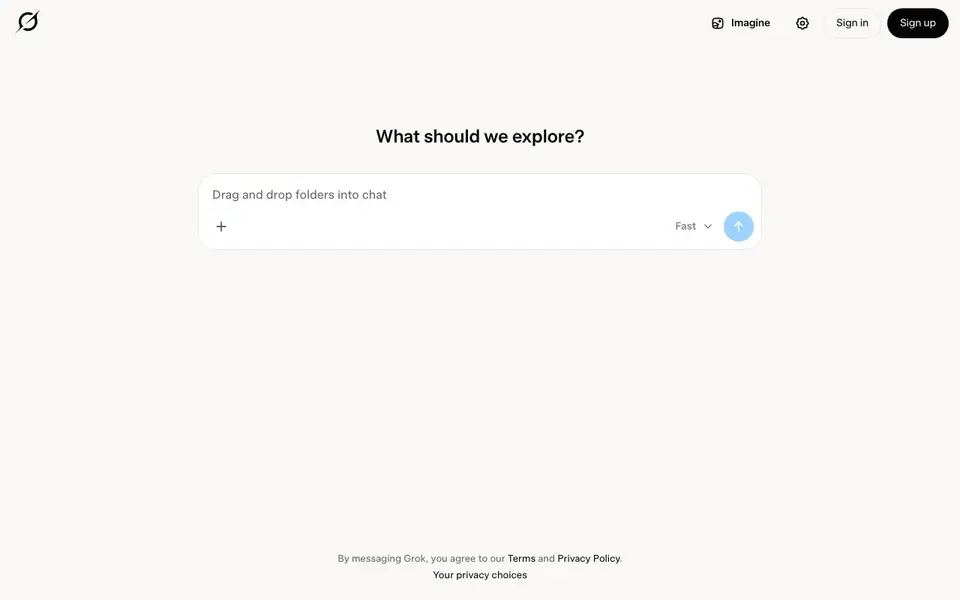
To get started, you simply sign in or sign up on Grok's website. Then you can type your question or request into the chat box. You can even drag and drop folders into the chat, which suggests you can share files for context or analysis. Grok responds directly in the conversation.
Grok suits anyone who wants a versatile AI companion for chat, creative tasks, coding help, or real-time research. The website mentions speed as a key trait. It doesn't specify pricing or detailed limits, so you'll need to check the site for those details.
Grok features
- Real-time answers: Get current information from the web and X directly in your chat.
- Image generation: Create images by describing what you want in the chat.
- Code writing: Ask Grok to write or debug code snippets for you.
- File upload: Drag and drop folders into the chat to share content with Grok.
- Fast responses: The assistant is designed to reply quickly to your queries.
What you can do with Grok
- Ask Grok for the latest news or trending topics on X.
- Generate an image for a social media post or personal project.
- Get help writing a Python script or debugging an error.
- Have a casual conversation or brainstorm ideas with the assistant.
How to get started with Grok
- Go to Grok's website and sign in or create an account.
- Type your question or request into the chat box.
- Optionally drag and drop files or folders into the chat for context.
- Read Grok's response and continue the conversation as needed.
Tips for better results with Grok
- Ask Grok for real-time updates on X or web topics, then follow up with specific questions to refine the answers you get.
- Drag and drop folders into the chat with Grok to share files for context, then ask targeted questions about the contents.
- Describe your desired image in detail to Grok, including style, colors, and composition, to get more accurate visual results.
- Use Grok to debug code by pasting the error message and relevant snippet, then ask for step-by-step fixes or explanations.
Grok pricing
Grok’s homepage does not list prices. Check grok.com for current plans.
What to check before you rely on Grok
- Check the website for pricing details, as Grok's site does not list any plan costs or subscription information.
- Review the Terms and Privacy Policy before sharing sensitive files, since the site does not specify data retention or usage rules.
- Verify what file types and sizes Grok accepts for folder uploads, as the website does not state these limitations.
Who Grok is for
Grok suits general users, developers, creators and researchers. If that is not you, the AI chatbots below may fit better.
Similar tools compared with Grok
| Tool | What it is | Pricing |
|---|---|---|
| Grok | AI assistant for chat, images, code, and web answers | See website |
| SiChatApp | Free browser chat with multiple AI models | Freemium |
| ChatGPT | AI chatbot for chat, work, and creation | Freemium |
| Gemini | AI assistant for chat and tasks | Freemium |
| Kimi | AI assistant for coding and knowledge work | See website |
Grok FAQ
What can Grok do?
Grok is an AI assistant that can chat with you, generate images, write code, and provide real-time answers from the web and X. It's a versatile tool for many tasks.
Is Grok free to use?
The website doesn't state pricing details. You'll need to check Grok's site for information about free plans, trials, or paid tiers.
Who is Grok for?
Grok is for anyone who wants an AI assistant for everyday questions, creative projects, coding help, or staying updated with real-time information from X and the web.
Can I upload files to Grok?
Yes, the website shows that you can drag and drop folders into the chat. This likely lets you share documents or code for Grok to analyze or reference.
Does Grok have a mobile app or desktop app?
The Grok website does not mention a dedicated mobile or desktop app. You can access Grok through its website on any device with a browser. For the latest information about app availability, check the official Grok website or your device's app store.
Can Grok connect to or export to other tools or platforms?
The Grok website does not mention specific integrations or export options beyond using it in the chat. You can copy text or images from the conversation. For details about connecting Grok to other services, check the website's help or FAQ section.
Does Grok require an account to use?
Yes, to use Grok you need to sign in or sign up on the website. The site shows a 'Sign in' and 'Sign up' option, so an account is required. After signing up, you can start chatting and using features like image generation and file upload.


