
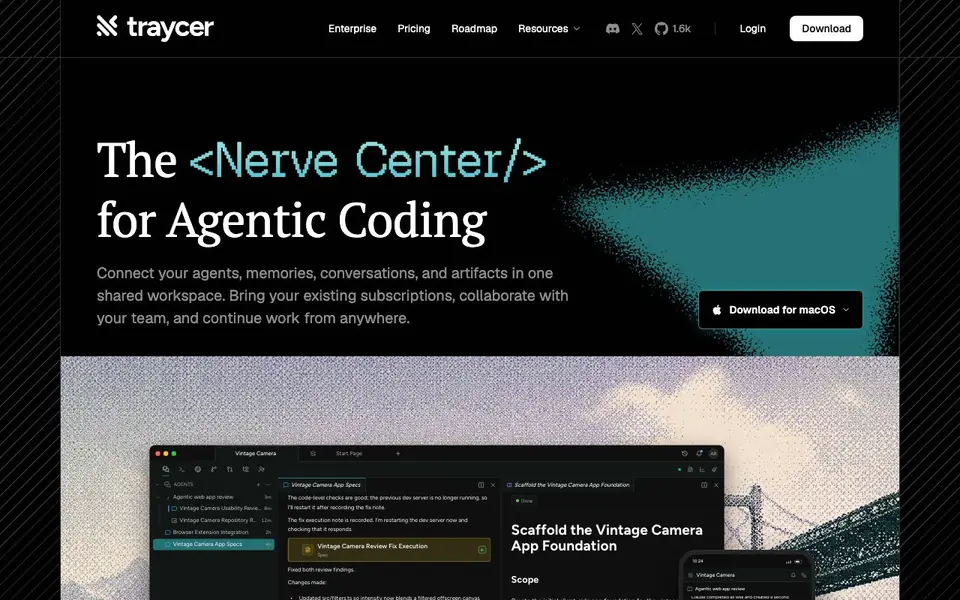
What is Traycer?
Traycer is a desktop application that brings spec-first development to AI coding workflows. It gives you a shared workspace where your AI agents, memories, conversations, and artifacts live together. You can connect your existing subscriptions, collaborate with your team, and continue work from anywhere.
You start by creating a new task, like building a vintage camera web app. Traycer's agent inspects your workspace, writes planning artifacts such as specs and tickets, and then executes them in dependency order. You can review changes, run commands, and unblock agents when they hit prompts. The interface shows agents, artifacts, terminals, browsers, git diffs, pull requests, and a file tree.
Traycer suits developers who want more structure in AI-assisted coding. It helps you plan changes clearly before execution, so you avoid messy guesswork. the website says enterprise options, pricing, and a roadmap, but does not list specific features or costs on the main page.
Traycer features
- Shared workspace: Connect agents, memories, conversations, and artifacts in one place for easy access.
- Spec-first planning: Create product briefs, technical plans, and tickets before writing code.
- Agent orchestration: Dispatch implementation to child agents and review their work in batches.
- Artifact management: Store and organize specs, tickets, and execution notes outside your repo.
- Team collaboration: Share your workspace and continue work from anywhere with your team.
What you can do with Traycer
- Plan a new feature by writing specs and tickets before coding.
- Execute a multi-step implementation with agents in dependency order.
- Review git diffs and pull requests within the same workspace.
- Unblock agents when they hit trust prompts during execution.
How to get started with Traycer
- Download Traycer for macOS from the website.
- Create a new task or connect your existing subscriptions and workspace.
- Let the agent write specs and tickets, then execute them with traycer:execute.
Tips for better results with Traycer
- Start each task by describing the outcome you want, like Traycer's example of a vintage camera app, so the agent can write specs and tickets that match your intent before coding.
- Review the planning artifacts Traycer creates, such as briefs and technical plans, and edit them if needed before letting agents execute, so the implementation follows your priorities.
- Use Traycer's workspace to inspect the file tree and git diffs after agents finish batches, and run commands to verify changes before you merge or share with your team.
- When agents hit prompts during execution, unblock them directly in Traycer by providing answers or clarifications, so the workflow continues without you switching to another tool.
Traycer pricing
Traycer’s homepage does not list prices. Check traycer.ai for current plans.
What to check before you rely on Traycer
- Check whether the website lists pricing or plan limits; it shows an Enterprise option and a Pricing link, but does not state costs or feature tiers on the main page.
- Verify what data Traycer stores in its shared workspace and how it handles your code or conversations, since the site does not detail data privacy or retention policies.
- Confirm which platforms Traycer supports; the download button says macOS, but the site does not specify Windows or Linux versions, so check before relying on it for your OS.
Who Traycer is for
Traycer suits developers, engineering teams and tech leads. If that is not you, the AI coding tools below may fit better.
Similar tools compared with Traycer
| Tool | What it is | Pricing |
|---|---|---|
| Traycer | AI coding workspace for agentic development | See website |
| Tabnine | Agentic quality engineering platform for AI code | See website |
| CodeRabbit | AI pull request reviewer and prioritizer | Free trial |
| Cursor | AI coding agent for ambitious software | See website |
| Claude Code | AI coding agent for terminal and IDE | Paid |
Traycer FAQ
What does Traycer do?
Traycer is a desktop app that gives you a shared workspace for AI coding. It connects your agents, memories, conversations, and artifacts so you can plan changes and execute them with confidence.
Is Traycer free?
The website does not state pricing details on the main page. It mentions 'Pricing' in the navigation, so you can check there for plan options.
Who is Traycer for?
It's for developers and teams who use AI coding agents and want a more structured workflow. You can plan specs, create tickets, and execute tasks in a shared workspace.
What can you build with Traycer?
You can build software projects from scratch, like the vintage camera app example. Traycer helps you create specs and tickets, then implement features step by step with agents.
Does Traycer run on Windows or Linux?
The Traycer website only mentions a download for macOS. It does not list Windows or Linux versions. To see if other platforms are supported, check the Download section on traycer.ai or contact their team.
Can Traycer connect to my existing AI subscriptions like ChatGPT or Claude?
Traycer says you can bring your existing subscriptions into its shared workspace. The website does not specify which ones are supported. For a list of compatible services, check the resources or roadmap pages on traycer.ai.
What does the Traycer free plan include?
The Traycer website does not mention a free plan or its features. Pricing is listed as enterprise options, but specific costs are not shown on the main page. To learn about plan details, visit the pricing page on traycer.ai.


