
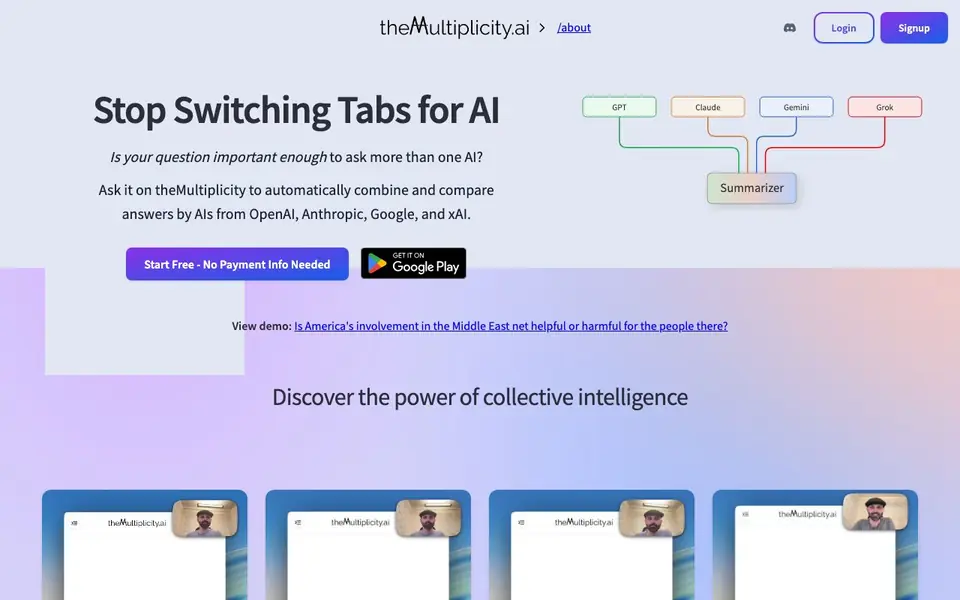
What is theMultiplicity.ai?
theMultiplicity.ai is a chat platform that lets you ask the same question to several leading AI models—like GPT, Claude, Gemini, and Grok—in one place. Instead of switching between browser tabs, you type once and receive a single response that combines all perspectives. The platform automatically summarizes agreements, disagreements, and unique points, so you can quickly see where models align and where they differ.
To use it, you type your question and choose which models to include, or let them respond automatically. The models can see each other's answers, and you can @-call them to build on or challenge ideas. You also get special commands like /rank for comparisons and /estimate for calculations. After the models respond, you get a structured summary with consensus and contrasts, and you can share a room link with your team to collaborate in real time.
This tool is built for people who want thorough, cross-checked answers—especially critical thinkers, researchers, and teams. It helps catch AI hallucinations by showing where models disagree. You can create custom AI variants with system prompts, like a panel of experts. Pricing starts at $5 per month, with a free trial that requires no payment info. The site notes it is thoughtfully built in Berkeley, California.
theMultiplicity.ai features
- Multi-model questioning: Ask one question to GPT, Claude, Gemini, Grok, and more simultaneously.
- Consensus summary: Automatically see agreements, disagreements, and unique points from all models.
- Team collaboration: Share a room link and let colleagues see and contribute to the same AI conversation.
- Specialized commands: Use /rank for comparisons and /estimate for calculations within the chat.
- Custom expert panels: Build AI variants with system prompts, like a room of advisors or specialists.
What you can do with theMultiplicity.ai
- Ask a complex question and compare answers from multiple AI models at once.
- Catch AI hallucinations by seeing where models disagree on a topic.
- Run a team brainstorming session where everyone can interact with the AI panel.
- Use /rank to compare options or /estimate to get quick calculations from multiple models.
How to get started with theMultiplicity.ai
- Go to theMultiplicity.ai and sign up for a free account—no payment info needed.
- Type your question and choose which AI models to ask, or let them respond automatically.
- Review the consensus summary, use /rank or /estimate, and share the room link with your team.
Tips for better results with theMultiplicity.ai
- Ask theMultiplicity.ai the same question to all major models to surface disagreements and catch hallucinations before you rely on the answer.
- Use the /rank command for side-by-side comparisons of options, and /estimate for quick calculations, to get structured results from multiple models at once.
- Create custom AI variants with system prompts to build a panel of experts, then @-call specific models to challenge or build on each other's responses.
- Share a room link with your team so everyone can see the same AI conversation and contribute in real time, making collaboration part of the answer.
- checks
theMultiplicity.ai pricing
theMultiplicity.ai has a free way to start, with paid plans for heavier use. Check themultiplicity.ai for current limits and prices.
What to check before you rely on theMultiplicity.ai
- Check the free trial's limits before starting real work, since the site says no payment info is needed but does not state how many questions or models are included.
- Verify whether the $5 per month plan covers all models or only a subset, as the pricing page does not list exact plan details or feature differences.
- Confirm your data handling and privacy expectations, because the website does not state how your questions or team conversations are stored or used.
Who theMultiplicity.ai is for
theMultiplicity.ai suits critical thinkers, researchers, teams and AI enthusiasts. If that is not you, the AI chatbots below may fit better.
Similar tools compared with theMultiplicity.ai
| Tool | What it is | Pricing |
|---|---|---|
| theMultiplicity.ai | Multi-model AI chat with consensus summaries | Freemium |
| SiChatApp | Free browser chat with multiple AI models | Freemium |
| ChatGPT | AI chatbot for chat, work, and creation | Freemium |
| Gemini | AI assistant for chat and tasks | Freemium |
| Kimi | AI assistant for coding and knowledge work | See website |
theMultiplicity.ai FAQ
How much does it cost?
You can try it once for free, then pay monthly starting at $5. The site says you can increase your subscription only if you need more access, and you can cancel anytime.
Which AI models can I use?
The site mentions access to OpenAI's GPT-5.2, Anthropic's Claude Opus 4.6, Google's Gemini 3 Pro, xAI's Grok 4, and more—all in one place.
Is this really better than using ChatGPT alone?
The site says yes for thoroughness. You get side-by-side comparisons, consensus summaries, and models can cross-check each other, which helps catch hallucinations. It also supports team collaboration.
Can my team collaborate on this?
Yes. You can share a room link with colleagues, and everyone sees the same AI responses and can contribute simultaneously. The site says this is a feature not offered by ChatGPT Teams, Claude Pro, Gemini Advanced, or Grok.
Does theMultiplicity.ai have a mobile app or desktop app?
The theMultiplicity.ai website does not mention a dedicated mobile or desktop app. It appears to be a web-based platform, so you can likely access it through your browser on any device. For the most current information, check the website's features or support pages.
Can I export or integrate theMultiplicity.ai conversations with other tools?
The theMultiplicity.ai website does not mention any export options or integrations with other tools like Slack, Notion, or Google Drive. It focuses on in-platform collaboration through shared room links. For details on possible exports or integrations, check the website's FAQ or contact support.
What does the free plan of theMultiplicity.ai include?
The theMultiplicity.ai website states you can start free with no payment info needed, but it does not specify the exact limits of the free plan. It likely includes basic access to multi-model questions and summaries. For precise details on free plan features, check the pricing page or sign up to see what's included.


