
What is Spec-first?
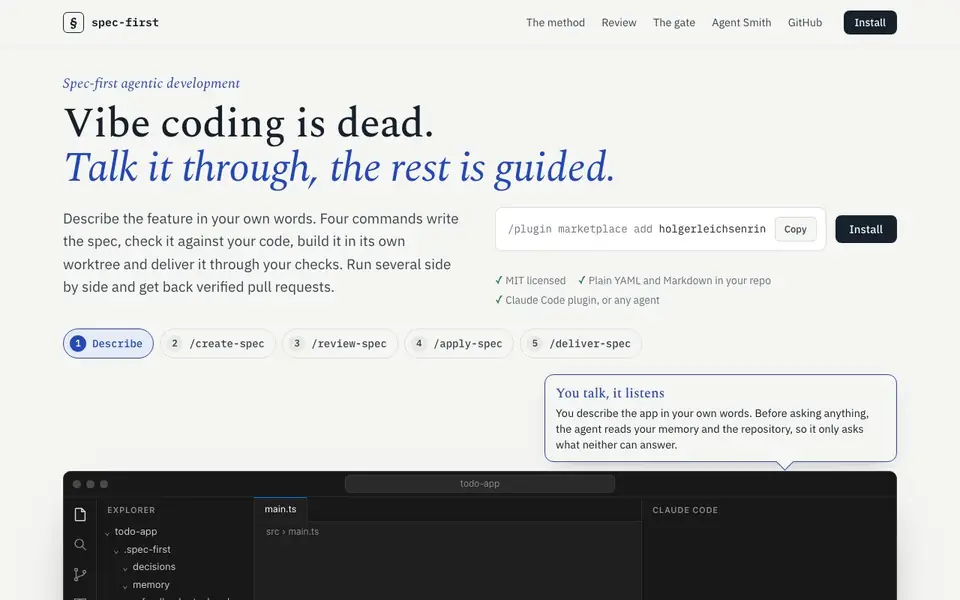
Spec-first is a method and plugin for AI coding agents that replaces unstructured vibe coding with a structured, spec-driven workflow. It helps you describe a feature in your own words, then guides the agent through four commands: create a spec, review it, apply it, and deliver it. Each step leaves a file behind, so the process is transparent and resumable.
You start by describing what you want. The agent reads your repository and memory to avoid asking unnecessary questions. Then /create-spec writes a plan with goals, steps, and done criteria. /review-spec has a fresh reviewer check the spec against your code. /apply-spec builds the feature in its own worktree, and /deliver-spec runs your checks before committing and opening a pull request.
Spec-first is MIT licensed and works as a Claude Code plugin, but it can be used with any agent. It supports running multiple specs in parallel, each in its own branch and worktree. The tool also logs every decision with its alternatives, so the reasoning stays next to the code. It's designed for developers who want more control and verification in AI-assisted coding.
Spec-first features
- Spec creation: /create-spec writes a goal, steps, facts with file references, and done criteria.
- Spec review: /review-spec has a fresh reviewer check the spec against your code before building.
- Isolated worktrees: Each spec gets its own branch and worktree, so you can run several side by side.
- Commit gate: /deliver-spec runs your checks before committing, ensuring only verified code is merged.
- Resumable state: Context is saved in context.yaml, so you can restart and pick up where you left off.
What you can do with Spec-first
- Describe a new feature in your own words and let the agent turn it into a spec.
- Run multiple feature specs in parallel without conflicts, each in its own worktree.
- Review a spec before any code is written to catch mistakes early.
- Deliver a series of specs as one pull request with verified commits.
How to get started with Spec-first
- Install the Spec-first plugin via the marketplace command shown on the website.
- Describe your feature in your own words; the agent reads your repo and memory first.
- Run the four commands: /create-spec, /review-spec, /apply-spec, /deliver-spec.
Tips for better results with Spec-first
- Start by describing your feature in plain words, then run /create-spec to generate a structured plan with goals, steps, and done criteria before any code is written.
- Run /review-spec after creating a spec to have a fresh reviewer check it against your codebase, catching mistakes early and reducing back-and-forth during the build.
- Use /spec-first:deliver-series for larger changes by cutting them into multiple specs, letting Spec-first build independent groups in parallel and open one pull request.
- Keep your repository memory and context files updated, as Spec-first reads them to avoid asking unnecessary questions and to resume work after interruptions.
Spec-first pricing
Spec-first’s homepage does not list prices. Check spec-first.dev for current plans.
What to check before you rely on Spec-first
- Verify your agent supports Spec-first's four commands, since it is a Claude Code plugin but can work with any agent, and confirm the installation method matches your setup.
- Check that your repository has the required.spec-first directory structure and that context.yaml is writable, as Spec-first saves state there for resumability.
- Confirm the commit gate runs your own checks before merging, and review the logged decisions with alternatives to ensure the reasoning aligns with your project's standards.
Who Spec-first is for
Spec-first suits developers, development teams and AI coding agent users. If that is not you, the AI coding tools below may fit better.
Similar tools compared with Spec-first
| Tool | What it is | Pricing |
|---|---|---|
| Spec-first | Spec-driven development workflow for AI agents | See website |
| Tabnine | Agentic quality engineering platform for AI code | See website |
| CodeRabbit | AI pull request reviewer and prioritizer | Free trial |
| Cursor | AI coding agent for ambitious software | See website |
| Claude Code | AI coding agent for terminal and IDE | Paid |
Spec-first FAQ
What is Spec-first?
Spec-first is a method and plugin for AI coding agents that structures development around specs. You describe a feature, and the agent creates a spec, reviews it, builds it in a separate worktree, and delivers it through your checks.
How does Spec-first work with AI agents?
It provides four commands: /create-spec, /review-spec, /apply-spec, and /deliver-spec. Each command handles a step in the workflow, leaving files behind for transparency. It works as a Claude Code plugin but can be used with any agent.
Is Spec-first free?
The website states that Spec-first is MIT licensed, which means the code is open-source and free to use. However, it doesn't mention any paid plans or pricing details, so check the GitHub repository for more information.
Who is Spec-first for?
It's for developers and teams who use AI coding agents and want more control and verification. It's especially useful if you're tired of agents making unverified changes and want a structured, reviewable process.
What file formats does Spec-first use for specs and decisions?
Spec-first stores everything as plain YAML and Markdown files directly in your repository. Specs, decisions, and context are saved in a.spec-first folder, so you can read, edit, and version them like any other code. The website does not mention exporting to other formats.
Which AI coding agents can run Spec-first besides Claude Code?
Spec-first is built as a Claude Code plugin, but the website says it can be used with any agent. It lists Claude Code, Codex, Cursor, and Copilot as compatible tools. You install it via the plugin marketplace command shown on the site, and the workflow commands work the same way.
Does Spec-first require a paid plan or subscription?
Spec-first is MIT licensed, which means the code is free to use and modify. The website does not mention any paid plan, subscription, or pricing tier. You can install it directly from the plugin marketplace without signing up for a separate account. Check the GitHub repository for any future licensing changes.


