
What is Sinicloud?
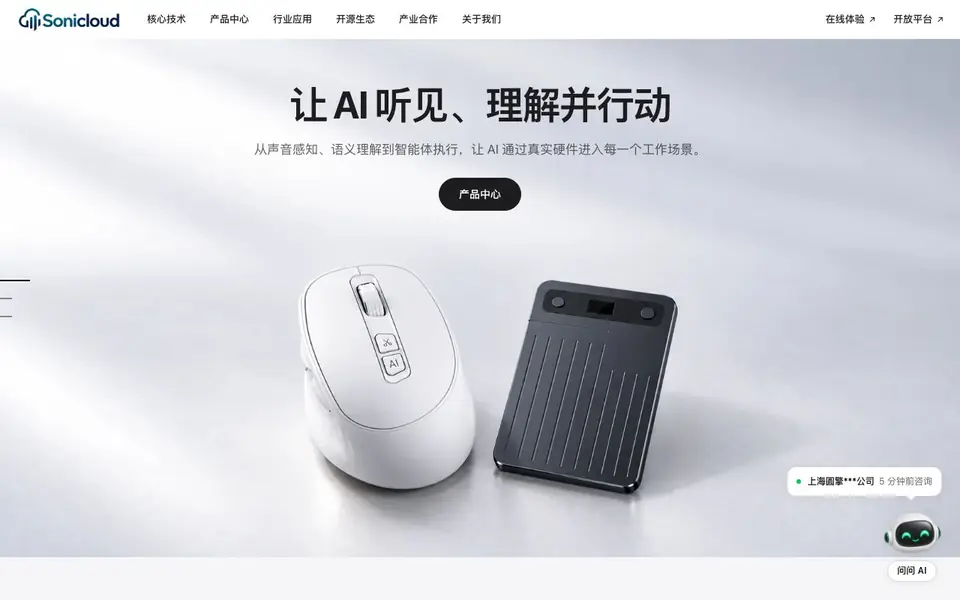
SiniCloud combines AI voice technology with physical devices to capture, understand, and act on spoken language. Their products include an AI mouse, recording card, keyboard, and badge, plus software like SoniNote for transcription and clawMouse for task initiation. The goal is to turn every voice interaction into useful, reusable knowledge.
You start by using a device like the AI mouse or recording card to capture speech. The audio is processed with multilingual speech recognition, translation, and semantic parsing. Then, an AI agent can execute tasks—for example, saying "turn this material into a report outline" triggers a workflow that confirms the plan and shows results. Everything syncs to SoniNote for review.
SiniCloud targets professionals in meetings, interviews, and client visits. It also offers an open platform for developers to integrate voice capabilities, and has served over 1,500 partner companies across 30+ countries. The site mentions hardware adaptation for multiple Bluetooth chips and noise-cancelling microphones for clear capture.
Sinicloud features
- Multilingual speech recognition: Transcribes, translates, and parses meaning from audio in multiple languages.
- BLE SDK: Provides standard tools, interfaces, and engineering examples for building Bluetooth-enabled voice devices.
- Bluetooth chip adaptation: Supports stable connection and transmission across multiple chip platforms.
- Noise-cancelling microphone: Captures clear audio with acoustic enhancement and noise reduction.
- AI mouse with voice key: Press a button to speak a task and initiate an AI workflow that confirms and executes it.
What you can do with Sinicloud
- Record a meeting with the AI recording card and get a searchable transcript and summary.
- Use the AI mouse to turn a spoken instruction into a formatted report outline.
- Capture client conversations on-site and sync them to SoniNote for later review.
- Integrate voice recognition into your own product via the open platform and SDK.
How to get started with Sinicloud
- Choose a hardware device like the AI mouse or recording card that fits your work scenario.
- Press the voice key or start recording to capture your speech or conversation.
- Sync the audio to SoniNote or use the AI agent to process, transcribe, and act on the content.
Tips for better results with Sinicloud
- Use the AI mouse's voice key to state a complete task, like turning material into a report outline, so the agent can confirm and execute the workflow clearly.
- For meetings or client visits, record with the AI recording card and sync to SoniNote, then search the transcript and summary to find specific points quickly.
- Test Sinicloud's multilingual speech recognition with your own audio in different languages to see how accurately it transcribes, translates, and parses meaning for your use case.
- If you build Bluetooth devices, explore Sinicloud's BLE SDK and chip adaptation docs to ensure stable connection and transmission across your target hardware platforms.
- Pair the AI mouse with clawMouse software to initiate tasks hands-free, but verify the workflow plan it proposes before letting it execute on important material.
Sinicloud pricing
Sinicloud’s homepage does not list prices. Check sinicloud.com for current plans.
What to check before you rely on Sinicloud
- Check whether Sinicloud's pricing is listed on the website; it is not stated, so contact the provided business emails or phone numbers for costs.
- Verify which specific Bluetooth chips and operating systems are supported for the AI mouse and recording card, as the site mentions multiple platforms but not a full list.
- Confirm data privacy and storage policies for recordings synced to SoniNote, since the site does not detail how audio is handled, retained, or secured.
- Check if the open platform and SDK require a paid plan or partnership agreement, as the website does not state pricing or access conditions for developers.
- Test export formats from SoniNote, like text or summaries, to ensure they meet your workflow needs, as the site does not specify available file types.
Who Sinicloud is for
Sinicloud suits business professionals, meeting-heavy roles, developers and enterprise teams. If that is not you, the AI voice generators below may fit better.
Similar tools compared with Sinicloud
| Tool | What it is | Pricing |
|---|---|---|
| Sinicloud | AI voice hardware and software suite | See website |
| ElevenLabs | AI voice generator and voice agents platform | Freemium |
| Murf | AI voice and conversational agent platform | See website |
| Resemble AI | AI deepfake detection and watermarking platform | See website |
| Speechify | AI text-to-speech and voice assistant | Freemium |
Sinicloud FAQ
What does SiniCloud do?
SiniCloud makes AI voice hardware and software that capture real-world speech, transcribe it, and let AI agents act on it. Products include an AI mouse, recording card, keyboard, and badge, plus apps like SoniNote.
Is SiniCloud free to use?
The website does not state pricing details. You can check the product pages or contact their sales team for cost information.
Who is SiniCloud for?
It suits professionals who attend many meetings, interviews, or client visits and want to turn spoken content into notes and actions. Developers can also use the open platform to build voice features.
What can I make with SiniCloud?
You can record conversations with the AI recording card and get transcripts and summaries. With the AI mouse, you can speak a task and have it executed, like creating a report outline from a document.
What devices and platforms does SiniCloud support?
SiniCloud works with its own hardware like the AI mouse, recording card, keyboard, and badge, plus software such as SoniNote and clawMouse. The website mentions Bluetooth chip adaptation and a BLE SDK, but it does not list specific operating systems or mobile platforms. Check the product pages or documentation for details.
Can SiniCloud export transcripts or summaries to other apps?
SiniCloud syncs audio and transcripts to SoniNote for review, but the website does not mention exporting to other tools like Word, Notion, or email. If you need a specific export format or integration, check the SoniNote documentation or contact SiniCloud support directly.
Does SiniCloud require an account to use its devices or software?
The SiniCloud website does not state whether an account is required for its devices or software. Typically, syncing to SoniNote and using AI features may need an account, but this is not confirmed. Check the sign-up or login options on the site or contact support for clarification.


