

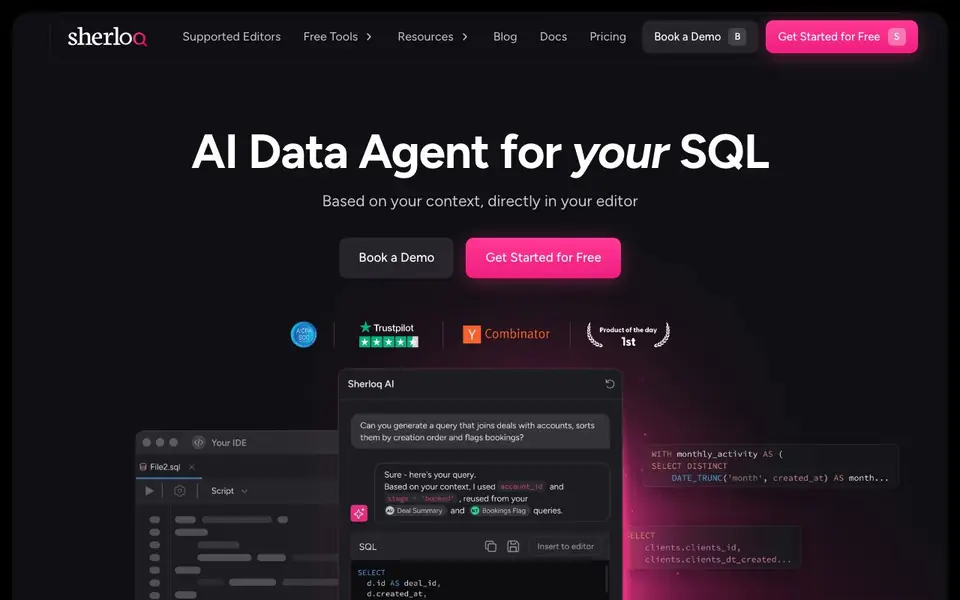
What is Sherloq?
Sherloq is an AI data agent that works inside your editor, like a Chrome extension or IntelliJ plugin. It learns from your own SQL queries, so the AI suggestions are based on your actual work, not generic examples. You can chat with it to generate new SQL, fix syntax errors, extract logic, modify existing queries, write correct JOINs, and find the right tables and fields.
Getting started is quick. You download the extension or plugin, and Sherloq imports your existing SQL from wherever it lives. You can save and manage queries from your editor, organize them into folders, and create versions of your queries. Permissions let you control who sees and edits each folder, and you can share with specific people or teams.
Sherloq suits data analysts and teams who want a central, AI-ready SQL repository. It works as a plugin, so no extra integrations are needed. The website mentions SOC2 compliance, SSO support, and on-prem options for Enterprise plans. It also offers free tools like an AI SQL syntax validator and SQL formatter.
Sherloq features
- Context-aware SQL chat: AI answers based on your own saved queries, not generic code.
- SQL generation and fixes: Generate new SQL, fix syntax, and modify existing queries.
- Query repository: Save, organize, and import SQL queries from your editor or elsewhere.
- Version control: Create versions of your queries without complex code processes.
- Team permissions: Control who views or edits folders and share with specific people or teams.
What you can do with Sherloq
- Generate context-aware SQL based on your existing query patterns.
- Fix syntax errors in your SQL directly from your editor.
- Extract logic and filters from old queries to reuse them.
- Share frequently used queries with your team in an organized way.
How to get started with Sherloq
- Download the Chrome extension or IntelliJ plugin from the Sherloq website.
- Import your existing SQL queries from your editor or other sources.
- Start chatting with the AI to generate, fix, or manage your SQL.
Tips for better results with Sherloq
- Import your existing SQL queries into Sherloq before asking for help, so the AI chat generates suggestions based on your actual work patterns and not generic examples.
- Organize your saved queries into folders with clear names and descriptions in Sherloq, which makes it easier for the AI to find the right tables and fields when you need them.
- Use Sherloq's chat to extract logic and filters from old queries you want to reuse, then modify the output to fit your current task instead of starting from scratch.
- Share your Sherloq folders with your team and set permissions, so everyone builds on the same repository and the AI learns from a consistent set of queries.
Sherloq pricing
Sherloq has a free way to start, with paid plans for heavier use. Check sherloqdata.io for current limits and prices.
What to check before you rely on Sherloq
- Check the pricing page for what the free plan includes and what limits apply, since the website does not list specific plan details or usage caps.
- Verify which editors are supported beyond Chrome and IntelliJ, as the site only mentions those two extensions and does not state others.
- Confirm data privacy terms for your SQL content, even though Sherloq claims SOC2 compliance and no integrations into your data, the site does not detail how your queries are stored or used.
Who Sherloq is for
Sherloq suits data analysts, product analysts, data teams and SQL developers. If that is not you, the AI coding tools below may fit better.
Similar tools compared with Sherloq
| Tool | What it is | Pricing |
|---|---|---|
| Sherloq | AI chat for your own SQL | Freemium |
| Tabnine | Agentic quality engineering platform for AI code | See website |
| CodeRabbit | AI pull request reviewer and prioritizer | Free trial |
| Cursor | AI coding agent for ambitious software | See website |
| Claude Code | AI coding agent for terminal and IDE | Paid |
Sherloq FAQ
What does Sherloq do?
Sherloq is an AI chat that works with your own SQL. It learns from your saved queries to help you generate new SQL, fix syntax, modify existing queries, and find tables and fields, all within your editor.
Is Sherloq free?
The website says you can 'Get Started for Free' and 'Get Sherloq Free', which suggests a free plan exists. For full pricing details, check the Pricing page on their site.
Who is Sherloq for?
It's for data people like product analysts, business analysts, and data teams who work with SQL daily. It helps them save, organize, and share queries while using AI to write better SQL faster.
Which editors does Sherloq support?
The website mentions a Chrome extension and an IntelliJ plugin. It says it works as a plugin with no integrations needed, and you can import queries from anywhere. Check the Supported Editors page for the full list.
Can Sherloq export my saved queries to other tools?
Sherloq lets you save and manage queries from your editor, and you can import existing SQL from anywhere. The website does not mention exporting queries to other tools. To see if export is available, check the Sherloq docs or contact their support.
Does Sherloq work on Windows, macOS, or Linux?
Sherloq is available as a Chrome extension and an IntelliJ plugin, so it works on any operating system that supports those applications. That includes Windows, macOS, and Linux. The website does not list any other platform-specific versions.
What does the free plan of Sherloq include?
Sherloq is freemium, and the website mentions free tools like an AI SQL syntax validator and SQL formatter. The free plan likely includes basic access to these tools, but the website does not detail the exact limits. For specifics, check the pricing page or book a demo.


