
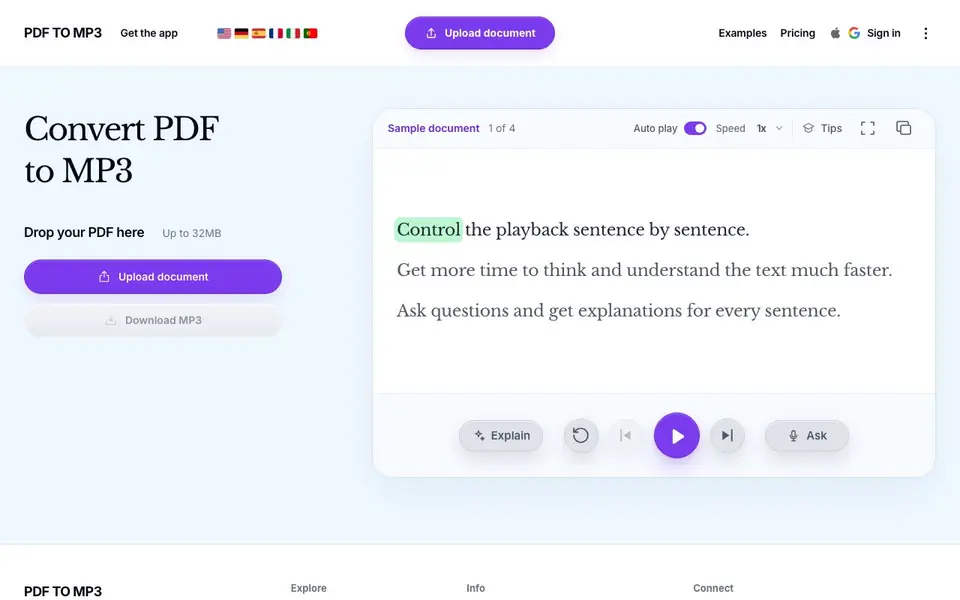
What is Pdftomp3?
Pdftomp3 is a web tool that converts PDF files into MP3 audio. You upload a document, and the site reads it aloud using text-to-speech, letting you listen instead of reading. It is designed for people who want to absorb documents faster or on the go.
To use it, you drop your PDF onto the page (up to 32MB), then the audio plays automatically. You can control playback sentence by sentence, adjust speed, and even ask questions or get explanations for each sentence. This makes it more than a simple converter—it doubles as a study aid.
The tool is useful for students, professionals, or anyone with long documents who prefers listening. The website mentions a sample document to try, and you can download the resulting MP3. Pricing details are not stated on the homepage, so you may need to check the site or contact them for plan information.
Pdftomp3 features
- Sentence-by-sentence playback: Control audio one sentence at a time to focus on each part.
- Speed control: Adjust playback speed to match your preferred listening pace.
- Ask questions: Get explanations for any sentence in the document.
- Download MP3: Save the converted audio file for offline listening.
- Sample document: Try the tool with a provided example PDF.
What you can do with Pdftomp3
- Convert a research paper to audio for listening during a commute.
- Turn a legal contract into an MP3 to review it hands-free.
- Listen to a textbook chapter while following along visually.
- Ask the tool to explain a confusing sentence in a technical manual.
How to get started with Pdftomp3
- Go to pdftomp3.com and upload your PDF file (up to 32MB).
- The audio starts playing automatically; use the controls to adjust speed or jump between sentences.
- Ask questions about any sentence or download the MP3 when done.
Tips for better results with Pdftomp3
- Upload a clean, text-based PDF under 32MB to ensure the converter reads every sentence accurately without skipping scanned or image-heavy pages.
- Use the sentence-by-sentence playback to pause after complex parts, and ask Pdftomp3 to explain any sentence you find confusing before you download the final MP3.
- Adjust the speed control to a slower pace for dense documents like contracts, then speed up for lighter material to match your listening comfort with Pdftomp3.
- Test the sample document first to see how Pdftomp3 handles formatting, then upload your own file and verify the audio matches the original text before relying on it.
- checks
Pdftomp3 pricing
Pdftomp3’s homepage does not list prices. Check pdftomp3.com for current plans.
What to check before you rely on Pdftomp3
- Check the website for pricing and plan limits before uploading large or multiple files, since the homepage does not state any costs or usage caps.
- Verify whether the free version includes MP3 download or if that requires a paid plan, as the site does not clearly list download restrictions.
- Review the privacy policy to confirm how your uploaded PDFs are stored or deleted, since the homepage gives no details on data handling.
Who Pdftomp3 is for
Pdftomp3 suits students, professionals, commuters and auditory learners. If that is not you, the AI voice generators below may fit better.
Similar tools compared with Pdftomp3
| Tool | What it is | Pricing |
|---|---|---|
| Pdftomp3 | PDF to MP3 audio converter | See website |
| ElevenLabs | AI voice generator and voice agents platform | Freemium |
| Murf | AI voice and conversational agent platform | See website |
| Resemble AI | AI deepfake detection and watermarking platform | See website |
| Speechify | AI text-to-speech and voice assistant | Freemium |
Pdftomp3 FAQ
What does Pdftomp3 do?
It converts PDF documents into MP3 audio files using text-to-speech. You can listen to the content, control playback sentence by sentence, and even ask questions about specific sentences.
Is there a free plan?
The homepage does not mention pricing or a free plan. You would need to check the site's pricing page or contact them to find out about costs.
Can I download the audio?
Yes, the website says you can download the MP3 after conversion. This lets you save the audio for offline listening.
What file size limit is there?
The site states you can upload PDFs up to 32MB. Larger files may not be supported, so you might need to split them first.
Does Pdftomp3 work on my phone or tablet?
Pdftomp3 is a web tool, so you can use it in any browser on a phone, tablet, or computer. The website does not mention dedicated mobile apps, but the page is designed to work with a drop zone for your PDF. Check the site for any device-specific instructions.
What can I do with the MP3 file after I download it from Pdftomp3?
After you download the MP3 from Pdftomp3, you can save it to your device, transfer it to a music player, or listen offline. The website does not list specific export options beyond downloading the MP3 file. For other uses, check the site's examples or contact them.
Does Pdftomp3 require me to create an account to use it?
The Pdftomp3 homepage shows a sign-in option, but it does not state whether an account is required to upload a PDF and get audio. You can try the sample document without signing in, but for full use, check the site or contact them for details.


