
What is Opensec?
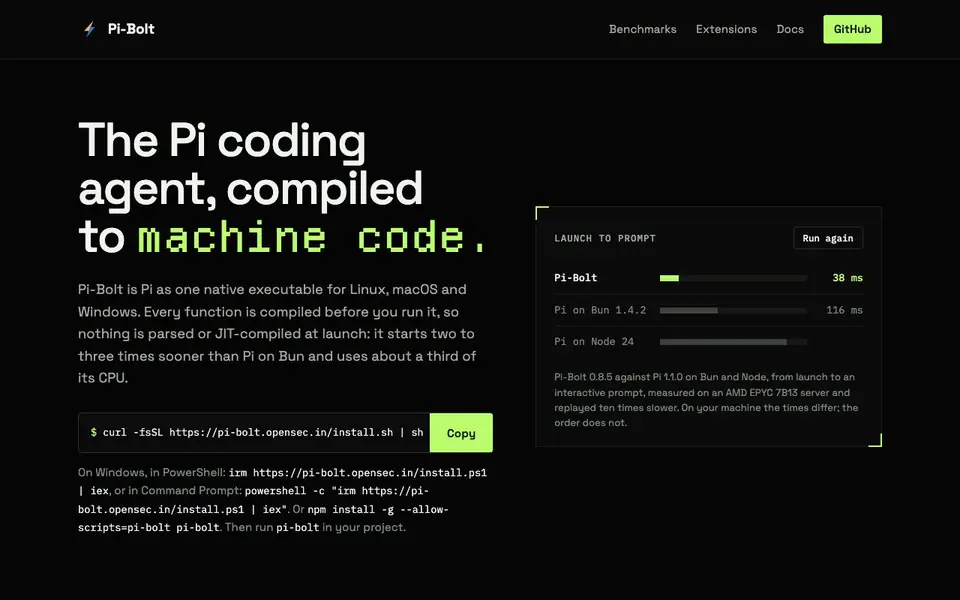
Pi-Bolt is a coding agent that runs as a single native executable on Linux, macOS, and Windows. It is compiled ahead of time, so it starts two to three times faster than the original Pi on Bun and uses about a third of the CPU. This makes it a good choice for developers who want a responsive AI coding assistant without the overhead of a runtime like Node.js or Bun.
You install Pi-Bolt with a simple command, then run it in your project directory. Your existing Pi settings, providers, sessions, and extensions carry over from ~/.pi/agent, so you can switch without losing your setup. The executable is self-contained, so you don't need Node.js or Bun installed. Extensions can be installed with Pi-Bolt's own package manager if npm is not available.
Pi-Bolt is an independent fork of Pi, built by OpenSec. It is MIT licensed and supports Linux x86-64, macOS on Apple silicon, and Windows 10 or 11 on x64. The website includes benchmarks showing performance improvements, but notes that actual times vary by hardware. It also offers two extensions: opensec-pi-subagents for parallel workflows and opensec-pi-todo for a live todo list.
Opensec features
- Compiled executable: Runs as a single native binary for Linux, macOS, and Windows.
- Fast startup: Starts two to three times sooner than Pi on Bun, from launch to prompt.
- Low CPU usage: Uses about a third of the CPU of Pi on Bun over a session.
- Self-contained: No Node.js or Bun required; releases are signed and checked.
- Extension support: Works with Pi extensions and offers prebuilt OpenSec extensions.
What you can do with Opensec
- Start a coding session quickly without waiting for a runtime to boot.
- Run long AI-generated answers without freezing the screen.
- Use specialized subagents for parallel coding workflows.
- Keep a todo list visible while working with the model.
How to get started with Opensec
- Install Pi-Bolt using the curl command on Linux/macOS or the PowerShell command on Windows.
- Run pi-bolt in your project directory to start an interactive session.
- Your existing Pi settings and extensions carry over automatically.
Tips for better results with Opensec
- Run pi-bolt in your project directory to inherit your existing Pi settings, providers, sessions, and extensions from ~/.pi/agent, so you can switch without reconfiguring anything.
- Install opensec-pi-subagents to delegate parallel coding workflows to specialized agents in separate sessions, which can speed up tasks that benefit from concurrent execution.
- Use opensec-pi-todo to keep a live todo list visible while working with pi-bolt, helping you track progress on multi-step coding tasks without losing focus.
- Benchmark pi-bolt on your own hardware before adopting it for critical work, since the website notes that actual times vary by machine and the published figures are measurements, not guarantees.
Opensec pricing
Opensec’s homepage does not list prices. Check pi-bolt.opensec.in for current plans.
What to check before you rely on Opensec
- Check whether the website lists a pricing plan or license cost for pi-bolt; it does not state any pricing, so confirm what you will pay before relying on it.
- Verify that your operating system and architecture are supported: the site mentions Linux x86-64, macOS on Apple silicon, and Windows 10 or 11 on x64, but not other platforms.
- Confirm how your data is handled, since the website does not describe data privacy, retention, or transmission policies for pi-bolt or its extensions.
Who Opensec is for
Opensec suits developers, programmers and AI coding enthusiasts. If that is not you, the AI coding tools below may fit better.
Similar tools compared with Opensec
| Tool | What it is | Pricing |
|---|---|---|
| Opensec | Compiled coding agent for fast startup | See website |
| Tabnine | Agentic quality engineering platform for AI code | See website |
| CodeRabbit | AI pull request reviewer and prioritizer | Free trial |
| Cursor | AI coding agent for ambitious software | See website |
| Claude Code | AI coding agent for terminal and IDE | Paid |
Opensec FAQ
What is Pi-Bolt?
Pi-Bolt is a compiled version of the Pi coding agent. It runs as a single native executable, so it starts faster and uses less CPU than the original Pi on Bun or Node.
Is Pi-Bolt free?
The website does not state pricing. It is MIT licensed, which suggests it is open-source, but you should check the GitHub repository for details.
Who is Pi-Bolt for?
It is for developers who use the Pi coding agent and want faster startup and lower resource usage. It also suits those who prefer a self-contained executable without needing Node.js or Bun.
What can I do with Pi-Bolt?
You can use it as an AI coding assistant in your projects. It supports Pi extensions, including subagents for parallel workflows and a todo list panel.
Does Pi-Bolt require an account or a subscription?
Pi-Bolt is an open-source coding agent, and the website does not mention any account or subscription requirement. You can install and run it locally without signing up. For details on pricing or licensing, check the GitHub repository or the official documentation.
Can Pi-Bolt connect to my existing AI providers or APIs?
Yes, Pi-Bolt carries over your existing Pi settings, including providers, from ~/.pi/agent. This means if you already use Pi with a provider like OpenAI or Anthropic, those configurations transfer automatically. The website does not list specific integrations beyond what Pi supports, so check the Pi docs for details.
What operating systems and hardware does Pi-Bolt support?
Pi-Bolt runs on Linux x86-64, macOS on Apple silicon, and Windows 10 or 11 on x64. It is a single native executable for each platform, so you don't need Node.js or Bun. For other architectures, the website does not mention support, so check the GitHub releases for available binaries.


