
What is mu?
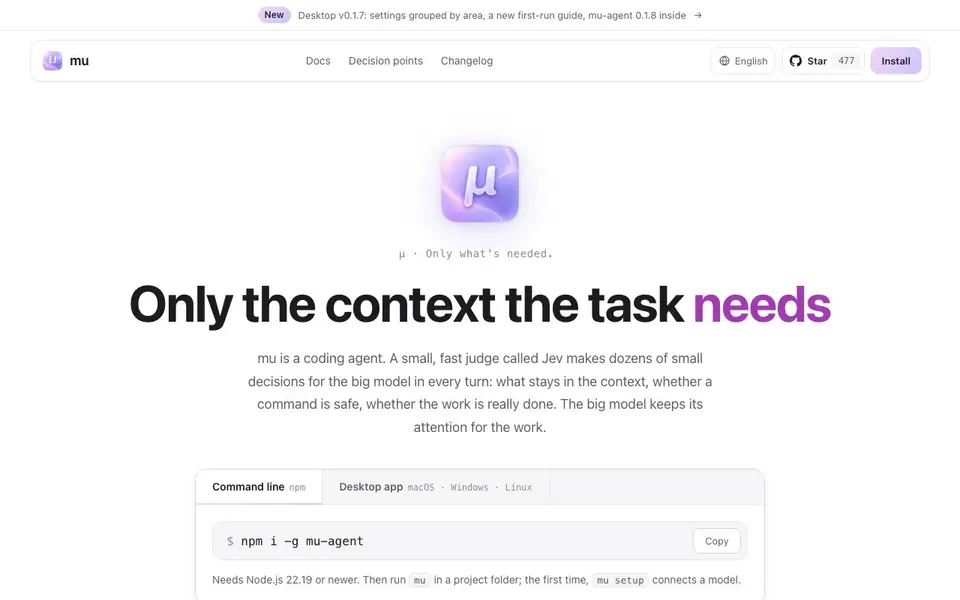
mu is a coding agent that runs on the command line or as a desktop app. It pairs a big model with a small, fast judge called Jev. Jev makes dozens of small decisions each turn: what stays in context, whether a command is safe, and whether the work is truly done. This keeps the big model's attention on the actual coding task.
You start by installing mu via npm and running it in a project folder. The first time, mu setup connects a model. Then you give it tasks like "run the tests and fix the failing ones." Jev reads your message first, decides if it's a new task or a follow-up, and whether heavy tools are needed. When tools return output, Jev filters it chunk by chunk, keeping what matters and archiving the rest. Before commands run, Jev checks if they're reversible and if they follow your rules. You can switch between Full access, Jev approves, and Minimal permissions at any time.
mu suits developers who want an AI assistant that doesn't bloat context or ask unnecessary questions. It also supports a hive mode where multiple agents work on one problem, with Jev deciding what findings to share. The plain-language board keeps you informed in simple terms. mu is open source under MIT and Apache-2.0 licenses, and it's built on pi. The website mentions a free judge model, jev-1.13-free, and a subscription cost display, suggesting a freemium model.
mu features
- Context filtering: Jev judges tool output chunk by chunk, keeping only what matters for the task.
- Permission modes: Choose Full access, Jev approves, or Minimal permissions, switchable anytime.
- Goal condition: Use /goal to keep the agent working until a specific condition holds true.
- Hive collaboration: Multiple agents share findings through Jev, avoiding context clutter and dead ends.
- Plain-language reporting: A dedicated model tells you what's happening in simple terms, separate from the working model.
What you can do with mu
- Run tests and fix failing ones automatically in your project.
- Keep context lean when working with large codebases or long tasks.
- Delegate multi-step coding tasks with minimal supervision.
- Collaborate with multiple agents on a single hard problem.
How to get started with mu
- Install mu globally with npm: npm i -g mu-agen (requires Node.js 22.19 or newer).
- Run mu in your project folder; the first time, mu setup connects a model.
- Give a task like "run the tests and fix the failing ones" and let Jev manage context and permissions.
Tips for better results with mu
- Start with a small, well-defined task like running a single test file, so Jev can judge the output chunk by chunk and keep only the relevant failures in context.
- Switch mu to Minimal permissions for exploratory work, then move to Jev approves or Full access only when you trust the commands it proposes for your project.
- Use the /goal command in mu to keep the agent working until a specific condition holds, like all tests passing, instead of stopping after the first fix.
- For large codebases, break your request into focused subtasks so mu's Jev can archive irrelevant logs and keep the big model's attention on the actual code changes.
- Run mu in a fresh git branch or a disposable folder so that any command it executes is reversible, letting Jev approve actions without you worrying about permanent damage.
mu pricing
mu has a free way to start, with paid plans for heavier use. Check usemu.dev for current limits and prices.
What to check before you rely on mu
- Check the pricing page for exact limits on the free judge model and subscription costs, since the website only shows a freemium label without specific numbers.
- Verify which model providers mu supports beyond the one shown in the demo, because the site lists google-antigravity but does not state the full list.
- Confirm your Node.js version is 22.19 or newer before installing, as the site requires this but does not explain what happens on older versions.
- Review the permission mode defaults and how Jev decides reversibility, since the site describes the concept but does not detail every rule it applies.
Who mu is for
mu suits developers, software engineers and tech leads. If that is not you, the AI coding tools below may fit better.
Similar tools compared with mu
| Tool | What it is | Pricing |
|---|---|---|
| mu | Judgment-first coding agent with context control | Freemium |
| Tabnine | Agentic quality engineering platform for AI code | See website |
| CodeRabbit | AI pull request reviewer and prioritizer | Free trial |
| Cursor | AI coding agent for ambitious software | See website |
| Claude Code | AI coding agent for terminal and IDE | Paid |
mu FAQ
What is mu?
mu is a coding agent that uses a small judge called Jev to decide what context the big model needs. It runs on the command line or as a desktop app and is open source.
Is mu free?
The website shows a free judge model, jev-1.13-free, and a subscription cost display, suggesting a freemium model. For exact pricing details, check the mu website.
Who is mu for?
mu is for developers who want an AI coding assistant that keeps context minimal and asks fewer questions. It's especially useful for complex tasks where context overload is a problem.
What can I do with mu?
You can run tests, fix bugs, and complete multi-step coding tasks. You can also set goal conditions, use multiple agents in a hive, and control permissions for commands.
What can mu export or connect to?
The mu website does not mention specific export formats or external integrations beyond MCP servers. It shows support for MCP servers in the context of skills and tools, but no list of compatible services is provided. For details, check the mu docs or changelog on usemu.dev.
Which devices or platforms does mu run on?
mu runs on the command line via npm, requiring Node.js 22.19 or newer, and as a desktop app for macOS, Windows, and Linux. You install it globally with npm and run it in a project folder. The website does not mention mobile or other platforms.
What does the free plan of mu include?
The mu website mentions a free judge model called jev-1.13-free and shows a subscription cost display, but it does not specify what the free plan includes beyond that. You can start using mu with the free judge model, but limits on usage or features are not detailed. Check the pricing section on usemu.dev for specifics.


