
What is memdoor?
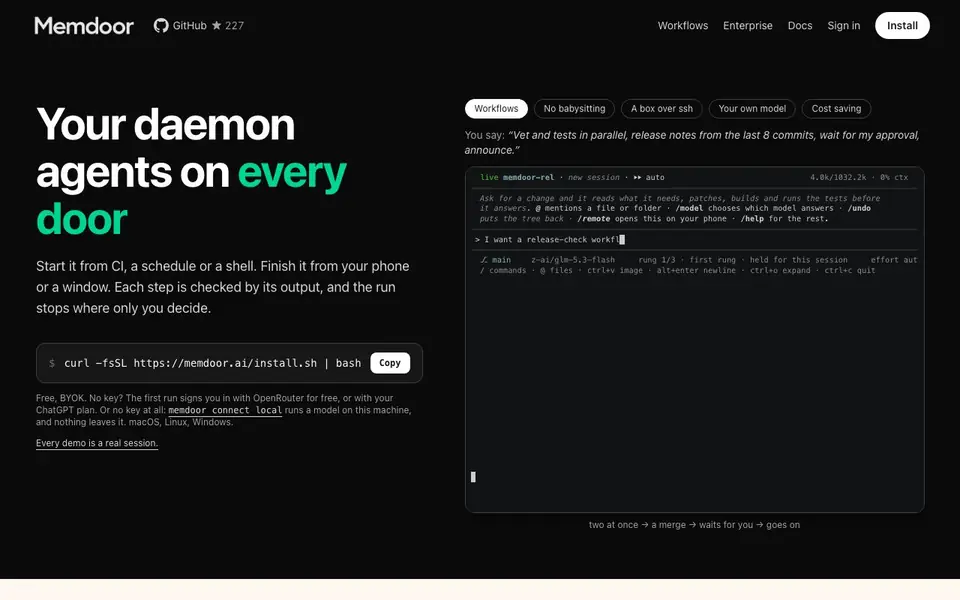
Memdoor is a lightweight coding and automation agent that lives in a single CLI binary. You can run it from a shell, a CI job, or a schedule, and it works on macOS, Linux, and Windows. It supports bring-your-own-key setups with OpenRouter or ChatGPT, or you can run a local model with nothing leaving your machine.
You start by installing the binary and running a command. Then you describe a task in plain language, like "vet and tests in parallel, release notes from the last 8 commits, wait for my approval, announce." Memdoor reads what it needs, makes changes, builds, and runs tests before answering. You can mention files or folders with @, switch models with /model, undo changes with /undo, and open sessions on your phone with /remote.
Workflows are like Airflow for agents: they have run state, retries, and approval gates. You can start a workflow from CI or cron and finish it from your phone. Each step is checked by its output, and the run stops where you decide. It's built for developers who want reliable, reproducible agent runs without babysitting.
memdoor features
- Durable workflows: Run multi-step agent tasks with state, retries, and approval gates.
- Local or remote: Execute on your machine or over SSH, with a local model option for privacy.
- Cost optimization: Token use is optimized, and you can bring your own API key.
- Interactive commands: Use /model, /undo, /remote, and @ mentions to control sessions.
- CI and cron integration: Start workflows from CI jobs or scheduled tasks and finish from anywhere.
What you can do with memdoor
- Automate release checks with parallel vetting and tests.
- Run coding tasks that patch, build, and test before answering.
- Create multi-agent workflows that collaborate through files.
- Start a workflow from CI and approve it from your phone.
How to get started with memdoor
- Install Memdoor by running the curl command from the website.
- Sign in with OpenRouter for free or use your ChatGPT plan, or connect a local model.
- Start a session and describe a task or workflow in plain language.
Tips for better results with memdoor
- Start with a precise task description in plain language, including steps like vet, test, and approval gates, so Memdoor knows exactly what to execute.
- Use @ mentions to point Memdoor at specific files or folders, and /undo to revert changes quickly if a patch goes wrong.
- Switch models with /model to match the task, and use /remote to approve or monitor workflows from your phone when you are away.
- Run Memdoor with a local model via memdoor connect local for privacy-sensitive tasks, ensuring no data leaves your machine.
- Break complex jobs into multi-step workflows with retries and approval gates, so each step is checked by its output before moving on.
memdoor pricing
memdoor has a free way to start, with paid plans for heavier use. Check memdoor.ai for current limits and prices.
What to check before you rely on memdoor
- Check the pricing label says freemium, but the website does not list specific free tier limits or paid plan details, so verify what you get.
- Confirm your API key setup with OpenRouter or ChatGPT works before relying on Memdoor, since bring-your-own-key is the main model access.
- Verify that your CI or cron environment can run the single binary on macOS, Linux, or Windows, as the website does not state specific system requirements beyond those.
- Ensure you understand how workflows handle state and retries, since the website does not document failure recovery or data retention policies.
Who memdoor is for
memdoor suits developers, DevOps engineers and automation enthusiasts. If that is not you, the AI coding tools below may fit better.
Similar tools compared with memdoor
| Tool | What it is | Pricing |
|---|---|---|
| memdoor | Lightweight coding and automation agent | Freemium |
| Tabnine | Agentic quality engineering platform for AI code | See website |
| CodeRabbit | AI pull request reviewer and prioritizer | Free trial |
| Cursor | AI coding agent for ambitious software | See website |
| Claude Code | AI coding agent for terminal and IDE | Paid |
memdoor FAQ
What is Memdoor?
Memdoor is a lightweight coding and automation agent that runs in a single CLI binary. It helps you run coding tasks and workflows locally or over SSH, with durable runs and approval gates.
Is Memdoor free?
The website says it's free with bring-your-own-key. You can sign in with OpenRouter for free on first run, or use your ChatGPT plan. There's no mention of paid plans on the site.
Can I run Memdoor with a local model?
Yes, you can use 'memdoor connect local' to run a model on your own machine. Nothing leaves your computer, which is good for privacy.
What can I automate with Memdoor?
You can automate coding tasks like running tests, generating release notes, and multi-step workflows. It supports parallel steps, approval gates, and can be started from CI or cron.
Can Memdoor export or connect to external tools like Slack or Jira?
The Memdoor website does not mention any direct integrations with external services like Slack or Jira. Memdoor focuses on running coding and automation tasks from your CLI, CI, or cron. For specific integration details, check the official docs or GitHub repository.
Does Memdoor require an account to use?
No, Memdoor does not require an account. You can install the binary and run it with a local model, which keeps everything on your machine. For remote models, you can bring your own API key from OpenRouter or ChatGPT, or the first run signs you in with OpenRouter for free.
What does the free plan of Memdoor include?
Memdoor is free to use with your own API key or a local model. The free plan includes the full CLI binary, workflows, and local execution. If you don't have a key, the first run signs you in with OpenRouter for free, but usage limits may apply based on that service.


