

What is KikiVoice?
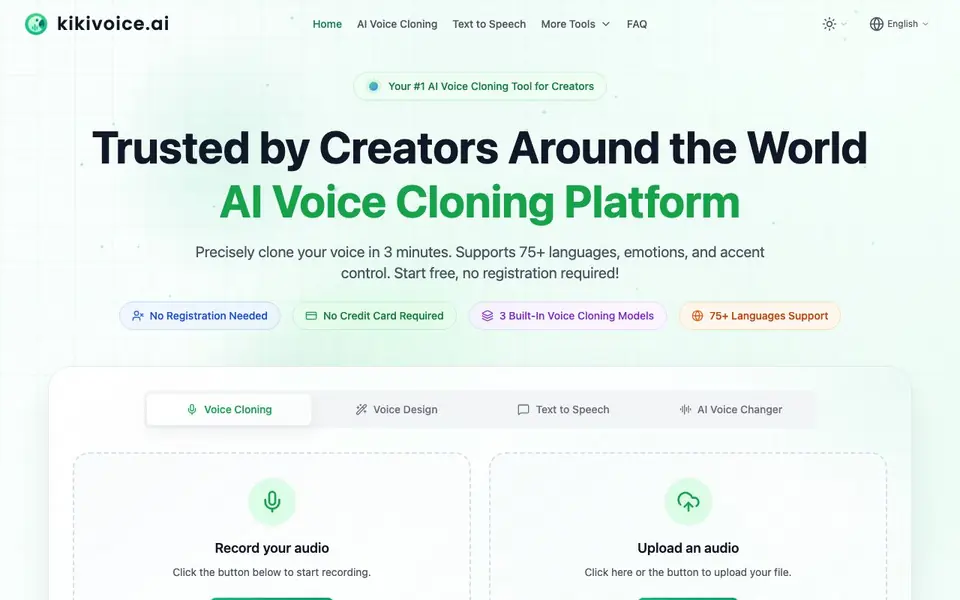
KikiVoice is an AI voice cloning platform built for creators. You can clone a voice from just a few seconds of audio, with no registration or credit card required. The platform claims high similarity and supports over 75 languages, making it useful for global projects.
To get started, you record or upload a short audio sample. Then you type your text and pick one of three built-in models: Kiki Core for speed and stability, Kiki Pro for emotional expression and parameter control, or Kiki Multilingual for 75+ languages and accents. The cloned voice is ready to play and download in under three minutes.
Beyond cloning, KikiVoice offers AI Voice Design to create voices from text descriptions, Text to Speech with 600+ LLM voices and 300+ standard voices, and an AI Voice Changer that transforms existing recordings while preserving the original delivery. It suits video dubbing, game voice acting, podcasts, and e-learning. The site does not mention any paid plans or usage limits.
KikiVoice features
- Three cloning models: Choose Kiki Core, Kiki Pro, or Kiki Multilingual for different speed, quality, and language needs.
- No sign-up required: Start cloning immediately without creating an account or entering a credit card.
- 75+ language support: Clone voices across many languages and accents for global content projects.
- Emotion and style control: Use Kiki Pro to access 15+ emotion presets and adjust intensity for mood.
- AI Voice Design: Create original voices from text descriptions with control over age, tone, and pacing.
What you can do with KikiVoice
- Dub videos into multiple languages with a cloned voice.
- Create voice acting for games using your own or designed voices.
- Produce podcast episodes with consistent AI narration.
- Build e-learning content with multilingual voiceovers.
How to get started with KikiVoice
- Record your audio or upload an audio file.
- Enter your text and choose a cloning model.
- Generate, play, and download your cloned voice.
Tips for better results with KikiVoice
- Start with a clean, quiet recording of a few seconds of your voice, avoiding background noise, to give KikiVoice the best sample for cloning.
- Choose Kiki Pro when you need emotional range, and use its 15+ emotion presets to match the mood of your project.
- For global content, select Kiki Multilingual in KikiVoice to clone your voice across 75+ languages and accents, then test a short phrase first.
- Compare Kiki Core and Kiki Pro outputs on the same text to see which model balances speed and quality for your specific use case.
KikiVoice pricing
KikiVoice is free to use according to its website.
What to check before you rely on KikiVoice
- Check if KikiVoice's free label includes unlimited generations or if there are hidden usage caps, since the website does not state any limits.
- Verify what audio formats you can upload and download, as the site does not list supported file types or export options.
- Review KikiVoice's privacy policy to confirm how your voice samples are stored or used, since no data handling details are provided.
Who KikiVoice is for
KikiVoice suits creators, video editors, podcasters and e-learning developers. If that is not you, the AI voice generators below may fit better.
Similar tools compared with KikiVoice
| Tool | What it is | Pricing |
|---|---|---|
| KikiVoice | AI voice cloning platform for creators | Free |
| ElevenLabs | AI voice generator and voice agents platform | Freemium |
| Murf | AI voice and conversational agent platform | See website |
| Resemble AI | AI deepfake detection and watermarking platform | See website |
| Speechify | AI text-to-speech and voice assistant | Freemium |
KikiVoice FAQ
Do I need to sign up to use KikiVoice?
No. KikiVoice states that no registration is required and no credit card is needed. You can open the site and start cloning immediately.
How long does it take to clone a voice?
The website says you can get a cloned voice in under 3 minutes. You record or upload a few seconds of audio, enter your text, and generate.
What languages does KikiVoice support?
KikiVoice supports 75+ languages and multiple accents. The Kiki Multilingual model is designed for multilingual content, and cross-lingual cloning is possible with any built-in model.
Is KikiVoice free?
The site says 'Start free' and mentions no registration or credit card. It does not state any paid plans, so it appears to be free, but check the website for any future pricing changes.
What can I export or download from KikiVoice after cloning a voice?
KikiVoice lets you play and download your cloned voice directly after generation, typically within three minutes. The website doesn't specify file formats or export options beyond downloading the audio. For details on available formats or integrations, check the platform's interface or contact support.
Does KikiVoice work on mobile devices or require a specific operating system?
KikiVoice is a web-based platform, so you can access it from any device with a browser, including phones and tablets. The website doesn't mention dedicated mobile apps or system requirements. For the best experience, use a modern browser and ensure your device can record or upload audio.
What does the free plan of KikiVoice include, and are there any usage limits?
KikiVoice is free to use with no registration or credit card required, and it includes all core tools like voice cloning, voice design, text-to-speech, and voice changer. The website doesn't mention any usage limits or paid plans. If you hit restrictions, check the FAQ or contact support for current details.


