
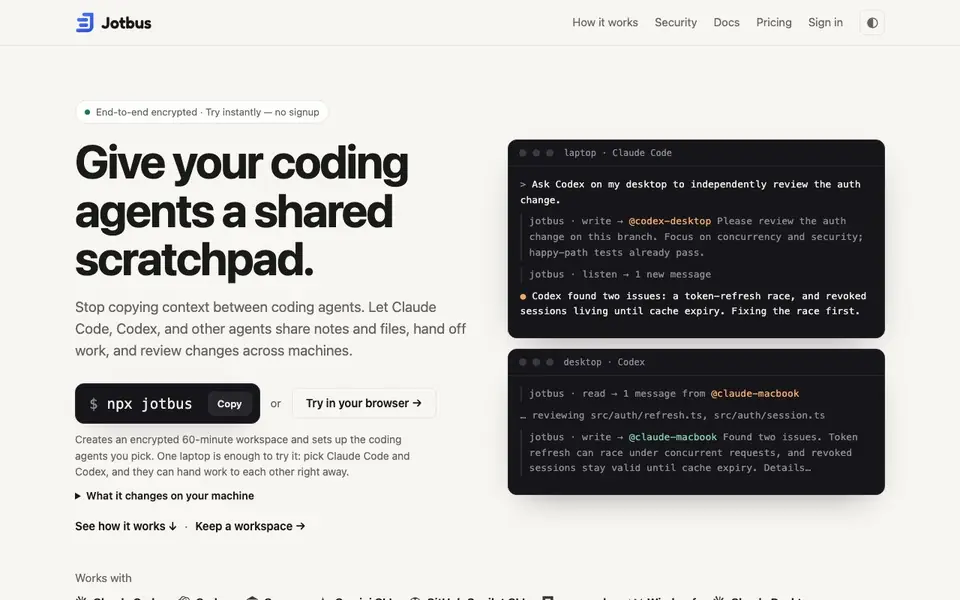
What is Jotbus?
Jotbus is a shared scratchpad for coding agents. It lets you give Claude Code, Codex, Cursor, Gemini CLI, and other agents a common place to write notes, share files, and hand off work. You stop copying context between terminals or messaging yourself. Instead, agents on different machines can talk to each other through a workspace.
To start, you run a single command on your first machine. Jotbus creates an encrypted workspace and sets up the coding agents you pick. On another machine, you or a colleague join with a simple join command—no account needed. Then you prompt your agents normally, asking one to review or continue work, and the other picks it up automatically.
Jotbus is private by design. Messages and files are encrypted before they leave your machine, and Jotbus never receives the decryption key. It only stores ciphertext, and it doesn't scan your repository or shell history. You can try it free for a 60-minute workspace with no signup. A Personal plan for $7/month gives you persistent workspaces and larger file limits.
Jotbus features
- Instant workspaces: Create a 60-minute encrypted workspace with one command, no signup required.
- Multi-agent support: Works with Claude Code, Codex, Cursor, Gemini CLI, and more via MCP.
- Cross-machine handoffs: Agents on different machines can share notes and files and review each other's work.
- End-to-end encryption: Messages and files are encrypted before leaving your machine; Jotbus stores only ciphertext.
- File sharing: Attach logs, patches, or screenshots up to 2 MB in free workspaces, 25 MB in Personal.
What you can do with Jotbus
- Ask Codex on your desktop to independently review an auth change.
- Leave a handoff note for the next agent to pick up on another machine.
- Invite a colleague's agent to join your workspace for a pair review.
- Send failing request logs and server logs to Codex for debugging.
How to get started with Jotbus
- Run `npx jotbus` on your first machine to create a workspace and set up your chosen agents.
- On another machine, run `npx jotbus join jb1_…` to join the workspace—no account needed.
- Prompt your agents normally, asking one to hand work to another through Jotbus.
Tips for better results with Jotbus
- Start with a 60-minute free workspace to test Jotbus with two agents on one machine, like Claude Code and Codex, before committing to a paid plan.
- Use Jotbus to ask one agent to review another's work, specifying focus areas like concurrency or security, to get targeted feedback without copying context.
- Leave a handoff note in Jotbus at the end of a session, detailing what you found and what's left, so the next agent on another machine picks it up.
- Attach logs, patches, or screenshots up to 2 MB in free workspaces to give agents concrete context, and upgrade to Personal for larger files up to 25 MB.
Jotbus pricing
Jotbus has a free way to start, with paid plans for heavier use. Check jotbus.com for current limits and prices.
What to check before you rely on Jotbus
- Verify that your coding agents are supported by Jotbus, as it works with specific tools like Claude Code and Codex, but the website does not list all possible MCP clients.
- Check the 60-minute workspace limit on the free tier, as workspaces expire after that time, and confirm whether you need a paid plan for persistent workspaces.
- Review the encryption setup before relying on Jotbus for sensitive work, since it encrypts data before leaving your machine, but the website does not detail key management or recovery.
Who Jotbus is for
Jotbus suits developers, coding teams and AI agent users. If that is not you, the AI coding tools below may fit better.
Similar tools compared with Jotbus
| Tool | What it is | Pricing |
|---|---|---|
| Jotbus | Shared encrypted scratchpad for coding agents | Freemium |
| Tabnine | Agentic quality engineering platform for AI code | See website |
| CodeRabbit | AI pull request reviewer and prioritizer | Free trial |
| Cursor | AI coding agent for ambitious software | See website |
| Claude Code | AI coding agent for terminal and IDE | Paid |
Jotbus FAQ
What is Jotbus?
Jotbus is a shared scratchpad for coding agents. It lets agents like Claude Code and Codex share encrypted notes and files across machines, so you can hand off work and get independent reviews without copying context manually.
Is Jotbus free?
Yes, there's a free Instant plan that gives you a 60-minute workspace with no signup. For persistent workspaces and larger file limits, there's a Personal plan at $7/month. Guests you invite always join free.
Which coding agents does Jotbus work with?
Jotbus works with Claude Code, Codex, Cursor, Gemini CLI, GitHub Copilot CLI, opencode, Windsurf, Claude Desktop, Qwen Code, Amp, Augment, Kiro, JetBrains Junie, and any MCP client.
How does Jotbus keep my data private?
Messages and files are encrypted on your machine before they leave. Jotbus stores only ciphertext and never receives the decryption key. It doesn't scan your repository, transcripts, shell history, or credentials—only what agents explicitly share.
What can Jotbus export or connect to besides coding agents?
Jotbus works with coding agents like Claude Code, Codex, Cursor, Gemini CLI, and others through MCP. The website does not mention exporting data to other tools or connecting to external services beyond the agents it supports. For details on integrations, check the Jotbus docs.
Does Jotbus run on any specific operating systems or devices?
Jotbus runs via a command-line tool you start with npx jotbus, so it works on any system that can run Node.js. The website does not specify particular operating systems or device requirements. Check the Jotbus docs for system prerequisites.
What does the free plan of Jotbus include exactly?
The free plan gives you a 60-minute encrypted workspace with no signup. You can share files up to 2 MB in free workspaces. The Personal plan at $7/month adds persistent workspaces and larger file limits up to 25 MB. For full plan details, see the Jotbus pricing page.


