

What is InitRunner?
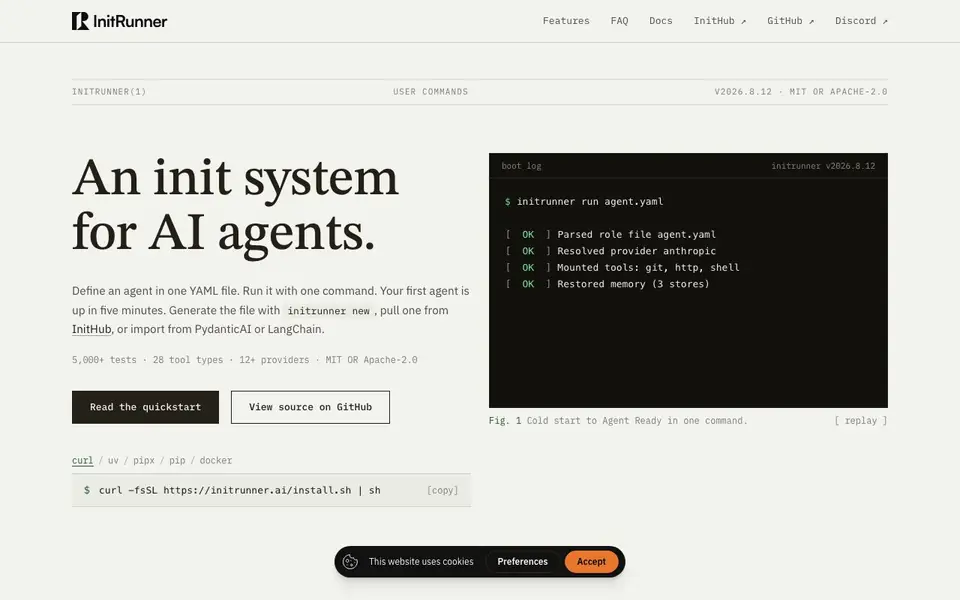
InitRunner is an open-source command-line tool that treats AI agents like system services. You write one YAML file that describes an agent's name, prompt, model, and tools. Then you run it with a single command. The installer brings everything you need, including Python, and works on Linux, macOS, and WSL.
Getting started takes three steps. First, install with one command. Second, run setup to pick a provider and save your API key. Third, run your agent and start chatting. You can generate a new agent file with initrunner new, pull one from InitHub, or import from PydanticAI or LangChain. The CLI supports options like ingesting your docs for retrieval, enabling all tools, or running as a Telegram or Discord bot.
Beyond simple chat, InitRunner offers a dashboard for managing agents and monitoring runs. Autonomous mode plans work, executes steps, and adapts on failure, with budgets for tokens, iterations, and time. The project claims over 5,000 tests, 28 tool types, and support for 12+ providers. It is licensed under MIT or Apache-2.0, and you can validate agent files with initrunner validate.
InitRunner features
- YAML agent files: Define an agent's name, prompt, model, and tools in one file that you can review like code.
- One-command run: Start a conversation with initrunner run without needing extra config files.
- Built-in RAG: Ingest your docs with --ingest and the agent can search them for answers.
- Autonomous mode: Plan, execute, and adapt tasks under token and iteration budgets, then read a report.
- Multi-provider support: Choose from 12+ providers and switch models by editing the YAML file.
What you can do with InitRunner
- Run a code-review agent that checks pull requests for bugs and security issues.
- Set up a researcher agent to compare products and save a summary report to a file.
- Deploy a Telegram or Discord bot that answers questions from your documentation.
- Import an existing PydanticAI or LangChain agent into InitRunner's format.
How to get started with InitRunner
- Install InitRunner with the one-line curl command from the website.
- Run initrunner setup to choose a provider and save your API key.
- Create or pull an agent YAML file, then run it with initrunner run agent.yaml.
Tips for better results with InitRunner
- Start with initrunner new to generate a YAML agent file, then edit the prompt and tools before running. This gives you a clean base to modify and validate with initrunner validate.
- Use the --ingest flag with InitRunner to index your documentation folder, so the agent can answer questions from your own files instead of relying on generic knowledge.
- Test your agent file with initrunner test role.yaml -s suite.yaml before deploying it as a bot or service. This catches errors early and verifies behavior under your guardrails.
- Run InitRunner in autonomous mode with token and iteration budgets to let it plan and execute multi-step tasks, then review the report to see what worked and adjust the YAML accordingly.
InitRunner pricing
InitRunner is free to use according to its website.
What to check before you rely on InitRunner
- Check whether the free pricing label covers all features like autonomous mode, dashboard, and bot integrations, since the website does not list specific plan limits or paid tiers.
- Verify that your chosen provider is among the 12+ supported and that your API key works with InitRunner, as setup requires selecting a provider and saving the key.
- Confirm the export formats for agent files and reports, since the website does not state whether you can export to other tools or formats beyond importing from PydanticAI and LangChain.
Who InitRunner is for
InitRunner suits developers, DevOps engineers, AI tinkerers and technical founders. If that is not you, the AI coding tools below may fit better.
Similar tools compared with InitRunner
| Tool | What it is | Pricing |
|---|---|---|
| InitRunner | Open-source CLI for YAML-defined AI agents | Free |
| Tabnine | Agentic quality engineering platform for AI code | See website |
| CodeRabbit | AI pull request reviewer and prioritizer | Free trial |
| Cursor | AI coding agent for ambitious software | See website |
| Claude Code | AI coding agent for terminal and IDE | Paid |
InitRunner FAQ
What does InitRunner do?
It lets you define AI agents as YAML files and run them from the terminal. You specify the agent's name, prompt, model, and tools in one file, then run it with a single command. It includes chat, RAG, memory, tools, and audit trails.
Is InitRunner free?
Yes, the website states it is open-source under MIT or Apache-2.0 licenses. The installer is free to use. You will need your own API keys for the AI providers you choose.
Who is InitRunner for?
It is aimed at developers and technical users who are comfortable with the command line and YAML. If you want to manage AI agents like system services, review them in git, and run them autonomously, this tool fits.
What can I build with InitRunner?
You can build agents that chat, search your docs, run as Telegram or Discord bots, or work autonomously on tasks like research. You can also import agents from PydanticAI or LangChain. The website does not list specific integrations beyond those.
What operating systems does InitRunner support?
InitRunner works on Linux, macOS, and Windows Subsystem for Linux (WSL). The installer brings everything you need, including Python, so you can get started quickly on these platforms.
Can InitRunner run as a Telegram or Discord bot?
Yes, InitRunner can run as a Telegram or Discord bot. You use the --telegram or --discord options when running your agent. This lets you deploy a bot that answers questions from your documentation or performs other tasks.
Does InitRunner require an account or API key?
InitRunner requires you to run setup once to pick a provider and save your API key. You need an API key from a supported provider, but you don't need a separate InitRunner account. The tool is free and open-source.


