
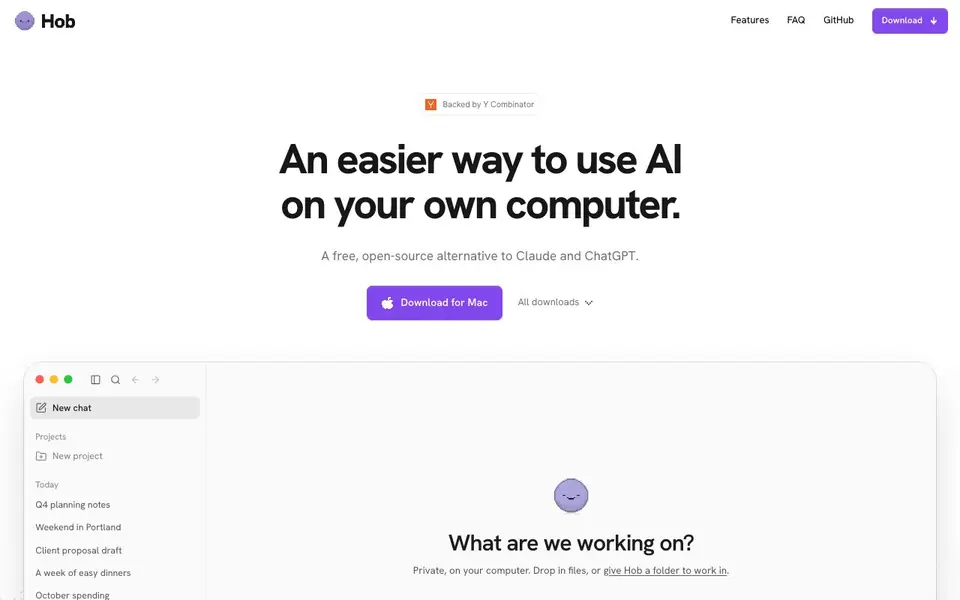
What is hob?
Hob is a free, open-source AI chat application that runs entirely on your own computer. It's designed as a private alternative to cloud-based assistants like Claude and ChatGPT. Because everything runs locally, your chats stay on your device, and you can work without an internet connection.
Getting started is simple. You download the app for Mac or other platforms, and Hob automatically picks the best open-weight AI model that fits your computer's hardware. It handles all the setup for you, so you don't need to configure anything. You can then start chatting, and even give Hob files like spreadsheets, documents, or PDFs to work with. It can fill out forms, summarize documents, and produce results you can open, edit, and share.
Hob is built for anyone who values privacy and wants AI assistance without sending data to the cloud. It's especially useful if you work with sensitive files or need AI in offline environments. the website code is on GitHub under an MIT license, and it's backed by Y Combinator. You can connect your email, calendar, and other apps like Notion and Linear, but you control what Hob can access—it asks before changing files.
hob features
- Local AI: Runs entirely on your computer, keeping your chats private and secure.
- Offline capability: Works without an internet connection, so you can use it anywhere.
- Automatic model selection: Picks the best open-weight model that fits your computer's specs.
- File handling: Works with local files like PDFs, spreadsheets, and documents, and can edit them.
- App connections: Integrates with email, calendar, and apps like Notion and Linear, with your permission.
What you can do with hob
- Chat privately with an AI assistant without sending data to the cloud.
- Work through documents and PDFs offline, asking questions and getting summaries.
- Fill out forms and edit spreadsheets directly in the chat.
- Connect your email and calendar to manage tasks with AI help.
How to get started with hob
- Download the Hob app for Mac or your platform from the website.
- Open the app; Hob automatically picks the best AI model for your computer.
- Start chatting, and give Hob files or connect apps to work with them.
Tips for better results with hob
- Start with a small test file like a one-page PDF to see how Hob handles it before trusting it with larger documents or spreadsheets.
- Use Hob offline for sensitive work by disconnecting from the internet, ensuring your chats and files never leave your computer.
- Give Hob explicit instructions about what to do with your files, such as summarizing or filling out forms, to get more accurate results.
- Connect only the folders or apps you need for a task, and review what Hob asks to access before allowing changes to your files.
hob pricing
hob is free to use according to its website.
What to check before you rely on hob
- Check that your computer meets the hardware requirements for running Hob locally, since the website does not list specific system specs.
- Confirm which operating systems are supported beyond Mac, as the site only highlights a Mac download and says all downloads are available.
- Review the open-source code on GitHub to verify how your data is handled, since the website does not detail data retention or privacy policies.
Who hob is for
hob suits privacy-conscious users, offline workers, students and professionals. If that is not you, the AI chatbots below may fit better.
Similar tools compared with hob
| Tool | What it is | Pricing |
|---|---|---|
| hob | Free, private AI that runs locally | Free |
| SiChatApp | Free browser chat with multiple AI models | Freemium |
| ChatGPT | AI chatbot for chat, work, and creation | Freemium |
| Gemini | AI assistant for chat and tasks | Freemium |
| Kimi | AI assistant for coding and knowledge work | See website |
hob FAQ
How is Hob different from other local AI apps?
Hob handles the setup for you. It picks the best open-weight model that fits your computer and configures everything, so you don't need technical skills to run a local AI.
Is Hob as capable as Claude or ChatGPT?
Hob uses frontier open-weight models like Qwen, Gemma, and GPT-OSS. It's designed to be a free, private alternative, but capabilities may vary compared to cloud-based assistants.
What stays on my computer?
All your chats stay on your computer. Hob only shares the folders you explicitly allow, and it asks before changing any files. You can undo changes if needed.
Are there any extra costs?
No. Hob is free with no subscription and no account required. There are no extra costs mentioned on the website.
What platforms can I run Hob on besides Mac?
Hob is available for download on Mac, and the website also lists an "All downloads" option, which suggests other platforms are supported. To see the full list of supported operating systems, check the downloads section on the Hob website.
Does Hob require an account or subscription to use?
Hob is free and requires no subscription and no account. You can download the app and start using it without signing up or paying anything. This is stated directly on the Hob website, so you can begin chatting privately right away.
Can Hob work with my email and calendar on Windows or Linux?
The Hob website says email and calendar connections are built in on Mac. For other platforms, it doesn't specify whether these integrations are available. Check the Hob downloads page or documentation for details on which features are supported on your operating system.


