

What is GoCodeo?
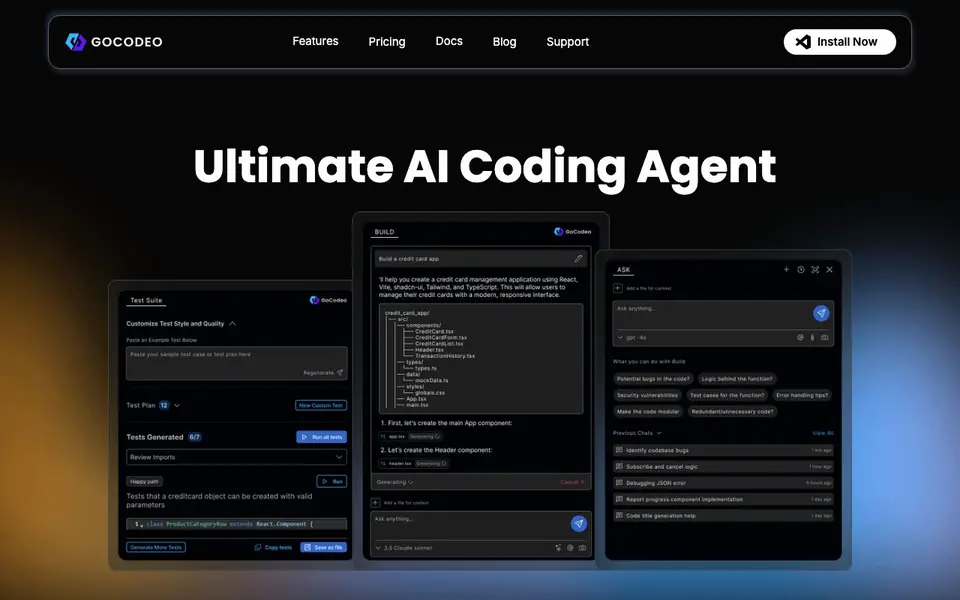
GoCodeo is an AI coding agent that works inside your IDE to help you build software faster. It focuses on three main areas: building, asking, and testing. You can prompt it to generate code, ask questions about your code, and create tests automatically. It supports many programming languages and frameworks, and it integrates with tools like Supabase and Vercel for easy deployment.
To get started, you install the GoCodeo extension in VS Code. You can then use keyboard shortcuts to open the AI chat or trigger code generation. For example, press Ctrl+Shift+K on Windows to start building, and Ctrl+Shift+L to ask questions. You can also use the one-click generate tests feature to create test cases for your code.
GoCodeo is designed for developers who want to speed up their workflow. It works with popular models like Claude, Gemini, and GPT-4o. It also supports web search and CLI recommendations. The website mentions that it is trusted by over 25,000 engineers. It is free to try, with paid plans available for more features.
GoCodeo features
- Real-time code generation: Generate production-ready code with modular project setup across 25+ frameworks.
- AI-powered chat: Ask questions about your code with context, including code and image support.
- Automated test generation: Create production-ready tests in under 30 seconds with one click.
- MCP-powered agents: Integrate 100+ tools for context-aware actions across the software development lifecycle.
- AI-driven Git integration: Initialize repos, commit changes, and create PRs with a link automatically.
What you can do with GoCodeo
- Generate code for a new project using your preferred framework.
- Ask GoCodeo to explain a complex piece of code in your IDE.
- Create unit tests for a function without writing them manually.
- Deploy your app to Vercel with a single prompt.
How to get started with GoCodeo
- Install the GoCodeo extension from the VS Code marketplace.
- Open the AI chat or code generation panel using the keyboard shortcuts.
- Type your prompt or select code to generate, test, or ask questions.
Tips for better results with GoCodeo
- Install the GoCodeo extension in VS Code and learn the shortcuts Ctrl+Shift+K for building and Ctrl+Shift+L for asking questions to speed up your workflow.
- Use GoCodeo's one-click generate tests feature to create production-ready tests in under 30 seconds, then run them and refine with AI suggestions.
- Prompt GoCodeo to set up Supabase or deploy to Vercel with a single prompt, and use its AI-driven Git integration to commit and create PRs automatically.
- Ask GoCodeo to explain complex code with code and image context, and use @Web for web search to get instant coding insights without leaving your IDE.
GoCodeo pricing
GoCodeo has a free way to start, with paid plans for heavier use. Check gocodeo.com for current limits and prices.
What to check before you rely on GoCodeo
- Check the free tier limits on the pricing page, as the website labels GoCodeo freemium but does not list specific quotas for builds, tests, or chat messages.
- Verify which of the supported LLMs like Claude, Gemini, or GPT-4o are available on your plan, since the website does not state model access per tier.
- Confirm data and privacy policies for code and images you share with GoCodeo, as the website does not detail how your code is stored or used.
Who GoCodeo is for
GoCodeo suits developers, software engineers and tech leads. If that is not you, the AI coding tools below may fit better.
Similar tools compared with GoCodeo
| Tool | What it is | Pricing |
|---|---|---|
| GoCodeo | AI coding agent for IDE | Freemium |
| Tabnine | Agentic quality engineering platform for AI code | See website |
| CodeRabbit | AI pull request reviewer and prioritizer | Free trial |
| Cursor | AI coding agent for ambitious software | See website |
| Claude Code | AI coding agent for terminal and IDE | Paid |
GoCodeo FAQ
What is GoCodeo?
GoCodeo is an AI coding agent that works inside VS Code. It helps you write code, ask questions about your code, and generate tests automatically. It supports many programming languages and frameworks.
Is GoCodeo free?
GoCodeo offers a free trial. The website says you can try it for free, but it does not specify if there is a permanent free plan. Check the pricing page for details.
Who is GoCodeo for?
GoCodeo is for developers and engineers who want to speed up their coding workflow. It is especially useful for those who find writing tests tedious, as it automates test generation.
What can I build with GoCodeo?
You can build full projects using GoCodeo's code generation. It supports 25+ frontend and backend frameworks, and it can set up Supabase and deploy to Vercel with a single prompt.
Does GoCodeo work on Mac, Windows, or both?
GoCodeo works in VS Code on both Windows and Mac. The keyboard shortcuts differ slightly: Ctrl+Shift+K on Windows and Cmd+Shift+K on Mac for building, and Ctrl+Shift+L or Cmd+Shift+L for asking. The website does not mention other operating systems or IDEs.
What can GoCodeo export or connect to besides Supabase and Vercel?
GoCodeo can integrate with 100+ tools through MCP-powered agents for context-aware actions. It also has AI-driven Git integration for repos, commits, and PRs. The website specifically mentions Supabase and Vercel for setup and deployment, but does not list other export or integration targets.
Does GoCodeo require an account to use the free plan?
The website does not explicitly state whether an account is required for the free plan. To get started, you install the GoCodeo extension in VS Code and use keyboard shortcuts. For details on account requirements or free plan limits, check the pricing page or sign-up flow on gocodeo.com.


