

What is FlowSpeech?
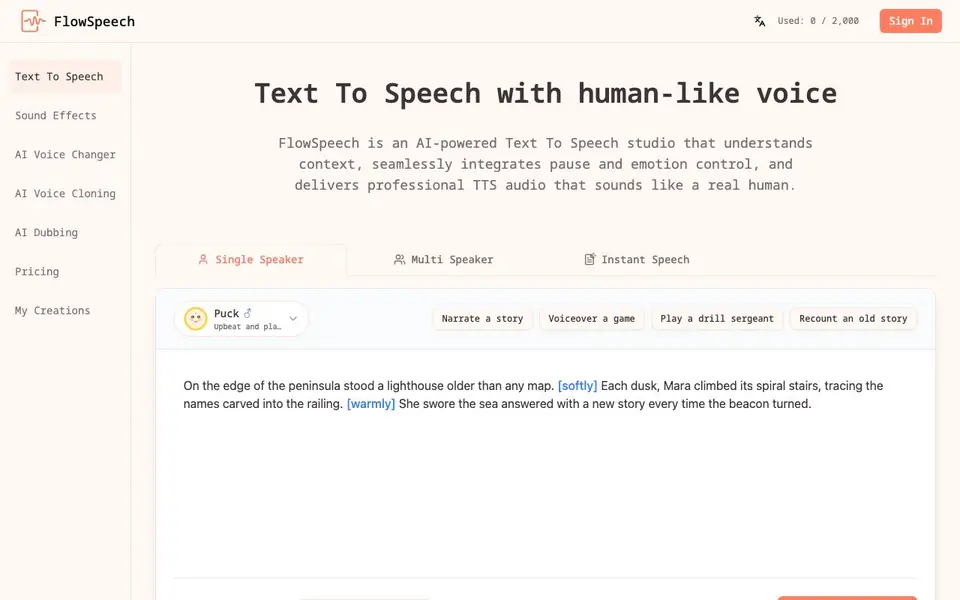
FlowSpeech is an AI-powered text to speech studio that focuses on understanding the context of your script. It automatically analyzes sentiment, timing, and nuance to deliver audio that sounds like a real human, not a robotic voice. You can also manually fine-tune the output for precise emotional impact.
To get started, you type or upload your script into the generator. You can add emotion tags, like [whisper] or [shout], or switch to a [strong British accent] using simple brackets. For pacing, insert pause tags like [⌛1.0s] to control the rhythm. The tool also offers a Single Speaker mode that automatically adds emotion cues, and a Multi Speaker mode that detects different speakers and assigns suitable voices for conversations.
FlowSpeech suits anyone creating voiceovers, podcasts, stories, or game narration. It also includes tools for sound effects, voice changing, voice cloning, and dubbing. The website does not state specific pricing details, so you would need to check its pricing page for plan options.
FlowSpeech features
- Context-aware emotion delivery: Automatically infuses joy, sorrow, or excitement into your audio based on script context.
- Custom emotion and accent tags: Use brackets like [whisper] or [shout] to instruct the AI for specific effects.
- Precise pause controls: Insert tags like [⌛1.0s] to master pacing without needing external audio editing software.
- Single Speaker emotion tagging: Analyzes your script and adds context-aware cues while keeping one consistent voice.
- Multi Speaker auto voice matching: Detects different speakers, splits the script, and pairs each part with a suitable AI voice.
What you can do with FlowSpeech
- Narrate a story with emotional depth and natural pacing.
- Voiceover a game with different character voices automatically assigned.
- Produce a podcast conversation with multiple distinct speakers.
- Create a professional voiceover for a video or presentation.
How to get started with FlowSpeech
- Type, paste, or upload your script into the text to speech generator.
- Add emotion or pause tags to customize the delivery, or use the auto-tagging feature.
- Choose Single Speaker or Multi Speaker mode, then click Generate Speech to produce your audio.
Tips for better results with FlowSpeech
- Write your script with natural dialogue and punctuation, then let FlowSpeech analyze the context before adding any manual tags to see what the AI infers on its own.
- Use bracket tags like [whisper] or [shout] in FlowSpeech to force specific emotions, but test one tag at a time so you can hear how each instruction changes the delivery.
- Insert pause tags such as [⌛1.0s] in FlowSpeech to control pacing exactly, especially before key lines, so the audio breathes without needing external editing.
- In Multi Speaker mode, label each speaker clearly in your script so FlowSpeech can detect and assign distinct voices, then review the split to confirm the casting matches your intent.
FlowSpeech pricing
FlowSpeech’s homepage does not list prices. Check flowspeech.io for current plans.
What to check before you rely on FlowSpeech
- Check the pricing page on flowspeech.io because the website does not list any plan costs, so you need to verify what you would pay before committing.
- Confirm the export formats and download options for your generated audio, as the website does not state which file types or quality settings are available.
- Review the privacy policy to see how your uploaded scripts are stored and used, since the site does not detail data handling practices for your content.
Who FlowSpeech is for
FlowSpeech suits content creators, podcasters, game developers and video producers. If that is not you, the AI voice generators below may fit better.
Similar tools compared with FlowSpeech
| Tool | What it is | Pricing |
|---|---|---|
| FlowSpeech | Context-aware AI text to speech studio | See website |
| ElevenLabs | AI voice generator and voice agents platform | Freemium |
| Murf | AI voice and conversational agent platform | See website |
| Resemble AI | AI deepfake detection and watermarking platform | See website |
| Speechify | AI text-to-speech and voice assistant | Freemium |
FlowSpeech FAQ
What is FlowSpeech?
FlowSpeech is an AI text to speech studio that converts your scripts into lifelike audio. It understands context to add emotion and pauses, and supports multiple speakers for conversations.
Can I control the emotion in the generated speech?
Yes. You can manually add emotion tags like [whisper] or [shout], or use the Single Speaker mode to automatically insert context-aware cues based on your script's tone.
Does FlowSpeech support multiple speakers?
Yes. Multi Speaker mode automatically detects different speakers in your text, splits the script, and assigns a suitable AI voice to each segment for natural conversations.
What is the pricing for FlowSpeech?
The website does not state specific pricing details. You should visit the Pricing page on FlowSpeech's website to see available plans and costs.
What file formats can FlowSpeech export audio in?
The FlowSpeech website does not mention specific export file formats. To find out what audio formats are available, check the tool's interface or its documentation after you sign in and generate a sample.
Does FlowSpeech have a free plan or trial?
The FlowSpeech website does not state whether it offers a free plan or a trial. You would need to visit the Pricing page or contact the company to see if there is a free tier or a test option.
Can FlowSpeech run on mobile devices or as a desktop app?
The FlowSpeech website does not mention a mobile app or a desktop application. It appears to be a web-based tool, so you likely access it through a browser on any device, but the site does not confirm this.


