
What is Cheapag?
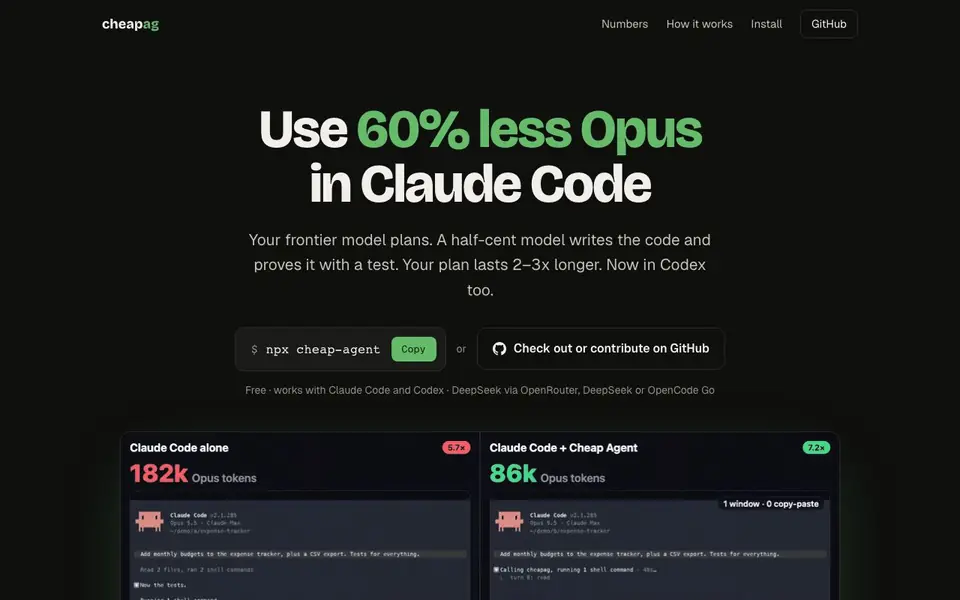
Cheap Agent is a free MCP server and plugin that makes your Claude Code or Codex plan last longer. Instead of your frontier model doing all the typing, it plans the work, then a half-cent model like DeepSeek writes the code and proves it with a test. The result is up to 63% fewer Opus tokens on real features, so your plan lasts 2–3x longer.
You keep using Claude Code or Codex exactly as before. Install with one command, pick a provider (OpenRouter, DeepSeek, or OpenCode Go), and paste your API key. In each project, run /cheapag:allow once. Then ask for changes normally. Cheap Agent turns your ask into a short task, a cheap model codes in its own git worktree, and only passing work lands.
It works on macOS, Linux, and Windows (with Git for Windows). The creator built it to help students and developers who can't afford expensive plans. It's honest about limits: on the 9 hardest bugs it solved 6 where plain Opus solved 7, and it shines on real features and fixes, not tiny jobs.
Cheapag features
- Token savings: Uses up to 63% fewer Opus tokens on real features, tested on SWE-bench.
- Test-driven coding: The cheap model writes a failing test, fixes code, and makes it pass.
- Verification: Cheap Agent runs tests itself; only passing work lands, uncommitted.
- Multi-provider: Works with OpenRouter, DeepSeek, or OpenCode Go for the cheap model.
- Easy setup: One command installs it, and one /cheapag:allow per project enables it.
What you can do with Cheapag
- Add a new feature to your project with fewer Opus tokens.
- Fix everyday bugs while keeping your plan usage low.
- Stretch a $20 Claude plan to get more work done.
- Use it in Codex by adding the plugin and trusting the hooks.
How to get started with Cheapag
- Run npx cheap-agent in your terminal and pick a provider.
- Paste your API key into the hidden prompt.
- In each project, run /cheapag:allow once in Claude Code or Codex.
Tips for better results with Cheapag
- Install Cheap Agent with the npx command, then run /cheapag:allow once in each project before asking for changes to activate it for that codebase.
- Use Cheap Agent for real features and bug fixes in actual code, not tiny jobs, since it saves up to 63% Opus tokens on substantial work.
- Pick a provider like OpenRouter and ensure your API key has a few dollars on it, so the cheap model can run tests without interruptions.
- Let Cheap Agent delegate tasks to the cheap model and verify tests itself; only passing work lands, so trust its summary before reviewing.
- For Codex, add the plugin and rely on the hooks to delegate typing to the cheap model, keeping your frontier model for planning only.
Cheapag pricing
Cheapag is free to use according to its website.
What to check before you rely on Cheapag
- Verify your Node.js is version 20 or higher and that you have Claude Code or Codex installed, since Cheap Agent requires both to run.
- Check that your provider API key has sufficient funds, as the website says you need a few dollars but does not list specific minimum balances.
- Confirm your operating system is macOS, Linux, or Windows with Git for Windows, as Cheap Agent supports these but the site does not detail others.
- Review the test results Cheap Agent reports, since it runs tests itself and only lands passing work, but the site does not state how failures are shown.
- Check the pricing label says free, but the website does not list any paid plans or limits, so assume no stated caps on usage or features.
Who Cheapag is for
Cheapag suits developers, students, Claude Code users and Codex users. If that is not you, the AI coding tools below may fit better.
Similar tools compared with Cheapag
| Tool | What it is | Pricing |
|---|---|---|
| Cheapag | AI coding assistant that saves tokens | Free |
| Tabnine | Agentic quality engineering platform for AI code | See website |
| CodeRabbit | AI pull request reviewer and prioritizer | Free trial |
| Cursor | AI coding agent for ambitious software | See website |
| Claude Code | AI coding agent for terminal and IDE | Paid |
Cheapag FAQ
What does Cheap Agent do?
It's a free MCP server and plugin for Claude Code and Codex. It delegates coding tasks to a cheaper model like DeepSeek, so your frontier model plans and checks, not types everything. You save tokens and make your plan last longer.
Is Cheap Agent free?
Yes, the tool itself is free. You need an API key with a few dollars on it from OpenRouter, DeepSeek, or OpenCode Go to pay for the cheap model's usage. The site says a few dollars lasts hundreds of tasks.
Who is Cheap Agent for?
It's for developers using Claude Code or Codex who want to reduce token usage. The creator mentions students in developing countries who can't afford expensive plans, but it suits anyone looking to stretch their plan.
Does it work with Codex?
Yes, the site says it works with Codex too. You log in with npx cheap-agent, add the plugin with codex plugin marketplace add, then trust the hooks and run $cheapag:allow once per project.
What can Cheap Agent export or connect to besides Claude Code and Codex?
Cheap Agent works as an MCP server and plugin for Claude Code and Codex, and it connects to OpenRouter, DeepSeek, or OpenCode Go for the cheap model. The website does not mention exporting data or connecting to other tools, so check the GitHub page for any updates on integrations.
Does Cheap Agent run on Windows, and what are the system requirements?
Cheap Agent runs on macOS, Linux, and Windows with Git for Windows. You also need Node.js 20+ and an API key from OpenRouter, DeepSeek, or OpenCode Go. The website does not specify other device or platform support, so verify the GitHub repository for the latest requirements.
What does the free plan of Cheap Agent include, and are there any paid tiers?
Cheap Agent is free to use. You only pay for the API costs of the cheap model provider you choose, like DeepSeek. The website does not mention any paid plans or premium features, so check the GitHub page or the tool's documentation for any future pricing changes.


