

What is Supawork AI?
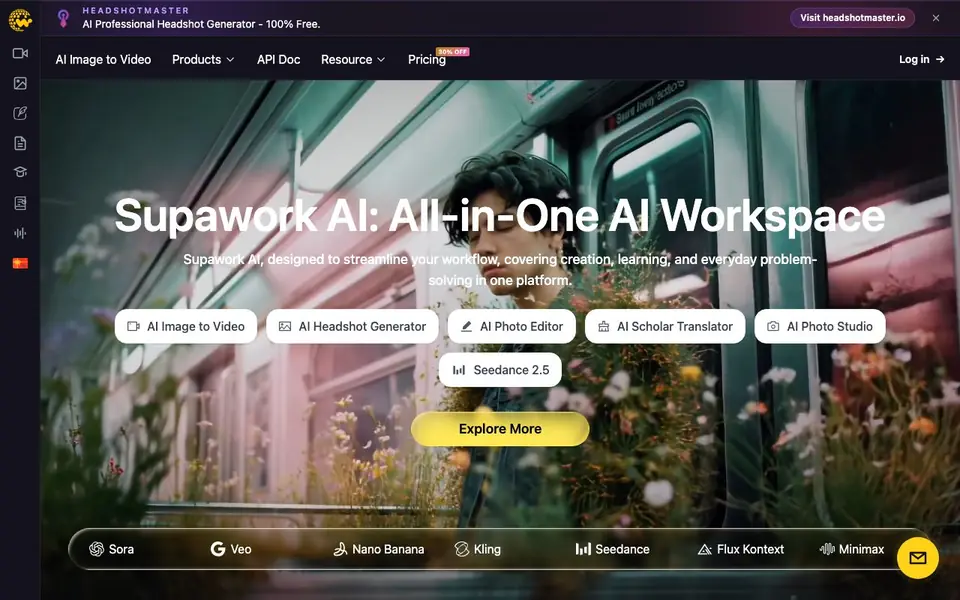
Supawork AI is an all-in-one AI workspace that brings together creation, learning, and everyday problem-solving tools. It offers a range of features including an AI headshot generator, image-to-video conversion, photo editing, and a scholar translator for academic PDFs. The platform aims to streamline your workflow by providing access to leading AI models in a single interface.
You can start by choosing a tool like the AI Headshot Generator to create professional headshots for LinkedIn or portfolios. Upload a photo, and the AI adapts to your features and style preferences, delivering studio-quality results with natural lighting and realistic backgrounds. For videos, you can use AI Motion to add cinematic effects like explosions or smoke, or AI Lip Sync to match speech to lip movements. The AI Removal tool cleans up watermarks and unwanted objects from images, videos, and GIFs.
Supawork AI is designed for social media creators, film makers, short video makers, and students. It helps you generate eye-catching images, viral short videos, and study content. The platform also includes tools like an AI resume builder, passport photo maker, and avatar generator. New tools are added regularly, and it claims to serve over 1 million customers.
Supawork AI features
- AI Headshot Generator: Creates professional headshots instantly with natural lighting and realistic backgrounds.
- AI Image to Video: Converts still images into cinematic videos using next-gen AI models.
- AI Removal: Removes watermarks, logos, and unwanted objects from images, videos, and GIFs.
- AI Motion: Adds cinematic VFX like explosions and particle effects to videos with one click.
- AI Scholar Translator: Translates academic PDFs while preserving citations and technical terminology.
What you can do with Supawork AI
- Generate a professional headshot for your LinkedIn profile without a photographer.
- Turn a product photo into a short promotional video for social media.
- Remove a watermark from an image before posting it on Instagram.
- Translate a research paper into another language while keeping references intact.
How to get started with Supawork AI
- Visit Supawork AI's website and choose a tool from the menu, like AI Headshot Generator or AI Image to Video.
- Upload your photo, video, or PDF, and adjust any style or preference settings.
- Let the AI process your content, then download the result or share it directly.
Tips for better results with Supawork AI
- Start with a high-resolution, well-lit photo when using the AI Headshot Generator to get the most natural facial details and realistic background results.
- For AI Motion, choose videos with clear subjects and stable framing so the added effects like explosions or smoke blend convincingly into the scene.
- Use the AI Scholar Translator on PDFs with clean text formatting to preserve citations and technical terms accurately; test a short section first.
- When using AI Removal, select the smallest area around the watermark or object to avoid altering surrounding details and keep the image quality intact.
Supawork AI pricing
Supawork AI’s homepage does not list prices. Check supawork.ai for current plans.
What to check before you rely on Supawork AI
- Check whether the free version or trial includes the specific tool you need, since the website does not list any pricing or plan details.
- Review the export formats and resolution limits for generated images and videos, as the website does not state these for each tool.
- Confirm how your uploaded photos and PDFs are stored and used, because the website does not clearly explain its data privacy or retention policies.
Who Supawork AI is for
Supawork AI suits social media creators, film makers, short video makers and students. If that is not you, the AI avatar generators below may fit better.
Similar tools compared with Supawork AI
| Tool | What it is | Pricing |
|---|---|---|
| Supawork AI | All-in-one AI creation workspace | See website |
| D-ID | AI video and interactive avatar platform | Free trial |
| Synthesia | AI video and avatar platform for business | Freemium |
| Fliki | AI video generator with lifelike voiceovers | Freemium |
| Hedra | Visual intelligence platform for creation | See website |
Supawork AI FAQ
Is Supawork AI free to use?
The website does not state a specific pricing model. It mentions a 30% discount and a pricing page, but you'll need to check that page for details on free or paid plans.
What can I create with Supawork AI?
You can create professional headshots, cinematic videos from images, add VFX effects, remove objects, and translate academic PDFs. It also offers resume building and avatar generation tools.
Who is Supawork AI designed for?
It's aimed at social media creators, film makers, short video makers, and students. The tools help with generating content, creating study materials, and speeding up creative work.
Does Supawork AI support academic translation?
Yes, the AI Scholar Translator tool translates academic PDFs while preserving citations, technical jargon, and formatting. You can upload a paper and get a precise translation in seconds.
Can Supawork AI export my projects to other platforms or file formats?
The Supawork AI website does not mention specific export options or integrations with other platforms. To find out what export formats or connections are available, check the tool's interface or contact their support team directly.
Does Supawork AI run on mobile devices or only on desktop?
The Supawork AI website does not specify which devices or platforms it supports. Since it is a web-based workspace, you can likely access it through a browser on most devices, but for confirmation, try visiting the site on your mobile phone or check their help resources.
What does the free plan of Supawork AI include?
The Supawork AI website does not mention a free plan or its features. Pricing details are not listed on the site, so you would need to sign up or contact their team to learn about any free tier or trial options.


