

What is GenYOU?
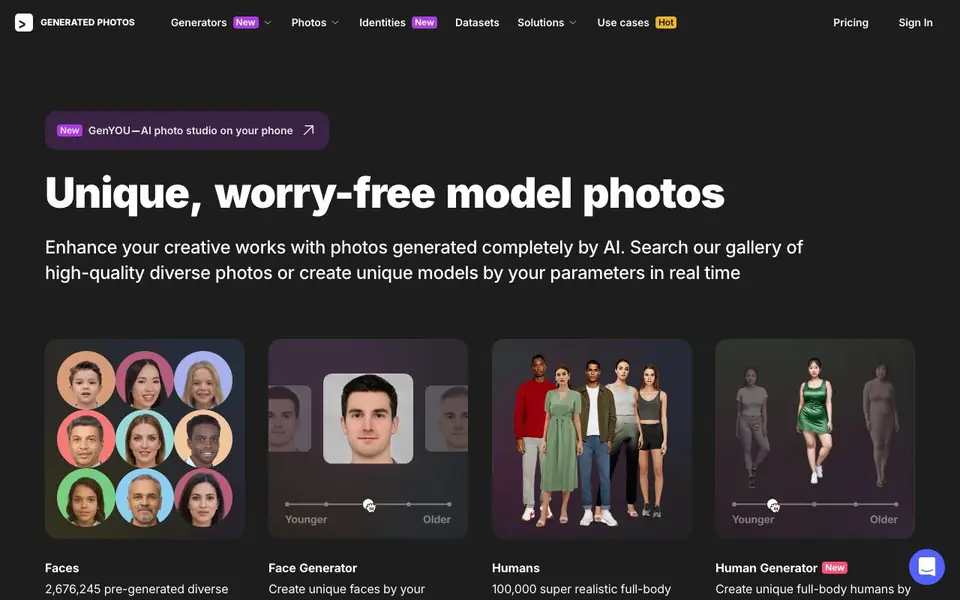
Generated Photos is a library of AI-created model photos. It offers over 2.6 million pre-generated diverse faces and 100,000 full-body human images. You can search this gallery or create new models in real time using your own parameters. All images are generated from scratch by AI, so they are copyright-free and worry-free for creative projects.
You can start by exploring the Faces database with filters, or upload a similar face to the Anonymizer to find matches. Then, use the Face Generator or Human Generator to create unique photo-realistic faces or full-body humans. You can also upload and modify your own photos in these tools. For larger projects, bulk downloads, custom datasets, and API integration are available.
This tool suits advertisers, designers, marketers, researchers, and machine learning teams. The website also mentions solutions for gaming, academic research, and face perception. If you need specific photos or want to integrate generated humans into your project, you can contact the team to discuss custom datasets or API access.
GenYOU features
- Face Generator: Create unique faces by adjusting parameters like age, gender, and ethnicity in real time.
- Human Generator: Generate full-body human images with your chosen attributes for diverse visuals.
- Anonymizer: Upload a similar face to find matches or anonymize existing photos in the database.
- Bulk download: Scale up your project with datasets or API integration for large-scale needs.
- Custom datasets: Request tailored sets of generated images for your specific business or research needs.
What you can do with GenYOU
- Create diverse model photos for advertising campaigns without copyright concerns.
- Generate unique faces for design mockups and marketing materials.
- Build training datasets for machine learning models using AI-generated humans.
- Anonymize faces in your existing photos for privacy-sensitive projects.
How to get started with GenYOU
- Browse the Faces database or use filters to find pre-generated images.
- Use Face Generator or Human Generator to create new models with your parameters.
- Download images, or contact the team for bulk datasets or API access.
Tips for better results with GenYOU
- Use the Anonymizer to upload a similar face and find matches in the Faces database before generating new ones, saving time when you need a specific look.
- In the Face Generator, adjust parameters like age, gender, and ethnicity in real time to fine-tune results, but start with a broad search to see the range available.
- For full-body images, use the Human Generator to set attributes for diverse visuals, and upload your own photos to modify them directly within the tool.
- If you have a large project, contact the team about bulk downloads or custom datasets, as the website does not list pricing or limits for these options.
- GenYOU lets you create unique models on your phone, so use it to quickly prototype ideas before committing to a final set of images for your campaign.
GenYOU pricing
GenYOU’s homepage does not list prices. Check generated.photos for current plans.
What to check before you rely on GenYOU
- Check whether the free gallery search covers your needs, as the website does not state any limits on searching or downloading individual images.
- Verify if the Face Generator and Human Generator require an account or payment, since pricing is not listed on the site.
- Review the privacy policy to understand how uploaded photos are handled, especially when using the Anonymizer for sensitive work.
Who GenYOU is for
GenYOU suits advertisers, designers, marketers and researchers. If that is not you, the AI avatar generators below may fit better.
Similar tools compared with GenYOU
| Tool | What it is | Pricing |
|---|---|---|
| GenYOU | AI face and human photo generator | See website |
| D-ID | AI video and interactive avatar platform | Free trial |
| Synthesia | AI video and avatar platform for business | Freemium |
| Fliki | AI video generator with lifelike voiceovers | Freemium |
| Hedra | Visual intelligence platform for creation | See website |
GenYOU FAQ
What is GenYOU?
GenYOU is an AI photo studio on your phone, mentioned on the website. It appears to let you create or edit photos using AI, but the site does not provide details on its specific features or availability.
Are the images copyright-free?
Yes, the website states that images are generated completely by AI and are copyright-free. This makes them suitable for ads, design, marketing, research, and machine learning without worrying about model releases.
Can I create custom images?
Yes, you can use the Face Generator and Human Generator to create unique photo-realistic faces or full-body humans by setting your own parameters. You can also upload and modify your own photos in these tools.
Is there a free plan?
The website does not state whether a free plan is available. Pricing information is not provided on the homepage, so you would need to check the Pricing section or contact the team for details.
What can GenYOU export or connect to?
The GenYOU page does not mention specific export formats or integrations. For details on exporting your creations or connecting GenYOU to other tools, check the app's in-app settings or contact the support team at work.with@generated.photos.
Does GenYOU run on both iOS and Android?
GenYOU is described as an AI photo studio on your phone, but the website does not specify which mobile platforms it supports. To confirm whether GenYOU is available on your device, check your app store or contact the team at work.with@generated.photos.
What does the free plan for GenYOU include?
The website does not detail a free plan for GenYOU. Pricing information is not listed on the page. For specifics on what GenYOU offers for free or paid, visit the pricing section on the Generated Photos website or reach out to work.with@generated.photos.


