

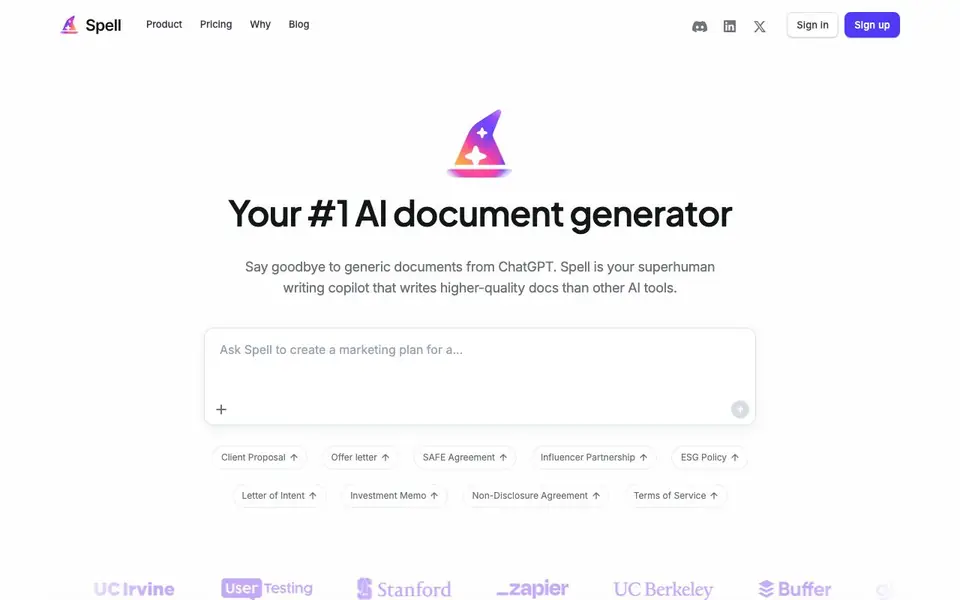
What is Spell?
Spell is an AI document generator that helps you move from a blank page to a finished document quickly. It focuses on producing higher-quality output than generic AI chatbots, with a wide range of document types like proposals, offer letters, legal agreements, and essays. You describe what you need in plain language, and Spell writes a strong first draft for you.
After the draft is ready, you can refine it by talking to the built-in editor. You can update sections, add data, or adjust tone through a chat-like interface. Once you are satisfied, you can share the document with others and collaborate in real time, making it easy to work with teammates or clients.
Spell suits professionals, students, and anyone who needs well-structured documents without starting from scratch. The website lists many examples, from business plans and marketing briefs to research abstracts and wedding speeches. It does not mention pricing details, so you should check the pricing page for cost information.
Spell features
- Natural language input: Describe your document in plain words and get a draft in seconds.
- High-quality drafts: Produces more polished and professional output than typical AI chat tools.
- Interactive editor: Talk to the editor to refine, revise, and update your document after the first draft.
- Real-time collaboration: Share your document with others and work together simultaneously.
- Wide document variety: Supports business, academic, and personal documents from proposals to essays.
- Template prompts: Offers many ready-made prompts like resignation letters, press releases, and job descriptions.
What you can do with Spell
- Draft a business proposal or partnership agreement for a client.
- Create a marketing campaign brief or product launch press release.
- Write a cover letter, resignation letter, or performance review.
- Generate an academic essay, research abstract, or lab report.
- Prepare a wedding speech, thank you letter, or personal bio.
How to get started with Spell
- Describe what you want to create in natural language, like a resignation letter or marketing brief.
- Spell writes a high-quality first draft of your document in seconds.
- Talk to the editor to update and refine your document, then share it to collaborate in real time.
Tips for better results with Spell
- Describe your document in specific detail, including audience, tone, and key sections, so Spell generates a draft that matches your needs instead of a generic one.
- Use Spell's interactive editor to refine sections one at a time, asking it to add data, adjust tone, or rewrite parts, rather than starting over from scratch.
- Try Spell's template prompts for common documents like resignation letters or press releases to see how it structures output, then customize the draft to fit your situation.
- After Spell produces a draft, review it for accuracy and completeness before sharing, and use the real-time collaboration feature to get feedback from teammates or clients.
Spell pricing
Spell’s homepage does not list prices. Check spellapp.com for current plans.
What to check before you rely on Spell
- Check the pricing page because the website does not state any costs, and you need to know if Spell has a free tier or subscription before committing.
- Verify what document export formats Spell supports, such as PDF or Word, since the website does not list export options and you may need a specific format.
- Review Spell's data and privacy policy to see how your documents are stored and used, as the website does not provide details on data handling.
Who Spell is for
Spell suits professionals, students, job seekers and business owners. If that is not you, the AI writing tools below may fit better.
Similar tools compared with Spell
| Tool | What it is | Pricing |
|---|---|---|
| Spell | AI document generator and writing copilot | See website |
| FreeSiTools | Free AI image prompt generator | Free |
| Jenni AI | AI academic writing and research assistant | Freemium |
| Wordtune | AI writing and paraphrasing assistant | Freemium |
| Grammarly | AI writing assistant for clear communication | Freemium |
Spell FAQ
What types of documents can Spell generate?
Spell can generate a wide range of documents, including business proposals, offer letters, legal agreements like NDAs, marketing briefs, press releases, cover letters, job descriptions, and even academic papers like essays and lab reports.
How is Spell different from ChatGPT?
Spell is designed specifically for document generation, aiming to produce higher-quality, less generic output than other AI tools. It offers a dedicated editor for refining documents and real-time collaboration features, which are tailored for document creation.
Can I edit the documents after Spell writes them?
Yes. After Spell writes the first draft, you can talk to the editor to update and refine your document. This allows you to make changes, add details, or adjust the content to better fit your needs.
Does Spell allow collaboration with others?
Yes, you can share your document and collaborate in real time. This makes it easy to work with teammates, clients, or colleagues on the same document simultaneously.
What file formats can Spell export documents in?
The Spell website does not mention specific export formats. It focuses on generating and refining documents within its editor. To find out if you can download your finished work as a PDF, Word file, or another format, check the Spell pricing or help pages for details.
Does Spell require creating an account to use it?
The Spell website shows a Sign up button, which suggests you need an account to use the tool. The site does not explicitly describe the sign-up process or whether a free trial is available. For specifics, visit the Spell sign-up page or pricing page.
Can Spell connect to other apps like Google Drive or Slack?
The Spell website does not mention integrations with other apps such as Google Drive, Slack, or Notion. It focuses on writing, editing, and collaborating on documents within its own interface. To see if integrations exist, check the Spell product or pricing pages for updates.


