

What is Resea AI?
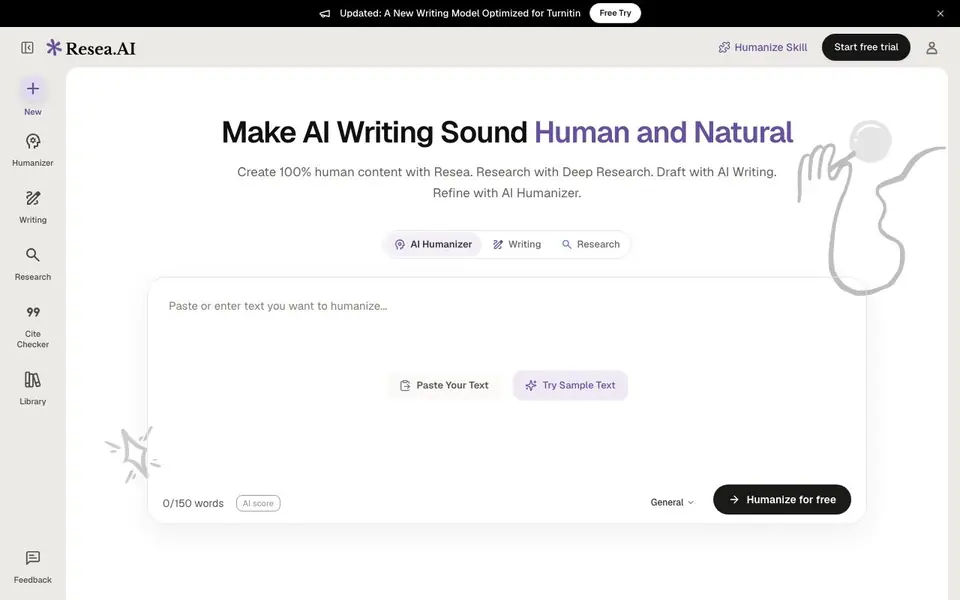
Resea is an AI writing platform centered on making AI-generated text sound human. Its main feature is the AI Humanizer, which rewrites text in seconds and rechecks it for AI patterns. The platform also includes Deep Research, a Writing Editor, and a Cite Checker, making it a full toolkit for academic and research writing.
You start by pasting your text into the humanizer. Resea analyzes it for patterns common in ChatGPT and Claude outputs, such as word choice, sentence variety, and predictability. Then it rewrites the content to remove robotic or repetitive phrasing, and gives you a human score. You can verify the result against detectors like GPTZero, ZeroGPT, and Turnitin.
The platform is free to start, and it is trusted by researchers at leading universities worldwide. A new writing model optimized for Turnitin was recently added. It suits students, academics, and anyone who wants to ensure their AI-assisted writing passes as original and natural.
Resea AI features
- AI Humanizer: Rewrites AI-generated text to sound natural and human in seconds.
- AI Score Check: Analyzes your text for patterns typical of ChatGPT and Claude outputs.
- Deep Research: Built-in tool for conducting thorough research within the platform.
- Cite Checker: Verifies and traces sources to ensure citations are accurate and verifiable.
- Writing Editor: Provides a space to draft and refine your writing alongside the humanizer.
What you can do with Resea AI
- Humanize AI-generated essays before submitting them to Turnitin.
- Check your draft for AI patterns and fix robotic phrasing.
- Research a topic and write a paper with verifiable sources.
- Refine academic writing to improve clarity and natural flow.
How to get started with Resea AI
- Go to Resea's website and click 'Start free trial' or 'Try Now'.
- Paste your text into the humanizer box or use the sample text.
- Click 'Humanize for free' and review the rewritten text and AI score.
Tips for better results with Resea AI
- Paste your raw AI-generated text into Resea and run the humanizer once, then review the output for accuracy before making manual edits to preserve your original meaning.
- Use Resea's AI score check before and after humanizing to see how much the pattern detection changes, and adjust the rewriting strength if the tool offers it.
- Run your humanized text through an external detector like GPTZero or Turnitin to confirm Resea's human score matches real-world results, since the tool's own score may differ.
- Combine Resea's Deep Research and Cite Checker with the humanizer when writing a paper, so you draft with verifiable sources and then humanize the final text in one workflow.
Resea AI pricing
Resea AI has a free way to start, with paid plans for heavier use. Check resea.ai for current limits and prices.
What to check before you rely on Resea AI
- Check whether Resea's free plan has word limits or usage caps per day, since the website only says free to start and does not list specific limits.
- Check if Resea supports the file formats you need for export, like DOCX or PDF, because the website does not state which export options are available.
- Check Resea's privacy policy for how your pasted text is stored and used, as the website does not clearly state data handling or retention practices.
Who Resea AI is for
Resea AI suits students, researchers and academic writers. If that is not you, the AI writing tools below may fit better.
Similar tools compared with Resea AI
| Tool | What it is | Pricing |
|---|---|---|
| Resea AI | AI writing and humanizing platform | Freemium |
| FreeSiTools | Free AI image prompt generator | Free |
| Jenni AI | AI academic writing and research assistant | Freemium |
| Wordtune | AI writing and paraphrasing assistant | Freemium |
| Grammarly | AI writing assistant for clear communication | Freemium |
Resea AI FAQ
What does Resea's AI Humanizer do?
It rewrites AI-generated text to sound more human and natural. It checks for patterns common in ChatGPT and Claude outputs, then fixes repetitive or robotic content, giving you a human score after the rewrite.
Is Resea free to use?
Yes, Resea is free to start. The website says 'Free to start' and offers a 'Start free trial' option, so you can try the humanizer and other features without paying upfront.
Who is Resea for?
Resea is aimed at researchers and students at universities. The website says it is trusted by researchers at leading universities worldwide, making it suitable for academic writing and research tasks.
Does Resea check against Turnitin?
Yes. Resea's website mentions a new writing model optimized for Turnitin, and the human score verification includes Turnitin alongside GPTZero and ZeroGPT, so you can check your text against these detectors.
Can Resea AI export or save my humanized text to a file or another app?
The Resea AI website does not mention any export options or direct integrations with other apps. You can copy the humanized text from the platform and paste it into your own documents or tools. For specific export features, check the Resea AI interface or contact support.
Does Resea AI work on mobile devices or only on desktop?
The Resea AI website does not specify which devices or operating systems are supported. It appears to be a web-based tool, so you can likely access it from any device with a browser, but the site does not confirm mobile compatibility. Check the Resea AI site for any system requirements or app availability.
What does the free plan of Resea AI include, and are there limits?
Resea AI is free to start, and you can humanize text for free. The website mentions a free trial and a 'Humanize for free' option, but it does not detail specific limits on word count or usage. For exact free plan limits, check the Resea AI pricing page or sign up to see your available credits.


