

What is ReadKidz?
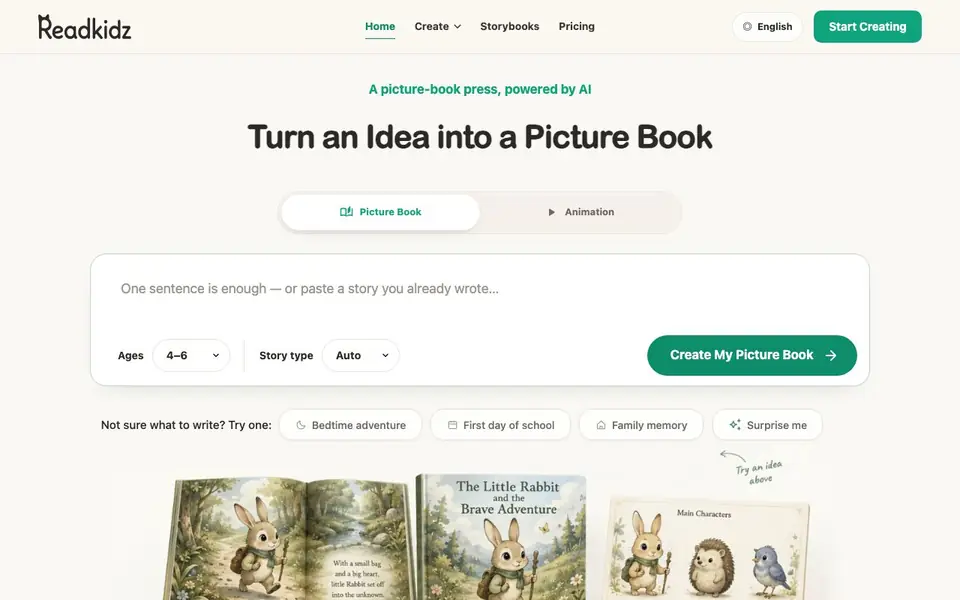
ReadKidz is an AI-powered picture-book press that helps you create complete illustrated children's books from just a sentence, memory, or character idea. You pick an age range and story type, and the tool generates the story, illustrations, and layout for you. It adapts language, story length, and text per page for ages 0-3, 5-7, and 9-12, so the same story can be told at different reading levels.
To get started, you enter a simple idea or choose a prompt like "bedtime adventure" or "first day of school." ReadKidz then shapes the plot and concept storyboard, helps define how characters look before illustrating, and brings every page together for you to review and refine. You can edit the story, swap art, and customize the book to make it uniquely yours.
The tool is designed for parents, educators, and anyone who wants to create personalized storybooks for children. You can print hardcover books or share them digitally with family and friends. The website shows a sample book created with the tool, demonstrating the quality of the illustrations and storytelling.
ReadKidz features
- One-sentence input: Start with a single idea, memory, or character and get a full story.
- Age-adaptive text: Automatically adjusts language, story length, and text per page for different age groups.
- Consistent illustrations: AI-generated art and layouts that maintain quality and character consistency.
- Edit and customize: Refine the story, swap artwork, and personalize the book to your liking.
- Print or share: Produce hardcover books or share the finished book digitally with others.
What you can do with ReadKidz
- Create a personalized bedtime story for your child from a simple idea.
- Generate a classroom picture book tailored to a specific age group.
- Turn a family memory into a printed keepsake book.
- Paste an existing story you wrote and have it illustrated and formatted.
How to get started with ReadKidz
- Enter a sentence, memory, or character idea, or choose a suggested prompt.
- Pick the age range and story type, then click to create your picture book.
- Review, refine, and customize the story and art, then print or share.
Tips for better results with ReadKidz
- Start with a specific character or memory rather than a vague idea, so ReadKidz can build a more focused plot and consistent illustrations from the beginning.
- Use the age range selector before generating, then review the sample text for your chosen age group to see how ReadKidz adjusts language and page length.
- After ReadKidz creates the storyboard, define your characters' appearance early so the illustrations stay consistent across every page you refine.
- Edit the generated story and swap art page by page, then preview the full book before printing or sharing to catch any layout issues.
ReadKidz pricing
ReadKidz’s homepage does not list prices. Check readkidz.com for current plans.
What to check before you rely on ReadKidz
- Check the pricing page on readkidz.com before starting, since the website does not list any plan costs or free trial limits.
- Confirm whether your chosen age range is supported for your story type, as ReadKidz only shows examples for ages 0-3, 5-7, and 9-12.
- Review the export and printing options carefully, because the site does not state which file formats or print sizes are available for digital sharing.
Who ReadKidz is for
ReadKidz suits parents, teachers, children's book authors and gift makers. If that is not you, the AI writing tools below may fit better.
Similar tools compared with ReadKidz
| Tool | What it is | Pricing |
|---|---|---|
| ReadKidz | AI children's book and storybook creator | See website |
| FreeSiTools | Free AI image prompt generator | Free |
| Jenni AI | AI academic writing and research assistant | Freemium |
| Wordtune | AI writing and paraphrasing assistant | Freemium |
| Grammarly | AI writing assistant for clear communication | Freemium |
ReadKidz FAQ
What can I create with ReadKidz?
You can create complete illustrated children's picture books from a single sentence, a memory, or a character idea. You can also paste a story you've already written and have it turned into a book with illustrations and layouts.
Does ReadKidz adapt the story for different ages?
Yes. ReadKidz adapts language, story length, and text per page for ages 0-3, 5-7, and 9-12. The same story can be told at different reading levels, as shown in the sample book on the website.
Can I customize the book after it's generated?
Yes. You can refine the story, swap artwork, and make the book uniquely yours. The tool is designed for editing and customization before you finalize the book.
Is ReadKidz free to use?
The website does not state pricing details. You can check the Pricing page on ReadKidz's website for information about plans and costs.
What can I export from ReadKidz, and can I connect it to other apps?
ReadKidz lets you print hardcover books or share the finished book digitally with family and friends. The website does not mention exporting to specific file formats or connecting to other apps. For details on export options, check the pricing or help sections on the site.
Does ReadKidz work on my device or platform?
ReadKidz is a web-based tool, so you can use it in a browser on any device with internet access. The website does not mention dedicated mobile apps or offline use. To confirm compatibility with your setup, visit the site and try the free creation flow.
What does the free plan include with ReadKidz, and do I need an account?
The website does not state whether ReadKidz has a free plan or what it includes, and it does not mention if you need an account to start creating. The pricing page is labeled unknown. To find out, check the pricing section on readkidz.com or contact their support.


