

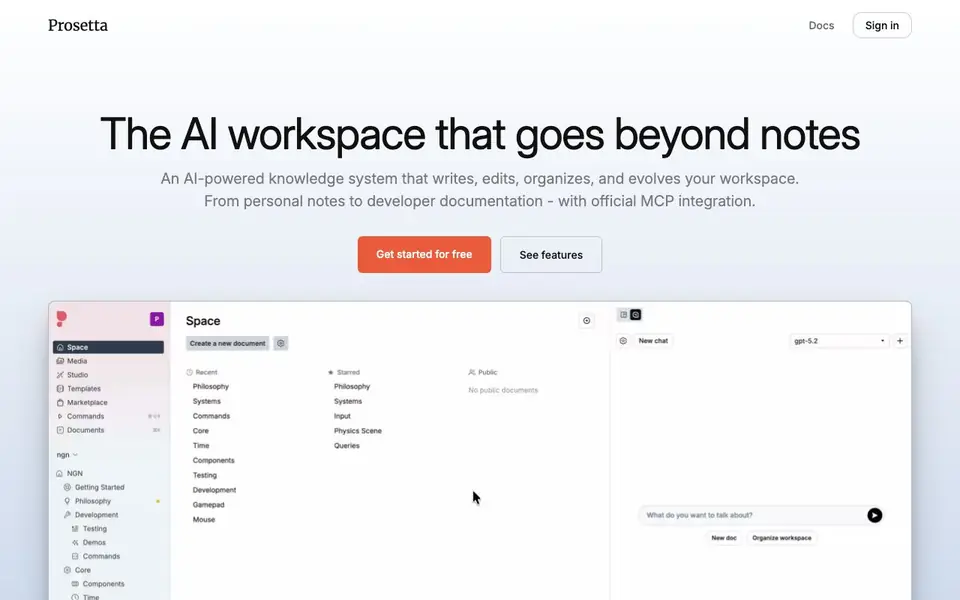
What is Prosetta?
Prosetta is an AI workspace that combines rich document editing with text, image, and video generation. It goes beyond simple note-taking by acting as a knowledge system that writes, edits, organizes, and evolves your content. You can use it for personal notes, team collaboration, or developer documentation.
You start by creating a space and adding documents. The AI assistant can edit, reorganize, or research your content, proposing changes that you approve before they are applied. Autopilot mode lets you describe a topic, and it builds the workspace structure, writes every page, and finds related images automatically.
For developers, Prosetta offers official MCP integration. You can connect any MCP-enabled AI tool to update your documentation in real time. The platform includes a marketplace of writing styles, image aesthetics, and video looks. Pricing starts with a free plan, with paid tiers offering more storage, AI credits, and collaboration features.
Prosetta features
- AI editing assistant: Proposes changes to your documents, which you review and approve before applying.
- Autopilot workspace builder: Creates a full knowledge base structure with written pages and images from a prompt.
- Real-time collaboration: See cursors and edits from teammates as they happen, including AI-generated changes.
- Official MCP integration: Connect any MCP-enabled AI tool to update your documentation directly from your code environment.
- Style marketplace: Choose from curated writing voices, image aesthetics, and video looks or create your own.
What you can do with Prosetta
- Build a structured knowledge base on any topic using Autopilot.
- Edit and reorganize existing documents with AI-suggested changes.
- Collaborate with your team on shared documents in real time.
- Keep developer documentation updated automatically via MCP tools.
How to get started with Prosetta
- Sign up for a free account on Prosetta's website.
- Create a space and start writing or paste existing content.
- Use the AI assistant to edit, or Autopilot to generate a full workspace from a prompt.
Tips for better results with Prosetta
- Start with Autopilot to generate a full workspace from a single prompt, then review and approve each page before refining details manually.
- Use Prosetta's AI assistant to propose edits on existing documents, approving only the changes that fit your intended structure and tone.
- Connect Prosetta to your MCP-enabled coding tools so documentation updates flow directly from your code environment without manual copying.
- Browse the style marketplace to apply a consistent writing voice or image aesthetic across your workspace, matching your project's audience.
- For team projects, enable real-time collaboration and watch AI-generated changes appear live, so everyone stays aligned without extra sync meetings.
Prosetta pricing
Prosetta has a free way to start, with paid plans for heavier use. Check prosetta.ai for current limits and prices.
What to check before you rely on Prosetta
- Check whether the free plan's 1 GB storage and $10 monthly AI credit cover your expected document volume and generation frequency.
- Verify that your data is handled securely, since Prosetta's site does not detail encryption, retention, or export policies on the pricing page.
- Confirm which platforms and browsers Prosetta supports, as the website does not list system requirements or offline access options.
Who Prosetta is for
Prosetta suits writers, teams, developers and researchers. If that is not you, the AI writing tools below may fit better.
Similar tools compared with Prosetta
| Tool | What it is | Pricing |
|---|---|---|
| Prosetta | AI workspace for writing and knowledge | Freemium |
| FreeSiTools | Free AI image prompt generator | Free |
| Jenni AI | AI academic writing and research assistant | Freemium |
| Wordtune | AI writing and paraphrasing assistant | Freemium |
| Grammarly | AI writing assistant for clear communication | Freemium |
Prosetta FAQ
What does Prosetta do?
Prosetta is an AI workspace that combines document editing with text, image, and video generation. It helps you write, edit, organize, and evolve your knowledge base, from personal notes to developer documentation.
Is Prosetta free?
Yes, Prosetta has a free plan with unlimited spaces and documents, 1 GB storage, and 3 templates. Paid plans start at $5 per month for Essentials, with more storage and AI credits.
Who is Prosetta for?
Prosetta suits writers, teams, and developers. Writers can use AI editing and styles, teams can collaborate in real time, and developers can integrate MCP tools to auto-update documentation.
Can I connect Prosetta to other AI tools?
Yes, Prosetta has official MCP integration. You can connect any MCP-enabled AI tool, like Claude, to read, create, edit, and delete documents in your workspace.
What devices or platforms does Prosetta run on?
Prosetta is a web-based AI workspace, so you can access it from any device with a browser. The website does not mention dedicated mobile apps or desktop clients. For the most current information on supported platforms, check the Prosetta website or docs.
What does the Prosetta free plan include?
The Prosetta free plan gives you unlimited spaces and documents, 1 GB of storage, and 3 templates. It includes access to AI features with a monthly credit of $10, but you can also bring your own API key (BYOK) for AI. Collaboration features like team members and real-time editing are not listed on the free plan.
Can I export or import content in Prosetta?
The Prosetta website does not mention export or import features. It focuses on creating and editing documents within the workspace, with real-time collaboration and MCP integration for developers. To find out if exporting or importing is supported, check the Prosetta docs or contact support.


