

What is Promtist?
Promtist is an AI prompt generator that helps you get better results from AI chatbots. You describe your task in plain language, and it creates a structured, optimized prompt you can copy and paste into tools like ChatGPT, Claude, or Gemini. It also lets you save and reuse prompts, so you can build your own library of effective prompts.
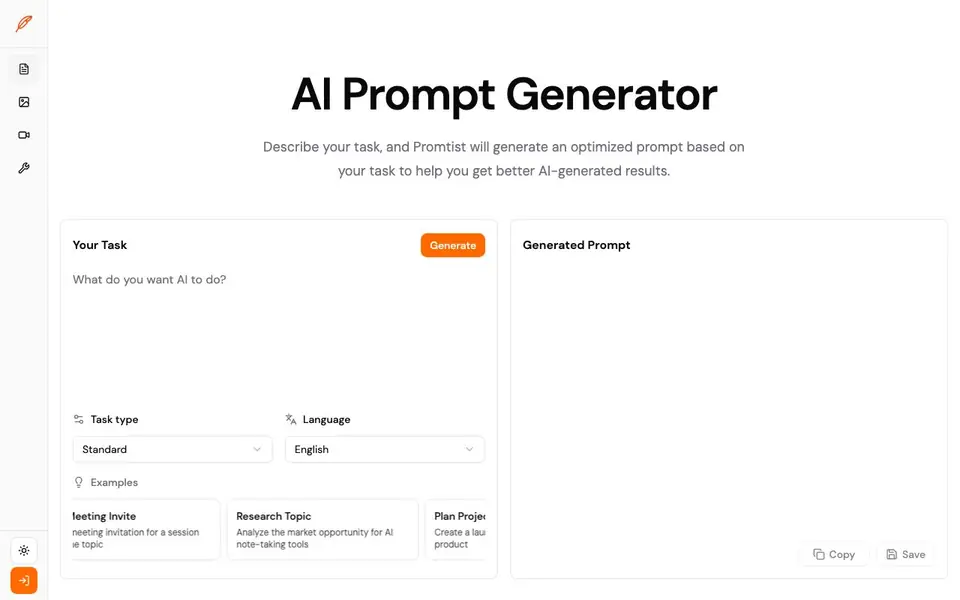
To use it, you start by typing what you want the AI to do. Then you choose a task type and language. After you click generate, Promtist produces a prompt draft. You can copy it directly or save it for later. The site shows examples like rewriting text, drafting meeting invites, researching topics, planning projects, debugging code, writing emails, and summarizing documents.
Promtist suits anyone who regularly uses AI chatbots and wants more consistent, detailed outputs. It is especially helpful for marketers, researchers, developers, and writers. The generated prompts include placeholders for your specific details, so you can edit them to fit your exact situation. The website does not state pricing or limits, so you may need to check there for plan details.
Promtist features
- Task-based generation: Describe your task and get a tailored prompt draft instantly.
- Task type selection: Choose from standard or other task types to match your work.
- Language options: Pick the language for your generated prompt.
- Save and reuse: Store prompts and access them later for repeated use.
- Example library: Browse built-in examples for rewriting, emailing, research, and coding.
What you can do with Promtist
- Rewrite text to improve clarity and professionalism before publishing.
- Draft a meeting invitation for a session about a specific topic.
- Research a market opportunity for a new product idea.
- Debug a React component that rerenders too often.
How to get started with Promtist
- Describe your task in the input box.
- Choose the task type and language that fit your work.
- Click generate, then copy or save the prompt for your AI tool.
Tips for better results with Promtist
- Describe your task with specific details like audience, tone, and desired outcome, so Promtist can generate a prompt that includes relevant placeholders for you to fill in.
- Use Promtist's task type and language options to match your work, then edit the generated prompt's placeholders with your exact information before copying it into ChatGPT, Claude, or Gemini.
- Save prompts you generate in Promtist for tasks you repeat, like weekly emails or project plans, to build a reusable library and avoid starting from scratch each time.
- Review the example prompts on Promtist, such as the launch email or market research ones, to see how a short input becomes a structured prompt, then model your own inputs on those patterns.
Promtist pricing
Promtist’s homepage does not list prices. Check promtist.ai for current plans.
What to check before you rely on Promtist
- Check whether Promtist states pricing or plan limits on its website, since the current information does not list any costs or usage caps.
- Verify if Promtist offers export options for your saved prompts, as the website does not mention formats for downloading or transferring your library.
- Confirm how Promtist handles data privacy for the tasks you describe, because the website does not specify whether your inputs are stored or shared.
Who Promtist is for
Promtist suits marketers, researchers, developers and writers. If that is not you, the AI writing tools below may fit better.
Similar tools compared with Promtist
| Tool | What it is | Pricing |
|---|---|---|
| Promtist | AI prompt generator and manager | See website |
| FreeSiTools | Free AI image prompt generator | Free |
| Jenni AI | AI academic writing and research assistant | Freemium |
| Wordtune | AI writing and paraphrasing assistant | Freemium |
| Grammarly | AI writing assistant for clear communication | Freemium |
Promtist FAQ
What does Promtist do?
Promtist turns a short description of your task into a detailed, optimized prompt. You can copy it into ChatGPT, Claude, Gemini, or other AI tools to get better results.
Is Promtist free?
The website does not state pricing or whether there is a free plan. You would need to check Promtist's website for current pricing details.
Who is Promtist for?
It is for anyone who uses AI chatbots regularly, including marketers, researchers, developers, and writers. It helps you get more structured and reliable outputs from AI.
Can I save prompts in Promtist?
Yes, the site shows a save option for generated prompts. This lets you build a library of reusable prompts for future tasks.
Can Promtist connect to ChatGPT, Claude, or Gemini directly?
Promtist generates prompts that you copy and paste into tools like ChatGPT, Claude, or Gemini. The website does not mention any direct integration or connection with these AI tools. To use Promtist, you manually copy the generated prompt and paste it into your preferred AI chatbot.
Does Promtist work on mobile devices or only on desktop?
The Promtist website does not specify which devices or platforms it supports. Since it is a web-based tool, you can likely access it through any device with a browser, but the site does not confirm this. For the most accurate information, check the Promtist website directly.
What does the free plan of Promtist include?
The Promtist website does not state whether it has a free plan or what it includes. It also does not mention any pricing or limits. To find out about free access or plan details, you need to check the Promtist website for the most current information.


