
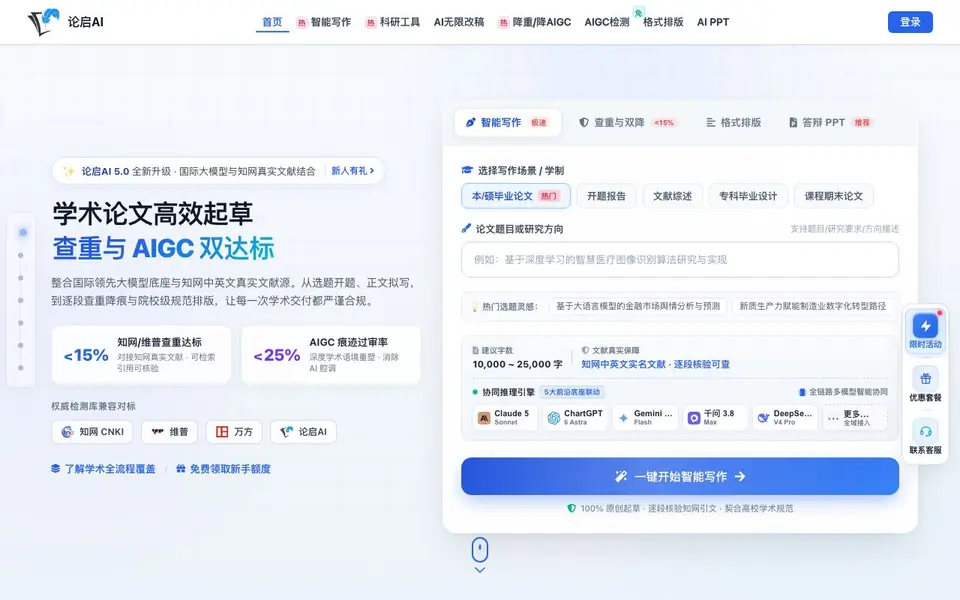
What is Openlun?
Openlun (论启AI) is an AI-powered academic writing platform designed for Chinese undergraduate and graduate students. It centralizes the entire thesis workflow: from topic selection, proposal reports, literature reviews, and task books to full-text drafting. The platform integrates international large models with authentic CNKI (知网) Chinese and English literature sources, so citations are real and verifiable.
You start by choosing your writing scenario (e.g., bachelor's or master's thesis, proposal report, literature review) and entering your topic or research direction. The AI then generates a structured draft with a logical outline, incorporating recent authoritative references. You can revise endlessly using the AI revision studio, which offers six types of text optimization (polish, expand, condense, reduce repetition, reduce AI traces, translate) and generates tables, formulas, and code on demand.
For quality assurance, Openlun provides a dual-engine service that simultaneously reduces plagiarism (to below 15% per CNKI/维普 standards) and AIGC traces (to below 25%). It supports uploading your own Word or PDF files or importing official check reports. The platform also includes a formatting desk with over 5,000 university templates and an AI defense PPT generator that creates slides and a speaking script. It suits students who need fast, compliant drafting and revision help, though the website says it is not a substitute for academic integrity.
Openlun features
- Real CNKI citations: Searches and cites authentic Chinese and English literature, verifiable paragraph by paragraph.
- AI revision studio: Rewrites text according to your supervisor's comments, with unlimited rounds of polishing and editing.
- Dual reduction engine: Simultaneously lowers plagiarism and AIGC detection rates while preserving academic meaning.
- Formatting desk: Applies 5,000+ university-specific layout templates to match institutional requirements.
- Defense PPT generator: Creates a 15-20 page academic presentation with a matching speaking script from your thesis.
What you can do with Openlun
- Generate a complete proposal report (开题报告) with background, literature review, and technical route.
- Draft a full thesis chapter with proper academic language and real CNKI references.
- Reduce plagiarism and AI traces in an existing draft to pass institutional checks.
- Format your thesis to match your university's official layout standards and export as Word.
How to get started with Openlun
- Sign up and claim your free starter credits on the website.
- Choose your writing scenario (e.g., thesis, proposal, literature review) and enter your topic or upload a document.
- Generate the draft, then use the revision studio and formatting tools to refine and export your final document.
Tips for better results with Openlun
- Start by selecting your exact writing scenario and entering a detailed topic description in Openlun, since the platform tailors the outline and CNKI citations to your specific research direction.
- Use Openlun's AI revision studio to address supervisor comments directly by pasting the feedback into the opinion box, then choose the targeted optimization type like polish or reduce AI traces for each revision round.
- Upload your existing Word or PDF draft into Openlun for the dual reduction engine, and import your official check report if you have one, so the platform can target the exact flagged sections.
- After generating your thesis or proposal in Openlun, run the formatting desk to apply your university's specific template, then export as Word and verify the layout matches institutional requirements before submission.
Openlun pricing
Openlun has a free way to start, with paid plans for heavier use. Check openlun.com for current limits and prices.
What to check before you rely on Openlun
- Check whether the free tier covers your full thesis length and revision needs, since Openlun's pricing is labeled freemium but the website does not state specific word or page limits for the free plan.
- Verify that Openlun's dual reduction results meet your university's specific plagiarism and AIGC thresholds, since the platform targets CNKI and Weipu standards but your institution may use different criteria.
- Confirm that Openlun supports your required export format beyond Word, since the website mentions Word export for drafts and reports but does not list other formats like PDF or LaTeX for final submission.
Who Openlun is for
Openlun suits undergraduate students, graduate students and academic researchers. If that is not you, the AI writing tools below may fit better.
Similar tools compared with Openlun
| Tool | What it is | Pricing |
|---|---|---|
| Openlun | AI academic writing and thesis assistant | Freemium |
| FreeSiTools | Free AI image prompt generator | Free |
| Jenni AI | AI academic writing and research assistant | Freemium |
| Wordtune | AI writing and paraphrasing assistant | Freemium |
| Grammarly | AI writing assistant for clear communication | Freemium |
Openlun FAQ
What is Openlun and what does it help with?
Openlun is an AI writing platform for academic papers. It helps you create proposal reports, task books, literature reviews, and full thesis drafts, with real CNKI citations and tools to reduce plagiarism and AI traces.
Does Openlun have a free plan?
Yes, the website mentions '免费领取新手额度' (free starter credits) for new users, indicating a freemium model. Paid plans likely offer more features, but specifics are not detailed on the site.
Who is Openlun for?
It is designed for undergraduate and graduate students writing theses or dissertations, especially those needing help with proposal reports, literature reviews, and meeting university formatting and originality requirements.
Can I upload my own document to revise?
Yes, you can upload Word (.docx) or PDF files that were not created on the platform. The AI will then help you rewrite, reduce plagiarism, and format them according to your needs.
Can Openlun export my thesis in Word format after formatting?
Yes, Openlun lets you export your thesis as a Word document. The formatting desk applies your university's template, and you can download the final file for submission. The website also mentions exporting proposal reports and other documents in Word format, so you can use it across your entire thesis workflow.
Does Openlun work on mobile devices or only on desktop?
The Openlun website does not specify whether it works on mobile devices or only on desktop. It is a web-based platform, so you likely access it through a browser. For the best experience, check the site on your device or contact support to confirm compatibility before starting your thesis work.
What does the free plan on Openlun include?
Openlun offers a free plan with a beginner quota, as mentioned on the website. The exact features in the free plan are not detailed, but you can use it to try the platform. For specifics on limits or what's included, check the pricing page or sign up to see your available credits.


