

What is Moonbeam?
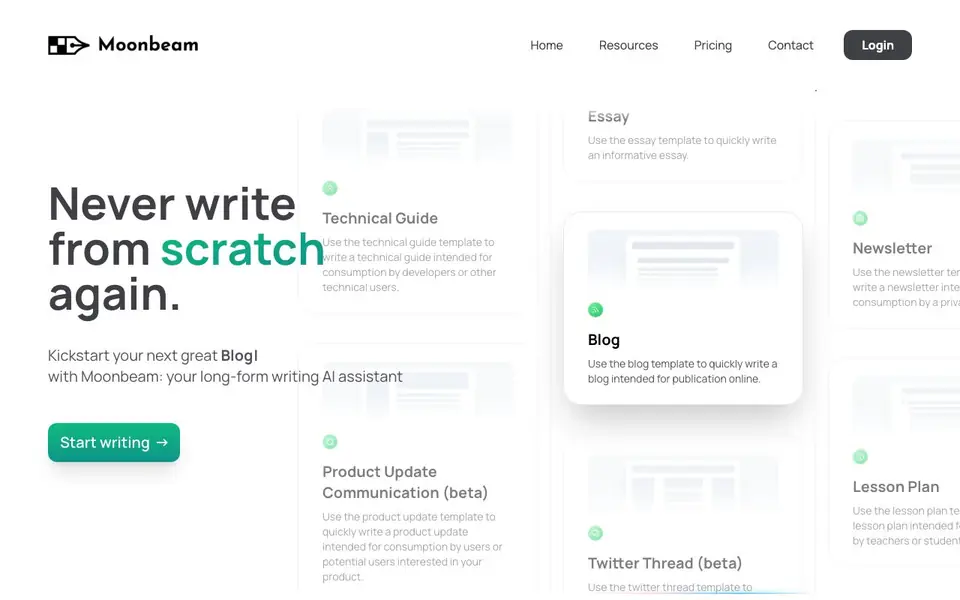
Moonbeam is an AI writing assistant built for long-form content like blogs, essays, stories, and technical guides. It uses templates to kickstart your writing, so you don't start from a blank page. The tool includes a text editor with features to refine or expand your work.
You begin by choosing a template, such as a blog, how-to guide, or newsletter. Then you can use the Wizard to turn jumbled notes into an outline, or prompt Luna, the AI, with a phrase to get a first draft. Smart Chat, powered by GPT-4, lets you talk to your document for real-time feedback and edits.
Moonbeam also generates content clusters from a keyword, giving you 10+ content ideas and one-click post outlines. It suits writers, marketers, and educators who produce regular long-form content. The website mentions templates for technical guides, help desk articles, and lesson plans, but does not state pricing details.
Moonbeam features
- Smart Chat: Chat with your document to get feedback and make edits in real time.
- Wizard: Turn your notes into a structured outline, then into full paragraphs.
- Content Cluster: Generate 10+ content ideas from a keyword with one click.
- Templates: Start with blog, essay, newsletter, or technical guide formats.
- Boss Mode: Transform your content completely with a single activation.
What you can do with Moonbeam
- Write a blog post from a simple prompt or keyword.
- Create a technical guide for developers using the template.
- Draft a newsletter for a private audience quickly.
- Expand a personal story with the AI text expander.
How to get started with Moonbeam
- Choose a template like Blog or How-to Guide from the homepage.
- Enter your notes or a phrase to generate an outline or first draft.
- Use Smart Chat or the editor to refine and polish your content.
Tips for better results with Moonbeam
- Start with the Wizard to turn your rough notes into a structured outline, then expand each section into full paragraphs for a coherent draft.
- Use the technical guide or lesson plan template when writing instructional content, as Moonbeam tailors the structure to those formats.
- Prompt Luna with a specific phrase that includes your topic and desired tone to get a more relevant first draft from Moonbeam.
- Highlight a passage and use Smart Chat to request targeted edits or expansions, refining your writing without rewriting the whole document.
Moonbeam pricing
Moonbeam’s homepage does not list prices. Check gomoonbeam.com for current plans.
What to check before you rely on Moonbeam
- Check whether Moonbeam's free plan or trial includes access to Smart Chat and the Wizard, as the website does not list pricing or plan limits.
- Verify if your content will be used to train AI models, since the website does not state its data privacy or retention policy.
- Confirm that Moonbeam can export your finished work in the format you need, as the website does not mention export options.
Who Moonbeam is for
Moonbeam suits bloggers, content marketers, educators and technical writers. If that is not you, the AI writing tools below may fit better.
Similar tools compared with Moonbeam
| Tool | What it is | Pricing |
|---|---|---|
| Moonbeam | AI long-form writing assistant with templates | See website |
| FreeSiTools | Free AI image prompt generator | Free |
| Jenni AI | AI academic writing and research assistant | Freemium |
| Wordtune | AI writing and paraphrasing assistant | Freemium |
| Grammarly | AI writing assistant for clear communication | Freemium |
Moonbeam FAQ
What types of content can I write with Moonbeam?
You can write blogs, essays, technical guides, newsletters, lesson plans, and personal stories. The website lists templates for each, so you can pick one that fits your format and start from a structured draft.
How does Moonbeam help me start writing?
You use the Wizard to turn jumbled notes into an outline, or prompt Luna with a phrase to get a first draft. This saves you from starting from scratch and gives you a foundation to build on.
Is there a free plan or trial?
The website does not state pricing or free plan details. You can check the Pricing page on Moonbeam's site for current options, but the homepage text doesn't mention costs or trials.
Who is Moonbeam best for?
It's built for people who write long-form content regularly, like bloggers, marketers, and educators. The templates for technical guides and lesson plans also make it useful for technical writers and teachers.
What can Moonbeam export or connect to?
Moonbeam's website does not mention export options or integrations with other apps. You can check the Pricing or Resources pages for more details, or contact their support team directly to ask about exporting your content or connecting to your favorite tools.
Does Moonbeam work on mobile devices or only on desktop?
Moonbeam's website does not specify which devices or platforms it supports. It is likely a web-based tool, but you should check the site's system requirements or contact support to confirm whether you can use it on a tablet or phone.
What does Moonbeam's free plan include?
Moonbeam's website does not list pricing or plan details, so it's unclear if a free plan exists. To find out what features are available without paying, visit the Pricing page or reach out to their team for a clear breakdown of any free tier.


