

What is GenPPT AI?
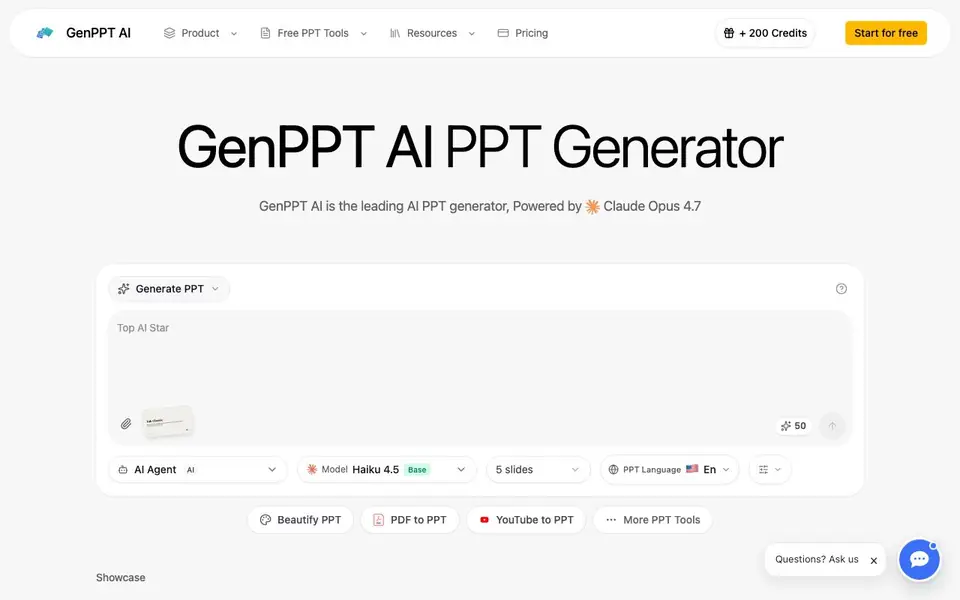
GenPPT AI is an AI presentation maker that builds complete slide decks from your text descriptions. It uses the Claude Opus 4.5 AI model to handle design, layout, and content structure. You can start from a topic, a PDF, a Word document, a web page, or even a YouTube video. The tool also beautifies existing presentations by improving their design and layout.
To get started, you describe your presentation topic or upload a file. GenPPT AI generates a deck with professional layouts and content. You can preview it in your browser and make edits. The tool also creates speaker notes for each slide, so you can practice your delivery. It supports multiple languages and offers a base plan of five slides.
The website mentions a free start and a credit system, with 200 credits available. It also lists many conversion tools, like PDF to PPT and YouTube to PPT. The site does not state specific limits on the free plan or details about paid tiers. It is suited for business and education users who want quick, polished presentations.
GenPPT AI features
- AI PPT generation: Creates a full slide deck from a text prompt about your topic.
- Beautify PPT: Upload an existing presentation to improve its design and fix layouts.
- PDF to PPT: Converts PDF files into editable PowerPoint presentations.
- YouTube to PPT: Turns YouTube videos into slide decks based on their content.
- Speaker notes generation: Produces detailed talking points for each slide automatically.
What you can do with GenPPT AI
- Generate a business pitch deck from a one-line description of your product.
- Convert a lecture PDF into a polished PowerPoint for your class.
- Turn a YouTube tutorial into a structured presentation for your team.
- Redesign an old slide deck using a template you provide.
How to get started with GenPPT AI
- Go to GenPPT AI's website and click 'Start for free'.
- Type your presentation topic or upload a file like a PDF or Word document.
- Generate the deck, preview it in your browser, and edit slides as needed.
Tips for better results with GenPPT AI
- Start with a clear, specific topic description to give GenPPT AI enough context for accurate slide content and structure.
- Upload a PDF or Word document instead of typing a prompt when you need slides that closely follow existing material.
- Use GenPPT AI's beautify feature on an old deck to refresh its design, then review the layout changes slide by slide.
- Generate speaker notes for each slide with GenPPT AI, then edit them to match your delivery style and timing.
- Test different input formats like YouTube links or web pages with GenPPT AI to see which produces the most useful outline for your topic.
GenPPT AI pricing
GenPPT AI has a free way to start, with paid plans for heavier use. Check genppt.ai for current limits and prices.
What to check before you rely on GenPPT AI
- Check whether the free plan's 200 credits cover your deck size, since the site does not state how many credits each generation uses.
- Verify if the base plan's five-slide limit applies to all input types, because the website does not specify limits for PDF or YouTube conversions.
- Confirm that GenPPT AI exports to PowerPoint or other formats you need, as the site does not list export options or file types.
- Review the privacy policy for uploaded files, since the website does not state how your documents or videos are stored or used.
Who GenPPT AI is for
GenPPT AI suits business professionals, educators, students and marketers. If that is not you, the AI presentation makers below may fit better.
Similar tools compared with GenPPT AI
| Tool | What it is | Pricing |
|---|---|---|
| GenPPT AI | AI presentation generator and beautifier | Freemium |
| Gamma | AI presentation, website, and document maker | Freemium |
| Beautiful.ai | AI presentation software for teams | See website |
| Pitch | Collaborative AI presentation workspace for teams | See website |
| Uizard | AI-powered UI design and prototyping tool | Freemium |
GenPPT AI FAQ
What does GenPPT AI do?
It generates PowerPoint presentations from text prompts, files, or videos. You can also upload an existing deck to have it beautified with better design and layout. It uses the Claude Opus 4.5 AI model.
Is GenPPT AI free?
The website says you can start for free and mentions a credit system with 200 credits. It does not specify exactly what the free plan includes or how much paid plans cost, so check the pricing page for details.
Can I convert a PDF or YouTube video to PPT?
Yes. GenPPT AI offers tools to convert PDF files, Word documents, web pages, and YouTube videos into PowerPoint presentations. These are listed under its suite of PPT tools.
Who is GenPPT AI for?
It is designed for anyone who needs presentations, including business users, educators, and students. The website mentions it delivers professional results for business and education purposes.
What file formats can GenPPT AI export to after creating a presentation?
GenPPT AI generates slide decks that you can preview and edit in your browser. The website does not specify the exact export formats, such as PowerPoint or PDF. To confirm what you can download, check the tool's interface after generating a deck or contact their support.
Does GenPPT AI work on mobile devices or only on desktop browsers?
GenPPT AI is a web-based tool, so you can access it through a browser on any device with internet, including phones and tablets. The website does not mention dedicated mobile apps. For the best experience, use a modern browser on your preferred device.
What does the free plan of GenPPT AI include besides the 200 credits?
GenPPT AI offers a free start with 200 credits and a base plan of five slides per presentation. The website does not list other free features or limits, such as the number of presentations or access to all tools. For detailed free plan terms, check the pricing page or sign up to see what's available.


