

What is AI Summary Generator?
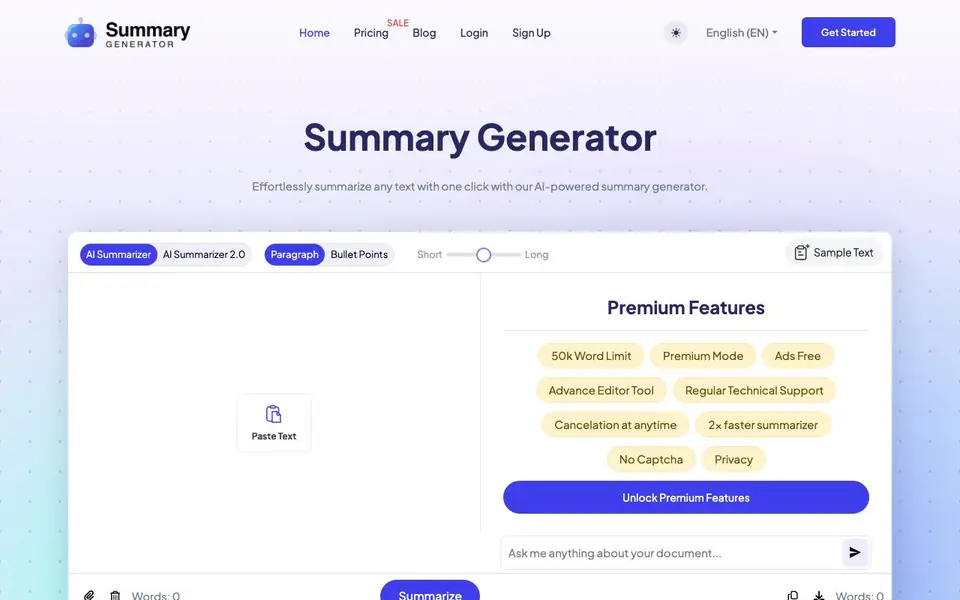
AI Summary Generator is a web tool that condenses long text into shorter, digestible summaries. You paste text or upload a Doc or PDF file, choose the summary length and style, and click Summarize. It works for articles, essays, academic papers, stories, technical documents, and meeting notes.
The tool offers options for paragraph or bullet-point summaries, with short, medium, or long lengths. It uses AI to extract key facts and data, presenting them in an easy-to-read format. You can copy the result or download it as a Doc or PDF file.
It suits students, researchers, writers, and professionals who need to quickly grasp the main points of dense material. The free version has a word limit, and premium features include a 50k word limit, ad-free experience, advanced editor, and faster processing.
AI Summary Generator features
- One-click summarization: Paste text or upload a file and get a summary in seconds.
- Length and style options: Choose short, medium, or long summaries in paragraph or bullet form.
- File upload support: Upload Doc or PDF files directly from your desktop.
- Copy and download: Copy the generated summary or save it as a Doc or PDF file.
- Premium mode: Unlock a 50k word limit, ad-free experience, and faster processing.
What you can do with AI Summary Generator
- Condense a lengthy research paper into key bullet points for quick review.
- Summarize a long article to capture the main ideas before writing your own piece.
- Convert meeting notes into clear, actionable points for your team.
- Simplify a technical document to understand complex jargon more easily.
How to get started with AI Summary Generator
- Copy and paste your text into the box, or upload a Doc or PDF file from your desktop.
- Choose your desired summary length (small, medium, or large) and style (paragraph or bullet points).
- Click the Summarize button and get your summary in a few seconds, then copy or download it.
Tips for better results with AI Summary Generator
- Paste the original text directly instead of uploading a file when you need the fastest result, since the tool processes pasted text immediately and file uploads add extra steps.
- Choose bullet points for meeting notes or research papers to extract key facts quickly, and use paragraph style for a flowing overview of articles or essays you plan to rewrite.
- Test AI Summary Generator with a short sample first to see how it handles your content type, then adjust the length setting between short and long to match your reading goal.
- Copy the summary into your own document for editing, because the built-in download options only save the generated text and you may want to refine wording before using it.
AI Summary Generator pricing
AI Summary Generator has a free way to start, with paid plans for heavier use. Check summarygenerator.io for current limits and prices.
What to check before you rely on AI Summary Generator
- Check the free word limit before pasting a long document, since the website states a limit exists but does not specify the exact number for the free version.
- Verify whether the summary preserves critical data like statistics or citations, as the tool extracts key facts but may omit context you need for academic or professional work.
- Confirm the output format you need is supported, because the site mentions Doc and PDF downloads but does not list other export options like TXT or Markdown.
Who AI Summary Generator is for
AI Summary Generator suits students, researchers, freelance writers and professionals. If that is not you, the AI writing tools below may fit better.
Similar tools compared with AI Summary Generator
| Tool | What it is | Pricing |
|---|---|---|
| AI Summary Generator | AI text and document summarizer | Freemium |
| FreeSiTools | Free AI image prompt generator | Free |
| Jenni AI | AI academic writing and research assistant | Freemium |
| Wordtune | AI writing and paraphrasing assistant | Freemium |
| Grammarly | AI writing assistant for clear communication | Freemium |
AI Summary Generator FAQ
What types of content can I summarize with this tool?
You can summarize articles, essays, academic papers, stories, technical documents, and meeting notes. The tool is designed to handle various text formats and extract the most important points.
Is the AI Summary Generator free to use?
Yes, the tool is free to use, but it offers premium features for a fee. The free version has a word limit, while premium unlocks a 50k word limit, ad-free experience, and faster processing.
Can I upload files to summarize?
Yes, you can upload a Doc or PDF file from your desktop. After summarizing, you can also download the result as a Doc or PDF file.
How does the summarizer work?
You paste or upload your text, choose the summary length and style, and click Summarize. The AI processes the content and generates a concise summary in a few seconds, which you can then copy or download.
Can the AI Summary Generator export summaries to formats other than Doc or PDF?
The AI Summary Generator lets you copy the generated summary or download it as a Doc or PDF file. The website does not mention exporting to other formats like TXT or Markdown. If you need a different format, you can copy the text and paste it into your preferred application.
Does the AI Summary Generator work on mobile devices or require an app?
The AI Summary Generator is a web tool, so you can use it in any browser on your phone, tablet, or computer. The website does not mention a dedicated mobile app. You just need an internet connection and a browser to access the tool.
What is included in the free plan of the AI Summary Generator, and what are the limits?
The free version of the AI Summary Generator lets you paste text or upload a Doc or PDF file, choose summary length and style, and get a summary. It has a word limit, though the exact number is not stated on the website. Premium features include a 50k word limit, ad-free experience, advanced editor, and faster processing.


