
What is vibestart?
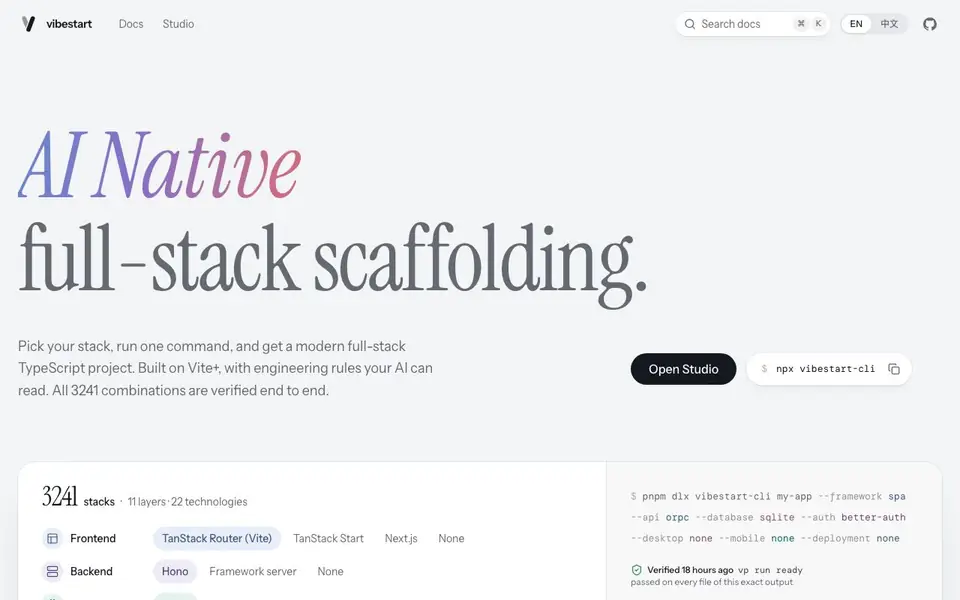
vibestart is a scaffolding tool that generates a complete full-stack TypeScript project based on your chosen stack. You pick from 11 layers covering frontend, backend, API, database, ORM, auth, desktop, mobile, deployment, runtime, and tests. Then you run one command, and vibestart creates a project with all files, configuration, and tests included.
The generated projects are verified end to end. Every stack combination is installed, checked, tested, and built from scratch in a CI pipeline. The output that passes gets a fingerprint, so you can verify what you receive. This means you start from a known working state, not a broken template.
vibestart is designed for developers who use AI coding tools. It includes AGENTS.md files that document project conventions, so both you and your AI assistant follow the same rules. The projects have type checking, code conventions, and behavioral tests built in. This helps you catch errors early and keep your code consistent as you build.
vibestart features
- Stack selection: Choose from 11 layers and 22 technologies to match your project needs.
- One-command setup: Run a single npx command to generate your entire project scaffold.
- End-to-end verification: Every stack combination is tested and built from scratch in CI.
- AI-readable rules: AGENTS.md files document conventions so AI tools follow your project style.
- Behavioral tests: Integration and browser tests cover real scenarios like sign-up and authorization.
What you can do with vibestart
- Start a new full-stack app with your preferred frontend and backend frameworks.
- Generate a project with authentication and database already wired up.
- Use as a base for AI-assisted development with clear project rules.
- Verify your stack works before writing any business logic.
How to get started with vibestart
- Go to the vibestart website and open the Studio to pick your stack layers.
- Copy the generated command, such as npx vibestart-cli my-app --framework spa.
- Run the command in your terminal to create your project and start building.
Tips for better results with vibestart
- Pick your stack deliberately in the Studio before running the command, since each of the 3241 combinations is verified end to end and you want one that matches your project.
- Use vibestart's AGENTS.md files to align your AI assistant with your project conventions, so both you and the tool follow the same type checking and formatting rules.
- Run the generated behavioral tests early, like sign-up and authorization flows, to confirm your chosen auth and database layers work together before adding business logic.
- Check the fingerprint for your exact stack output in vibestart to confirm you're starting from a verified state, not a template that might have broken pieces.
vibestart pricing
vibestart’s homepage does not list prices. Check vibestart.net for current plans.
What to check before you rely on vibestart
- Confirm the pricing and plan limits for vibestart, since the website does not list any pricing details or free tier information.
- Verify the generated project's license and export formats, as the documentation does not state what licenses or output options are included.
- Check whether vibestart supports your target platforms beyond the listed layers, since the site does not mention Windows, macOS, or Linux specifics.
Who vibestart is for
vibestart suits developers, full-stack engineers, AI coding enthusiasts and tech leads. If that is not you, the AI app builders below may fit better.
Similar tools compared with vibestart
| Tool | What it is | Pricing |
|---|---|---|
| vibestart | AI-native full-stack project scaffolding tool | See website |
| SiGameGen | AI game builder from one sentence | Freemium |
| Durable | AI business builder and website maker | Freemium |
| Lovable | AI app and website builder | Freemium |
| Replit | AI app and website builder | Freemium |
vibestart FAQ
What does vibestart do?
vibestart creates a full-stack TypeScript project from a template you choose. You pick your frontend, backend, database, and other layers, then run one command to get a working project with tests and configuration.
Is vibestart free?
The website does not state pricing details. It shows a command to run the CLI, but you should check the site or docs for any costs or free tier information.
Who is vibestart for?
It's for developers who want a solid starting point for a new app, especially those using AI coding tools. The generated projects include rules and tests that help both humans and AI work consistently.
What can I build with vibestart?
You can build web apps, desktop apps, or mobile apps. The stack options include frontend frameworks like Next.js, backends like Hono, databases like PostgreSQL, and auth with Better Auth. You can mix and match to suit your project.
Can vibestart export or connect to external services like a cloud database or deployment platform?
The vibestart website does not mention exporting or connecting to external services beyond the built-in database and deployment options. You can choose from PostgreSQL, MySQL, SQLite, MongoDB, and Docker for deployment. For specifics on external integrations, check the vibestart documentation or Studio.
Does vibestart run on Windows, macOS, and Linux?
vibestart runs as a command-line tool via npx, so it works on any platform that supports Node.js and npm. The website does not list specific OS requirements, but since it uses standard Node.js tooling, it should work on Windows, macOS, and Linux. Check the vibestart docs for any platform notes.
What does the free plan include for vibestart?
The vibestart website does not mention a free plan or pricing. It appears to be a command-line tool you can run with npx, and the site shows an example command. For details on any free usage limits or paid features, check the vibestart pricing page or contact their support.


