

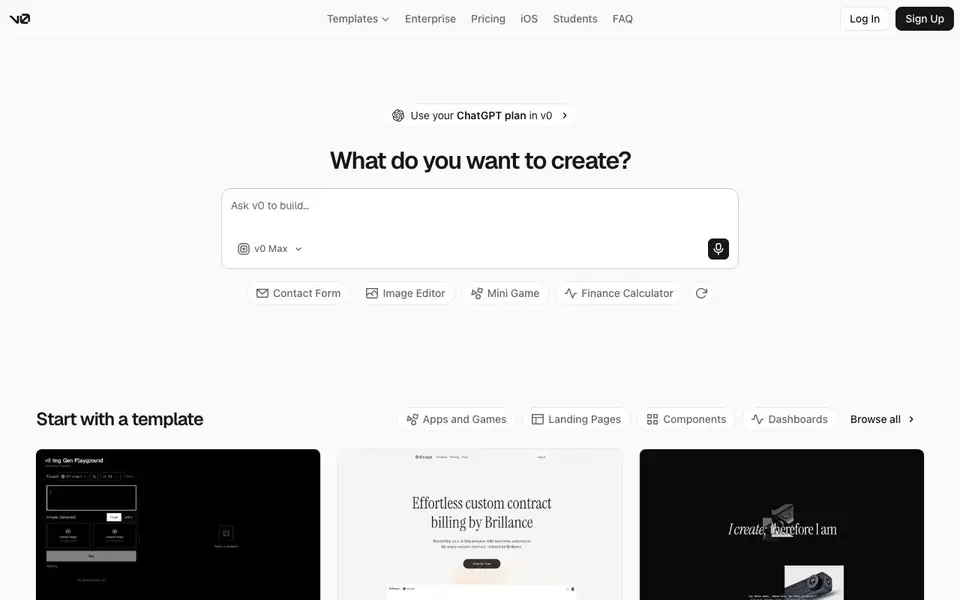
What is v0?
v0 by Vercel is an AI assistant that builds full-stack web applications from your text prompts. You describe what you want, and it generates working apps, landing pages, dashboards, and components. You can publish them as live websites in seconds.
To start, you type a prompt or pick a template. v0 plans the build, creates tasks, and connects to databases and APIs as it works. You can sync with GitHub to push code, integrate with your favorite tools, and deploy to Vercel with one click. A design mode gives you visual controls and a live preview to fine-tune details.
It suits developers, designers, and product teams who want to move from idea to production fast. You can also build on your phone with the iOS app. The site mentions templates for apps, games, landing pages, and dashboards, but it does not list specific limits or pricing details.
v0 features
- Prompt-based generation: Describe your app idea, and v0 creates working code for you.
- One-click deployment: Publish your app as a live website on Vercel in seconds.
- GitHub sync: Connect your repository and push generated code directly to it.
- App integrations: Build with your favorite tools and APIs without needing accounts.
- Design mode: Adjust every detail with visual controls and see changes in real time.
What you can do with v0
- Create a contact form or finance calculator from a simple prompt.
- Build a landing page for your SaaS product using a template.
- Design a dashboard for tracking data or smart home devices.
- Develop a mini game or 3D gallery for your portfolio.
How to get started with v0
- Sign up or log in to v0, then start a new chat.
- Type what you want to build or choose a template to begin.
- Review the generated app, fine-tune with design mode, and deploy it live.
Tips for better results with v0
- Start with a specific prompt that describes the app's purpose, key features, and target users. v0 works best when you give it clear, detailed instructions about what you want to build.
- Use one of v0's templates for common layouts like landing pages or dashboards. Templates give you a solid starting point, and you can then customize the design and content to match your needs.
- Take advantage of v0's design mode to fine-tune colors, typography, and spacing visually. This lets you adjust the look of your app without editing code, and you see changes in real time.
- Connect your GitHub repository before generating code. This lets v0 push the generated code directly to your repo, making it easier to review, version, and deploy your app from your usual workflow.
v0 pricing
v0’s homepage does not list prices. Check v0.app for current plans.
What to check before you rely on v0
- Check whether v0's free plan includes enough usage for your project, since the website does not list specific limits or pricing details.
- Verify how v0 handles your data and code, especially if you're building proprietary apps. The site mentions privacy policies but does not detail data retention.
- Confirm that v0 supports the integrations and APIs you need, as the site lists integrations but does not specify which tools or services are covered.
Who v0 is for
v0 suits developers, designers, product teams and students. If that is not you, the AI app builders below may fit better.
Similar tools compared with v0
| Tool | What it is | Pricing |
|---|---|---|
| v0 | AI full-stack web app builder | See website |
| SiGameGen | AI game builder from one sentence | Freemium |
| Durable | AI business builder and website maker | Freemium |
| Lovable | AI app and website builder | Freemium |
| Replit | AI app and website builder | Freemium |
v0 FAQ
What can I build with v0?
You can build full-stack web apps, landing pages, dashboards, components, and even mini games. The site shows templates for contact forms, image editors, finance calculators, and more. Just describe your idea or start from a ready-made template.
Does v0 have a free plan?
The website does not state pricing details on the homepage. It mentions a pricing page and a special plan for students, but you would need to check those pages for specific costs and free options.
Who is v0 for?
It is for developers, designers, and product teams who want to build and ship web apps quickly. Students can also use it, as the site mentions a dedicated v0 for Students option. You do not need to be a coding expert, but some technical knowledge helps.
Can I deploy my app with v0?
Yes. v0 integrates with Vercel for one-click deployment, so you can publish your app as a live website in seconds. You can also sync with GitHub to push your code to a repository for further development.
Can v0 integrate with my existing tools and APIs?
Yes, v0 can integrate with your favorite tools and APIs automatically, without requiring you to create accounts for each one. This is mentioned on the v0 website, so you can connect services like databases and other APIs directly during the build process.
Does v0 have an iOS app?
Yes, v0 offers an iOS app that lets you build and design on the go. The v0 website mentions the iOS app as a way to create from your phone, so you can use v0's features from your mobile device.
Can I use v0 to create a design system?
Yes, v0 allows you to create design systems by defining colors, typography, and styles that you can use across projects. This is stated on the v0 website, so you can establish consistent design tokens for your work.


