
What is Trickle Magic Canvas?
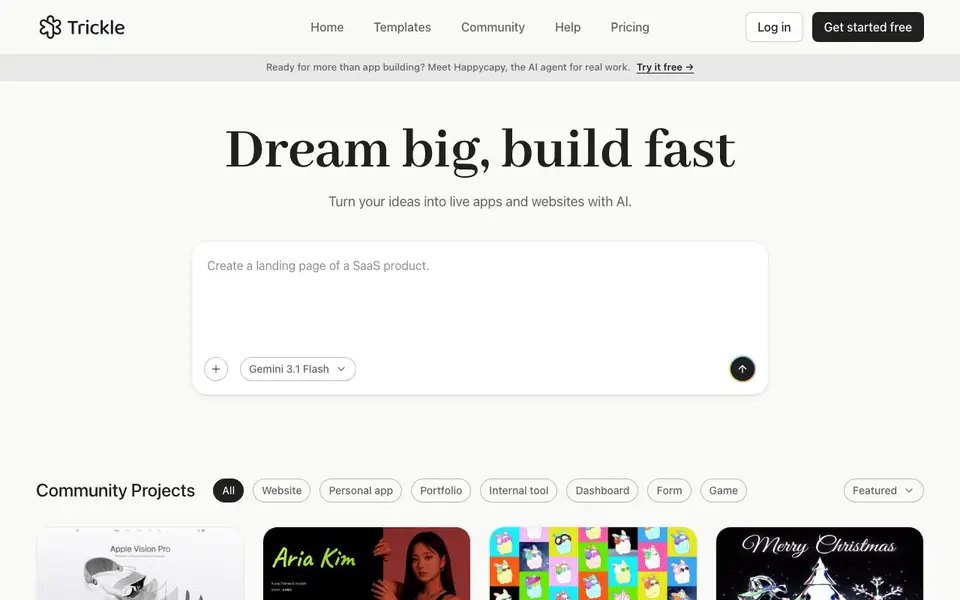
Trickle Magic Canvas is an AI-powered canvas where you can build and launch production-ready apps and websites by describing what you want in plain language. It combines vibe coding with built-in image and video generation, AI models, a database, and design tools, so you can go from idea to live product quickly.
You start by typing your idea or using a template. The AI generates the app or website for you. You can then refine it, add media, and connect data. The canvas lets you see and edit everything visually, making it easy to iterate without writing code.
It suits creators, entrepreneurs, and teams who want to prototype or ship apps fast. The community shows examples like portfolios, dashboards, forms, and games. You can explore templates and community projects to get inspired. The website mentions a free plan to get started.
Trickle Magic Canvas features
- Natural language creation: Describe your app or website in plain words and watch it build.
- Built-in media generation: Create images and videos directly inside your project.
- AI models integration: Add AI capabilities to your apps without separate setup.
- Database included: Store and manage data within your built app.
- Design tools: Style your creation with built-in design features.
What you can do with Trickle Magic Canvas
- Build a personal portfolio website from a prompt.
- Create an internal dashboard for your team.
- Design a mini CRM for tracking customers.
- Generate a game or interactive video project.
How to get started with Trickle Magic Canvas
- Go to Trickle's website and sign up for free.
- Start a new project by typing your idea or picking a template.
- Use the canvas to refine, add media, and connect data, then launch.
Tips for better results with Trickle Magic Canvas
- Start with a clear, specific prompt describing your app's purpose, users, and key features. Vague requests produce generic results, so include details about layout, colors, and functionality.
- Use Trickle Magic Canvas's built-in media generation to add custom images and videos directly in your project. This saves time and keeps your app visually cohesive without external tools.
- Iterate visually on the canvas after generation. Refine text, adjust design elements, and rearrange components by clicking and editing directly, rather than rewriting your original prompt repeatedly.
- Explore community projects and templates in Trickle Magic Canvas for inspiration. Clone or adapt existing examples like dashboards or portfolios to learn effective prompt patterns and speed up your workflow.
Trickle Magic Canvas pricing
Trickle Magic Canvas has a free way to start, with paid plans for heavier use. Check trickle.so for current limits and prices.
What to check before you rely on Trickle Magic Canvas
- Verify the free plan's limits before starting a serious project. The website mentions a free plan but does not state specific usage caps, storage, or feature restrictions.
- Check whether your generated app can export code or files you need. The site does not list export formats, so confirm if you require portability before building.
- Review the privacy policy and AI terms for how your prompts and generated content are used. The site links these policies but does not summarize data handling on the main pages.
Who Trickle Magic Canvas is for
Trickle Magic Canvas suits creators, entrepreneurs, teams and no-code builders. If that is not you, the AI app builders below may fit better.
Similar tools compared with Trickle Magic Canvas
| Tool | What it is | Pricing |
|---|---|---|
| Trickle Magic Canvas | AI canvas for building apps and websites | Freemium |
| SiGameGen | AI game builder from one sentence | Freemium |
| Durable | AI business builder and website maker | Freemium |
| Lovable | AI app and website builder | Freemium |
| Replit | AI app and website builder | Freemium |
Trickle Magic Canvas FAQ
What can I build with Trickle Magic Canvas?
You can build live apps and websites, including portfolios, internal tools, dashboards, forms, and games. The community shows examples like a mini CRM and a pet card generator.
Do I need coding skills to use it?
No, you can build using natural language. The AI generates the app for you. However, having some technical understanding may help you refine details.
Is there a free plan?
Yes, the website says 'Get started free' and offers a free plan. For specific limits, check the pricing page on Trickle's website.
Can I add images and videos to my app?
Yes, Trickle has built-in image and video generation. You can create media directly within your project without needing external tools.
What can Trickle Magic Canvas export or connect to?
Trickle Magic Canvas lets you build and launch apps and websites directly on its platform. The website does not list specific export formats or external connections like Zapier or GitHub. To see what export or integration options are available, check the Help section or contact support from the site.
Does Trickle Magic Canvas run on mobile devices?
Trickle Magic Canvas is a web-based tool you access through a browser, so it works on any device with internet, including phones and tablets. The website does not mention dedicated mobile apps for iOS or Android. For the best experience, use a modern browser on your device.
What does the free plan of Trickle Magic Canvas include?
The website says there is a free plan to get started, but it does not list specific limits like project count or storage. You can sign up for free and explore the canvas, templates, and community projects. For detailed free plan features, check the Pricing page on trickle.so.


