

What is Styldod?
Styldod is a platform that uses AI to transform home photos into decision-ready visuals. It serves real estate agents, brokerages, homeowners, and designers. You can use it self-serve through ReimagineHome, get expert delivery, or run it at enterprise scale with Smart Media Module.
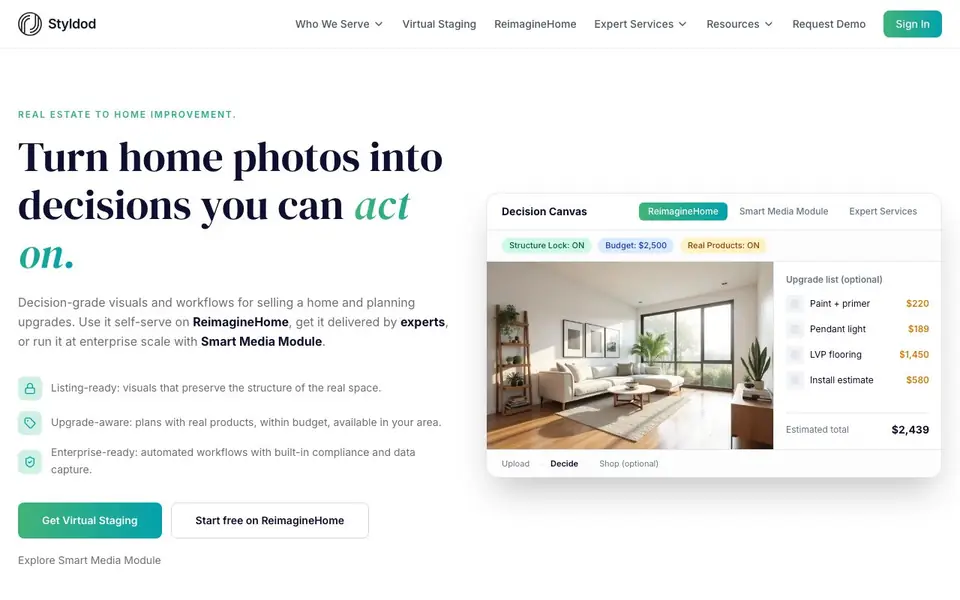
You upload a photo, set constraints like budget and real products, and the AI generates staged versions that preserve the room's structure. It also creates upgrade plans with estimated costs and product suggestions. The platform includes compliance checks to flag risky edits and ensure listings meet MLS standards.
For agents, it offers batch processing of up to 50 photos in about a minute. For complex edits, expert services provide QA and revisions within 24-48 hours. The platform is used by over 2.3 million users and has generated 30 million designs across 185 countries.
Styldod features
- Virtual staging: AI stages empty or plain rooms with furniture that preserves the original structure.
- Structure Lock: Keeps the room layout true and prevents AI from changing the space.
- Budget-aware plans: Generates upgrade lists with real products and estimated costs within your budget.
- Batch processing: Upload up to 50 photos and get listing-ready outputs in about a minute.
- Compliance checks: Flags risky edits and ensures photos meet MLS and regulatory standards.
What you can do with Styldod
- Stage listing photos for MLS to attract more buyers.
- Create renovation plans with real product costs for homeowners.
- Batch process entire listing portfolios in minutes.
- Generate compliant visuals for brokerages and MLS platforms.
How to get started with Styldod
- Sign up and choose a starting point: ReimagineHome for self-serve or request a demo for enterprise.
- Upload a home photo and set your constraints like budget or real products.
- Review the staged or upgraded result, then download or share it for your listing.
Tips for better results with Styldod
- Upload photos with good lighting and clear angles so Styldod can preserve the room's structure accurately and generate more realistic staging results.
- Set your budget and turn on real products in Styldod before generating, so the upgrade plans include items you can actually purchase and afford.
- Use Styldod's batch processing for large portfolios by uploading up to 50 photos at once, then review the original and edited pairs to catch any issues early.
- Enable Structure Lock in Styldod for every listing photo to prevent the AI from altering the layout, which keeps your visuals compliant with MLS standards.
- For complex edits or high-stakes listings, rely on Styldod's expert services for QA and revisions within 24-48 hours instead of self-serve alone.
Styldod pricing
Styldod has a free way to start, with paid plans for heavier use. Check styldod.com for current limits and prices.
What to check before you rely on Styldod
- Check whether the free plan on ReimagineHome includes all features you need, since the website lists pricing as freemium but does not state specific limits.
- Verify that Styldod's compliance checks cover your local MLS rules, as the website mentions CA AB 723 but does not list all regional standards.
- Confirm the export formats available for edited images, since the website does not specify which file types you can download from the platform.
Who Styldod is for
Styldod suits real estate agents, brokerages, homeowners and design professionals. If that is not you, the AI photo editors below may fit better.
Similar tools compared with Styldod
| Tool | What it is | Pricing |
|---|---|---|
| Styldod | AI virtual staging and home design platform | Freemium |
| SiPhotoEditor | AI photo editor by description | Paid |
| SiImageGen | AI image generator and photo editor | Freemium |
| Clipdrop | AI photo editing and image generation suite | See website |
| Photoroom | AI photo editor for e-commerce product visuals | Freemium |
Styldod FAQ
How does Styldod handle privacy and data?
Styldod is consent-first. You choose what you upload and share. Photos are processed to generate outputs and run compliance checks. For enterprise partners, controls like retention settings and audit logs are available. They do not sell personal data.
What is the Decision Canvas?
It's a controlled workflow that turns a photo into outcomes with constraints and measurable results. Instead of just generating an image, it locks what must stay true, applies checks, and produces outputs you can ship.
Can I use Styldod for free?
Yes, you can start free on ReimagineHome. For enterprise features like Smart Media Module or expert services, you'd need to request a demo or purchase a plan. The website doesn't list specific pricing for those.
Who is Styldod for?
It's for real estate agents, brokerages, MLS platforms, homeowners, renters, and design professionals. Each role gets tailored outputs, from listing-ready staging to renovation plans with real product costs.
What file formats can Styldod export or connect to?
The Styldod website does not mention specific export formats or integrations. To check what you can export or connect, visit the Styldod website or contact their support team.
Does Styldod work on mobile devices or only on desktop?
The Styldod website does not specify which devices or platforms Styldod runs on. For details about mobile or desktop compatibility, check the Styldod website or reach out to their support.
What does the free plan on Styldod include?
Styldod offers a free plan, but the website does not list its specific limits. To find out what you can do for free, visit the Styldod website and look for pricing or start free options.


