

What is Picsart?
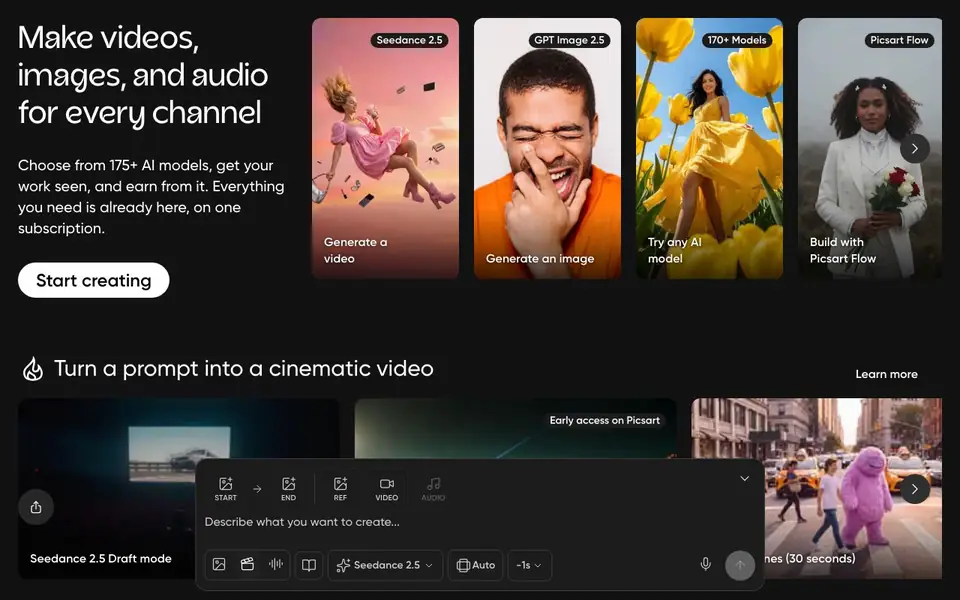
Picsart is an all-in-one creative platform where you can make videos, images, and audio for any channel. It brings together a wide selection of free AI design tools, expert-crafted templates, and built-in asset libraries. You can also choose from over 175 AI models, including Seedance 2.5 for video and GPT Image 2.5 for images, all on one subscription.
To start, you pick a tool like Generate a video, Generate an image, or Remove the background. You can also try trending effects, cartoonify anything, or edit with a prompt using Picsart Aura. For more advanced work, you can animate images with Kling 3.0, hire one of 17 creative agents, or make an AI twin with over 100 personas.
Picsart suits creators who want speed and variety. The site mentions free AI design tools, but some features may require a paid plan. You can explore 168K+ assets and 60+ styles to find what fits your project. The platform also supports building with Picsart Flow for custom workflows.
Picsart features
- 175+ AI models: Access a wide range of models for generating images, videos, and more.
- Background removal: Remove the background from any image with a single click.
- Frame expansion: Expand the frame of your images to change composition.
- Picsart Aura: Edit your photos using simple text prompts.
- AI twins: Create a digital twin of yourself using 100+ personas.
What you can do with Picsart
- Generate cinematic videos from a text prompt using Seedance 2.5.
- Cartoonify any photo with one of 60+ styles.
- Animate a still image with Kling 3.0.
- Create a family portrait or AI couple photoshoot for social media.
How to get started with Picsart
- Go to Picsart's website and click Start creating.
- Choose a tool like Generate a video, Generate an image, or Remove the background.
- Pick a model or style, then follow the prompts to create and download your work.
Tips for better results with Picsart
- Start with a clear, detailed prompt for Picsart's video or image generators, specifying subject, style, and lighting to get closer to your intended result on the first try.
- Use Picsart's background removal and frame expansion tools before applying AI effects, as cleaner source images produce more accurate and polished outputs.
- Explore Picsart's 60+ cartoonify styles and trending effects on a test image first, then refine your choice based on the preview before committing to final edits.
- For complex projects, combine Picsart's AI models with its asset library and Flow workflows, layering tools like Kling 3.0 or Aura to build custom results step by step.
Picsart pricing
Picsart has a free way to start, with paid plans for heavier use. Check picsart.com for current limits and prices.
What to check before you rely on Picsart
- Check whether the free AI tools you plan to use are actually included in the free tier, since Picsart's site mentions free tools but some features may require a paid plan.
- Verify the export formats and resolution limits for your final files, as the website does not list specific output options or maximum sizes for generated content.
- Review Picsart's data and privacy policy to understand how your uploaded images and prompts are used, especially before working with sensitive or copyrighted material.
Who Picsart is for
Picsart suits content creators, social media marketers, small business owners and hobbyist designers. If that is not you, the AI photo editors below may fit better.
Similar tools compared with Picsart
| Tool | What it is | Pricing |
|---|---|---|
| Picsart | All-in-one AI creative platform | Freemium |
| SiPhotoEditor | AI photo editor by description | Paid |
| SiImageGen | AI image generator and photo editor | Freemium |
| Clipdrop | AI photo editing and image generation suite | See website |
| Photoroom | AI photo editor for e-commerce product visuals | Freemium |
Picsart FAQ
What can I create with Picsart?
You can make videos, images, and audio for any channel. This includes AI-generated images, cinematic videos, cartoonified photos, and background-removed pictures, using templates and asset libraries.
Is Picsart free?
The website says Picsart has a wide selection of free AI design tools. However, it also mentions a subscription for everything you need, so some features likely require a paid plan. Check the Pricing page for details.
Who is Picsart for?
It is for creators who want to produce content fast, including social media users, marketers, and small business owners. The platform offers trending effects and templates to help you follow current styles.
Can I use AI models from other companies?
Yes, Picsart lets you choose from over 175 AI models, including Seedance 2.5 for video and GPT Image 2.5 for images. You can try any model from the selection.
What can Picsart export or connect to?
Picsart's website does not mention specific export formats or third-party integrations. For details on exporting your projects or connecting to other apps, check the Picsart help center or contact support directly.
Does Picsart work on mobile and desktop?
Picsart's website does not specify which devices or platforms it runs on. To find out if Picsart is available on your device, visit the official Picsart website or check app stores for mobile versions.
What does the free plan include in Picsart?
Picsart's website mentions free AI design tools, but it does not list exactly which features are free. To see what the free plan includes, sign up on Picsart or check the pricing page for details.


