

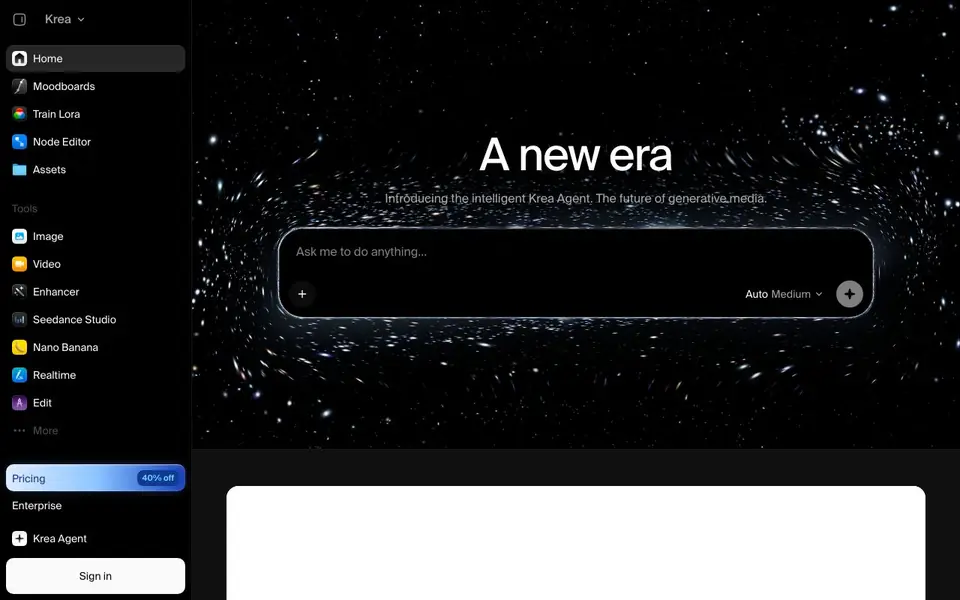
What is Krea?
Krea is a creative AI suite that brings many powerful models into one place. You can generate images from text prompts, create videos, enhance existing images, and edit by typing. It includes tools like Krea 2 for image generation, Nano Banana Pro for editing, Krea Enhancer for upscaling, and Seedance Studio for video creation.
To get started, you pick a model from the library or open the Krea Agent for guided workflows. You type your prompt, and the tool generates images or videos for you. For realtime drawing, Krea Realtime renders as you sketch. You can also train your own LoRA models or use the Node Editor for more advanced control.
Krea suits creators, designers, and marketers who want access to frontier models without switching between many apps. The website mentions a free tier and a 40% discount on pricing, but it does not list exact plan details. Enterprise options are available for teams.
Krea features
- Krea 2 image generation: Create images from text prompts using Krea's own model.
- Nano Banana Pro editing: Edit images by typing natural language instructions.
- Krea Enhancer upscaling: Enhance images up to 21K resolution for high-detail output.
- Seedance Studio video: Generate cinematic videos with models like Seedance 2.5 and MiniMax H3.
- Krea Realtime drawing: Render images as you draw, giving instant visual feedback.
What you can do with Krea
- Generate product mockups and packaging designs from a prompt.
- Create explainer videos from a single text description.
- Enhance low-resolution photos for print or portfolio use.
- Edit existing images by typing changes instead of using manual tools.
How to get started with Krea
- Sign in to Krea and choose a model like Krea 2 or Seedance 2.5.
- Type your prompt or open the Krea Agent for a template workflow.
- Generate, then edit or enhance the result using the available tools.
Tips for better results with Krea
- Start with the Krea Agent template workflows to see how prompts and model settings combine before building your own from scratch.
- Use Krea Realtime to sketch rough ideas and refine them visually, then switch to Krea 2 for final high-detail generation.
- For image edits, write specific instructions in Nano Banana Pro, mentioning the exact object, color, and position you want changed.
- When upscaling with Krea Enhancer, generate at a lower resolution first, then enhance only the final selected image to save credits.
Krea pricing
Krea has a free way to start, with paid plans for heavier use. Check krea.ai for current limits and prices.
What to check before you rely on Krea
- Check whether your free tier includes enough generations for your project, since the website does not list exact plan limits or credit amounts.
- Verify if Krea supports exporting in the file formats you need, as the site does not specify available export options.
- Review Krea's data and privacy policy before uploading sensitive images, because the website does not state how your content is handled.
Who Krea is for
Krea suits creatives, designers, marketers and content creators. If that is not you, the AI image generators below may fit better.
Similar tools compared with Krea
| Tool | What it is | Pricing |
|---|---|---|
| Krea | Creative AI suite for images and videos | Freemium |
| SiImageGen | AI image generator and photo editor | Freemium |
| FreeSiTools | Free AI image prompt generator | Free |
| SiPhotoEditor | AI photo editor by description | Paid |
| Civitai | AI art community and model library | Freemium |
Krea FAQ
What can I create with Krea?
You can generate images from text, create videos from prompts or images, enhance photos up to 21K, and edit images by typing. The suite includes many models like Krea 2, Seedance 2.5, and MiniMax H3.
Is Krea free to use?
The website says you can generate, edit, and enhance images and videos using powerful AI for free. It also mentions a 40% off pricing page, so there are likely paid plans, but exact details are not stated on the homepage.
Who is Krea for?
Krea is for creators, designers, marketers, and anyone who wants to produce images or videos quickly. It offers both simple prompt-based generation and advanced tools like the Node Editor for more technical users.
Can I use my own images with Krea?
Yes, you can use image-to-video features, enhance existing images, and edit photos by typing. Some video models also accept tagged image references, so you can condition generation on your own visuals.
Does Krea offer a free plan and what does it include?
Krea has a free tier, but the website does not list exactly what it includes. You can try generating images or videos with the free tier to see what limits apply. For detailed plan features, check the pricing page on krea.ai.
Can I use Krea on my phone or tablet?
Krea is a web-based tool, so you can access it through a browser on most devices, including phones and tablets. The website does not mention dedicated mobile apps. For the best experience, use a modern browser on any device with internet access.


